This article was originally written in Japanese and translated into English with AI assistance. Please note that some expressions may carry nuances from the original Japanese.
Series: utf8conv Development Journal (Part 5 — a technical explanation)
This time steps away from the timeline a little. At the end of last time, I wrote that I had added one line to the background of the requirements document Rev.2: “mojibake is not fixed even when you ‘save as UTF-8’ in VS Code.” In this installment, I write about the “why.” What is actually happening when you convert a character encoding? When re-saving does not fix it, where does the cause lie? And the feature I added to utf8conv on March 9, the day after writing Rev.2, is exactly the feature for this problem.
Let me state up front the one thing I want to say in this installment. Converting a character encoding is the work of rebuilding the contents of a file (its byte sequence). However, in a file like HTML that has written inside itself “what character encoding I am written in,” the text of that declaration stays as it is even after the contents are rebuilt. The reader believes the declaration, so even though the contents are correct, the text comes out garbled.
A File Is Nothing but a Byte Sequence
First, the basic premise. A file saved on a computer is, when you get right down to it, a string of numbers called a “byte sequence.” A byte is any one number from 0 to 255, and a long row of these numbers is the body of the file.
For example, even if you save just the single character “あ” (the Japanese syllable “a”) to a text file, the file does not contain the shape “あ.” What it contains is several numbers. The agreement about which character corresponds to which set of numbers is called an “encoding” (a character encoding).
There is more than one such agreement. The same “あ” becomes the 2 bytes 82 A0 (130 and 160 as numbers) under the agreement called Shift-JIS, and the 3 bytes E3 81 82 (227, 129, and 130) under the agreement called UTF-8. This way of writing is hexadecimal, which I also used last time. Even for the same character, if the agreement differs, the row of numbers inside the file differs.
The reverse also happens. If you read the 2 bytes 82 A0 as Shift-JIS, you get “あ,” but if you read them as GBK (a Chinese character encoding), you get a different Chinese character, “偁.” The same row of numbers becomes a different character depending on how you read it. This is the true nature of mojibake.
To Convert Is to Rebuild the Byte Sequence
So what, concretely, is happening when you “re-save a file saved in Shift-JIS as UTF-8”?
Intuitively, it may sound like nothing more than peeling off a label that says “this file is Shift-JIS” and sticking on one that says “UTF-8.” But what actually happens is the work of rebuilding the byte sequence itself, from top to bottom.
There are three steps. First, read the original file’s byte sequence under the Shift-JIS agreement and turn it back into a sequence of characters. This is called “decoding.” Next, write that sequence of characters out as a new byte sequence under the UTF-8 agreement. This is called “encoding.” Finally, write that new byte sequence to the file.
Inside utf8conv, what does these three things is, in effect, these two lines.
text = path.read_bytes().decode("shift_jis")
path.write_text(text, encoding="utf-8")
Take the single character “あ,” for example. What is inside a file saved in Shift-JIS is the two numbers 82 A0. The decoding on line 1 turns these back into the character “あ.” The encoding on line 2 turns that “あ” into the three numbers E3 81 82 under the UTF-8 agreement, and writes them to the file. 82 A0 disappears from the file and is replaced by E3 81 82. Even the count of the numbers changes, so merely swapping a label would never get you this.
Line 1 turns the Shift-JIS byte sequence back into a sequence of characters, and line 2 writes it out as a UTF-8 byte sequence. Two short lines, but every number inside the file is replaced. It is not a swapping of labels.
The True Nature of “I Saved as UTF-8 but It’s Still Broken”
Here, let me return to the problem I wrote about in Part 1 of this series: mojibake that was not fixed even after re-saving in VS Code. In the background of the requirements document Rev.2, I described this as “a mismatch between the encoding declaration and the actual encoding.”
Some file formats, such as HTML and XML, have a mechanism for embedding, inside the file itself, a declaration that says “this file is written in this character encoding.” For HTML it is <meta charset="Shift_JIS">, for XML <?xml version="1.0" encoding="Shift_JIS"?>, and for CSS @charset "Shift_JIS";.
These declarations are markers that tell the reading software, such as a browser, what character encoding the body of the file is written in. The reader looks at this marker and decides how to read.
Here is the trap. An editor’s “save as UTF-8” rebuilds the body’s byte sequence as UTF-8. That is exactly the “decode, then encode” from above. However, the declaration <meta charset="Shift_JIS"> is just a string of text within the body. Even when a string is rewritten under the UTF-8 agreement, what it says (the name Shift_JIS) does not change. The body has been converted, but the declaration remains Shift-JIS. This is the “mismatch between the declaration and the actual encoding.”
The result is a state like this.
- The file’s actual contents (the byte sequence): UTF-8
- The declaration inside the file: “This file is Shift-JIS”
When you open this file in a browser, the browser reads the declaration, concludes “Shift-JIS, then,” and tries to interpret the UTF-8 byte sequence as Shift-JIS. Naturally, it does not come out as correct Japanese. The familiar mojibake screen is the result. (To be precise, a browser looks first at a marker called a BOM at the start of the file, and at the information the web server sends, before it looks at the declaration. When you open a local file directly, neither of those is present, so the declaration is used.)
In other words, VS Code was not lying. The conversion of the byte sequence was done correctly. It just did not reach as far as the declaration. And the reader treats the declaration as the truth. This is the true nature of “I saved as UTF-8 but it’s still broken.”
For files that carry no declaration (.txt, .md, and so on), re-saving alone solves it. Only files that have a mechanism for declaring their own character encoding — HTML, XML, CSS — fall into this trap.
To try another kind of example, the translation of languages may come close.
If something is written in Japanese as “私は日本人です。” (Watashi wa Nihonjin desu — “I am Japanese”), the language and the declaration of what nationality the writer is agree with each other.
On the other hand, if it is written in Chinese as “我是日本人,” or in English as “I’m Japanese,” the meaning to be expressed — “I am Japanese” — stays the same while becoming Chinese or English, but as a declaration it says “Japanese.” If you give priority to this declaration part, then whether the text is Chinese or English, since it declares the writer to be Japanese, you treat it as Japanese. Even once you have decided to treat it as Japanese, the language actually in use is something other than Japanese, so naturally it cannot be interpreted as Japanese.
In this example, I have swapped in language itself and meaning that carries context, so the intent is slightly different, but you can see that the cause of the problem is that there is a declaration and that it causes a mismatch.
It Was Not Only About Browsers
This “gap between the declaration and the actual encoding” is not limited to browsers. As I touched on briefly in Part 1 of this series, the same thing happens in the preview that appears when you select a file in the macOS Finder and press the space bar. To confirm it, I made four files and checked.
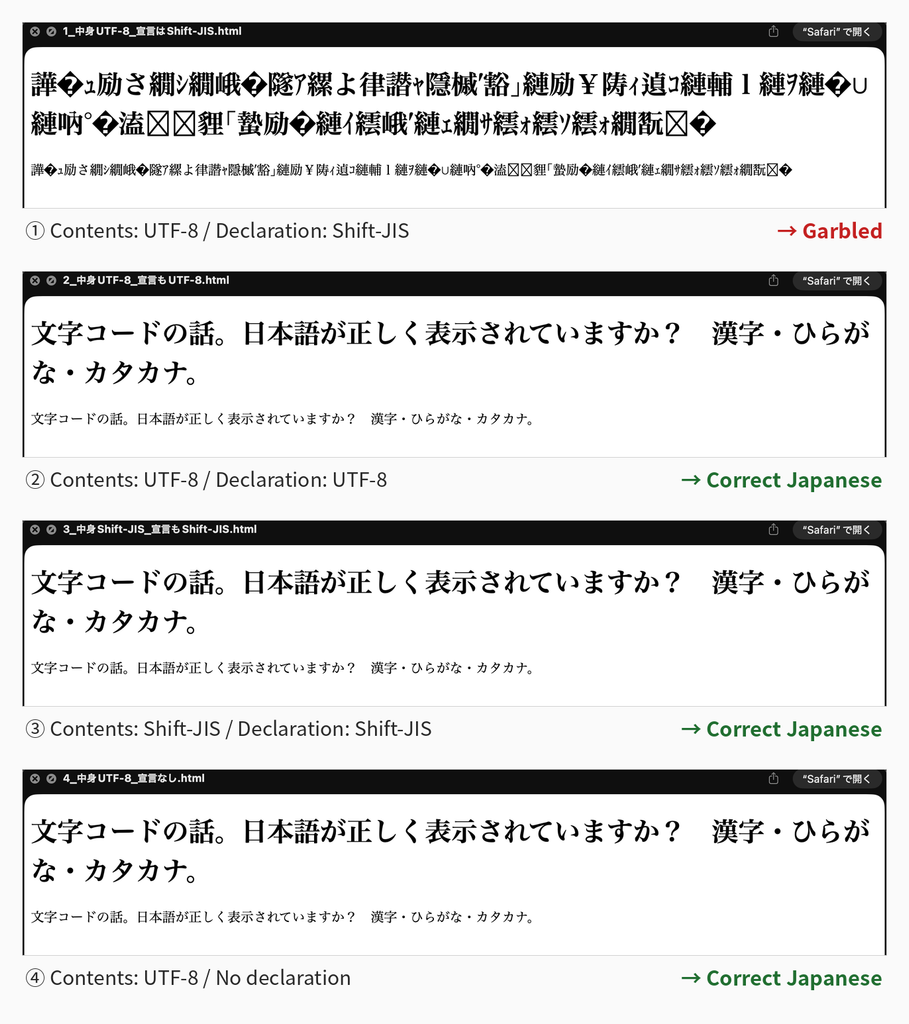
A file whose contents are UTF-8 and whose declaration says “Shift-JIS” — garbled in the preview too. If both the contents and the declaration are UTF-8, it reads fine. If both the contents and the declaration are Shift-JIS, that reads fine too. And the file with the declaration itself removed read correctly.
In other words, the preview can guess correctly by looking at the contents. Even though it can guess, when there is a declaration, it believes that instead and breaks. The result is a somewhat perverse one: it displays correctly when there is no declaration.
The four screenshots I actually took. ①, where only the declaration disagrees, cannot be read; ④, which has no declaration at all, can be read.
This Is What utf8conv Wanted to Solve
utf8conv has a feature for this problem. I added it to the requirements document Rev.2 as “the target of the next work,” and implemented it the following day, March 9. This feature does two things.
The first is to convert the body’s byte sequence from the detected character encoding to UTF-8 (up to here, it is an ordinary conversion). The second is to rewrite the declarations inside the file — <meta charset>, <?xml encoding>, @charset, and the like — so that they point to UTF-8. The targets of the rewrite are four extensions: .html .htm .xml .css.
By doing these two things at the same time, it can produce the state “both the actual contents and the declaration are UTF-8.” Open it in a browser and it is not garbled.
There are, however, declarations it does not rewrite. The line # -*- coding: shift_jis -*- that is sometimes written at the top of Python source code. utf8conv does not rewrite this line, because doing so would count as modifying source code.
This is easy to misunderstand, so let me state it clearly. The role of this line is the same as HTML’s <meta charset>. A Python specification called PEP 263 defines it as the declaration, placed on line 1 or line 2 of a source file, of “what this file itself is written in.” That means that if you include .py in utf8conv’s targets and convert, the body becomes UTF-8 while this line remains, pointing at Shift-JIS. Python reads that file as Shift-JIS, as declared, so either it fails to read it and raises an error, or it raises no error and turns into different characters. The gap between declaration and actual encoding occurs here in just the same way.
Also, with HTML and the like, the purpose is basically only to read the file out and display it. A program such as Python, on the other hand, is required, once read in, to “run correctly as a program.”
At first glance it looks like merely rewriting the declaration so that it matches, but the behavior of a program with that modification in it cannot be guaranteed, and there is a considerable risk of contributing to the creation of unintended bugs. For that reason, I excluded the declaration line inside programs that are run from the targets of the rewrite.
Later, after various deliberations, I changed it so that .py files themselves can also be converted. I assumed there would be demand along the lines of “there are many files, so I want them changed all at once.” However, when a conversion is done, the encoding of the body becomes UTF-8 while the declaration remains as it was, leaving a mismatch in place; so I decided to notify the user of that fact and prompt them to deal with it individually.
What It Means to Read the Whole File
utf8conv reads the byte sequence of a file it is detecting from beginning to end, not just the head. Having read it, it tries, in order, “can this be read through, without contradiction, as this character encoding?” It can happen that a file reads fine partway and then breaks down in the last few bytes, so nothing certain can be said without reading all of it. Consequently, a large file takes correspondingly more time.
On the other hand, files outside the targets are sifted out by extension before their contents are read. Even if a 1 GB video file is mixed into the folder, no time is spent there.
For this reason, to the “How It Works” section of the requirements document Rev.2, I added: narrow down the target folder before running; check with a dry run first; and avoid system folders such as /Library and /System (which can run to tens of thousands of files or more).
Knowing the Limits of Detection
utf8conv’s detection works like this: it first tries “can this be read as UTF-8?”, and if it cannot, it tries the candidates in a set order and takes the first one that can read the file as the answer.
Here there is a limit that comes from first principles. A file consisting only of ASCII (letters, digits, and symbols) has exactly the same byte sequence whether it is UTF-8, Shift-JIS, or EUC-JP. That is because all of these character encodings use the same numbers for the ASCII range. In other words, for a file of nothing but letters and digits, “which character encoding it was saved in” cannot be distinguished in principle. Whatever tool you use, it is the same. The numbers that would serve as a clue do not exist inside the file.
In the work of March 9, this actually happened. When I wrote a test that runs all 252 pairs of test files made the day before, some of the files made in Western and Eastern European character encodings were detected as “UTF-8.” That was because their contents were only in the ASCII range. I decided to treat these files as “skipped” in the tests.
utf8conv treats files expressed only within the ASCII range like this as “detected as UTF-8, no conversion needed.” Since an ASCII-only file has the same byte sequence whatever character encoding it was saved in, nothing breaks by treating it as UTF-8.
In the README, I wrote this behavior not under “Limitations” but under “How It Works.” It is not that it cannot distinguish; it is that there is no need to distinguish. Since treating it as UTF-8 is fine whatever the character encoding, it is not “failing to distinguish” but “correctly skipping.”
Something I learned after writing this article: ISO-2022-JP, an old Japanese character encoding (the one used in email in the old days), keeps every byte within the ASCII range even when Japanese is written in it. That is because it works by inserting signal bytes before and after kanji that say “kanji start here” and “kanji end here.” In other words, though the contents are Japanese, it looks the same as the “ASCII-only file” I just described. utf8conv at this point, while it had ISO-2022-JP among its candidates, let such files pass straight through at the earlier step “it could be read as UTF-8 = no conversion needed.” I will continue this story in a future blog post.
Coming Up Next
Next time returns to implementation. The story of actually building the declaration rewrite described in this installment, and the story of writing the tests as data rather than as code.
About Soul Resonant Works
Soul Resonant Works is a solo venture developing seven local AI systems.
Starting from zero programming experience, the development is progressing through collaboration with AI.
🌐 Soul Resonant Works:
→ https://sr-works.net/en/index.html
📝 This blog publishes the entire development process as a serialized journal.
CubePlot (free version available)
CubePlot is the first product from Soul Resonant Works — it turns a CSV into a 3D scatter plot you can rotate and zoom. No install, no sign-up: it’s a single HTML file you open in your browser, and it works offline. CubePlot itself does not send the data you load outside your machine — external network traffic is blocked at the browser level (CSP). Start with the free version.
▶ Product page: https://sr-works.net/en/cubeplot/
▶ Get it (commercial license, USD $39 + tax where applicable): https://soulworks8.gumroad.com/l/pzcij
If you found this article useful, please share it.
Leave a Reply