Category: 未分類

  • Stopped for Half a Year — The Story of Realizing, Only Later, That I Had Already Crossed the Wall

    This article was originally written in Japanese and translated into English with AI assistance. Please note that some expressions may carry nuances from the original Japanese.

    🇯🇵 日本語版はこちら / Japanese version


    Series: utf8conv Development Journal (Part 7)


    At the end of last time, I wrote this.

    With this, the implementation of utf8conv is complete. The Mac app form (.app), as I wrote two installments ago, has already been exported. What remains is not writing code but the procedures for “putting it out into the world.” The signing and notarization with an Apple Developer ID written under “Future Outlook” in the requirements document. And then deciding where to distribute it.

    Last time’s story was a record from March. And now, as I write this, it is October. utf8conv has still not been distributed.

    This time, I will write about what happened in that half year. Not a story about development, but a story about “why something I thought I had finished building did not go out.”

    What Was Left When I Wrote “Just a Little More”

    First, let me line up what was visible as of last time.

    • The code is written. The tests pass too
    • The .app for macOS has been built too
    • What remains is the signing and notarization with an Apple Developer ID
    • And then, deciding where to distribute it

    Written like this, it looks like a matter of a few more days. In fact, I thought so myself.

    There is something that was not in this list. That I found this out in September is what this installment is about.

    Why I Was Stopped for Half a Year

    The reason I was stopped is a single one. It was because I could not decide whether or not to join the Apple Developer Program. To distribute a Mac desktop app to other people, the app has to be checked as to whether it was developed in a proper environment, and that requires joining the Apple Developer Program (99 dollars a year). What I was agonizing over was not the amount itself. “Am I even the kind of person who is at a level where I can join in the first place?” “If I pay 99 dollars a year, will I be able to get a return on it?” “Can software of mine, truly developed together with AI, really get through that process?” — I was extremely skeptical about these three. The payment itself is not an amount I could not afford, but if the certification and so on did not go through, it would be wasted, and I did not know whether I could recover from there.

    Unable to reach conclusions on these, I decided to stop the work. I would resume once I had made up my mind — that is what it came to.

    Also, a different idea had come up, and the urge to hand that one over to AI quickly and confirm whether it could be realized had come over me — that too was one reason I was stopped.

    I Had Crossed the Wall While Building Something Else

    For that half year, the work of distributing utf8conv was stopped. But that does not mean my hands were idle. I built and released CubePlot, a tool for drawing 3D graphs, and separately from that I was building one more desktop app, for Mac and Windows.

    It was on August 11 that I joined the Apple Developer Program in order to distribute that desktop app.

    What joining lets you do is “signing” and “notarization.”

    • Signing: writing your name with a certificate, saying “this app is something I made”
    • Notarization: sending it to Apple’s side and having them check that nothing bad is inside

    An app that has not been signed and notarized shows the warning 「開発元が確認できません」 (the developer cannot be verified) when you try to open it on a Mac.

    And this is the thing I most wanted to write this time.

    The wall that had stopped utf8conv, I had crossed, before I knew it, while building a different app.

    Joining the Apple Developer Program is per developer, not per product. Once you have joined, it can be used as is for signing and notarizing other products too. During the half year I was stopped, intending to cross it for utf8conv’s sake, I had crossed it for a different reason. That is what it was.

    Rereading After Half a Year: The Design Was Right, and My Notes Were Wrong

    Now, from here is the main subject.

    In September, I checked the drafts of this series against the current implementation. Their content is the record from March, and half a year has passed. I needed to confirm that they did not conflict with the implementation as it is now.

    There were conflicts. Only, in the opposite shape from what I had expected.

    In the draft of the technical explanation installment, I had written this.

    utf8conv opens a file, reads only the first few hundred to few thousand bytes, and determines which encoding it is written in. There is no need to read the whole file.

    But when I open the code, this is what it says.

    raw = path.read_bytes()   # ← reads the whole file
    

    It reads all of it. There is no processing anywhere that reads only the beginning.

    (The technical explanation installment of this series has been corrected since this discovery. If you reread it now and it says it reads the whole file, that is why.)

    At first I thought, “I must have changed the implementation partway through.” In half a year, that kind of thing happens. But as I followed the records, that was not it.

    There was no record of changing the implementation partway, neither in the development journal nor in the instructions. When I went back and checked the code saved in March, as of the code saved on day two of development, that is, March 8, it was already reading all of it. Not once had it read only the beginning.

    Then where did that description come from?

    From One Line I Wrote to an Article

    I searched for the origin. I searched the utf8conv repository — the place where this project’s files and the history of their changes are kept together — and the place where the blog manuscripts are kept, for the word 「先頭」 (the beginning), and lined up the results from oldest to newest.

    1. March 8, the requirements document Rev.2 says “determine the whole from the leading bytes”
    2. The instruction text handed to AI the next day, based on that requirements document, carries the same description
    3. It is carried over into the memo organizing the discussion points, written in May
    4. The blog-material memo recorded on March 8 has the concrete expression “reads only the first few hundred to few thousand bytes”
    5. That is taken into the blog’s manuscript collection
    6. It becomes the draft, before correction, of the technical explanation installment

    Six documents. Counted as the number of times it was copied, five. And all of them were still on hand. Four in the utf8conv repository, two on the blog side. (The recorded date of the fourth memo is March 8, the same as the requirements document Rev.2. Which of these two came first cannot be told from the records.)

    In other words, one mistaken line I had written in the specification had become an article I wrote, and was about to go out into the world. The implementation had been right from the start, and only the explanation of the implementation had taken on a life of its own over half a year.

    This error was found and corrected in August. The requirements document Rev.3 of August 4 says this.

    The description “determine by looking only at the leading bytes” was an error and was deleted in Rev3. In reality, read_bytes() reads the whole file, and the whole is decoded

    But what was corrected in August was only the requirements document and the document that instructed that correction. The material memo, the manuscript collection, and the article draft were all left as they were. What is more, the requirements document itself still had a sentence derived from this misstatement, “processing speed is proportional to the number of files,” and that disappeared only on September 9. Correcting upstream does not automatically correct the downstream copies. And where the copies are, you do not know until you look.

    One more thing became clear. Among the tests, there is a test placed with a comment like this.

    Detect here a regression to an implementation that “looks only at the first N bytes.”

    It had been set up so that if I ever carelessly went back to an implementation that “reads only the beginning,” the test would fail. The implementation had been consistent from first to last. What wavered was the writing.

    In That Half Year, the Design Had Changed in Three Ways

    One more thing I learned from the comparison. During the half year that the distribution work was stopped, utf8conv’s design had changed in three ways. In terms of the revision history of the requirements document, Rev.3 of August 4 and Rev.4 of August 31.

    First. The way character encodings are assigned changed from the ground up.

    In the fourth installment of this series, I wrote this: try 16 encodings from the top in a fixed order, and adopt the first one that reads. How to decide that order was the theme of that installment.

    Now it is different. Instead of guessing by order, it asks the person using it first: “What language is this file?” Choose Japanese and there is one candidate; choose Korean and there is one. The very idea of trying everything in turn is gone.

    Moreover, Japanese alone is split into two choices: 「日本語(まずはこちら)」 (Japanese (try this first)) and 「日本語(EUC-JP:上でエラーや文字化けになる場合)」 (Japanese (EUC-JP: if the one above gives errors or mojibake)). The reason is written in a comment in the code. With a byte sequence that could be read either way, EUC-JP would succeed first, and things like Shift-JIS half-width katakana had been silently garbled. If the candidates are narrowed to one, that mix-up structurally cannot happen.

    While doing this rewrite, I had also plugged a hole I had left noted in the technical explanation installment. The story of an ISO-2022-JP file looking like “a file with nothing but ASCII” and passing straight through. Now, the processing that looks for those signal bytes comes before the UTF-8 check. Something I had not noticed when I wrote the article had been fixed half a year later, with no connection to the article. The order is the reverse: after the fix, the article caught up.

    Second. latin-1 was removed from the candidates.

    That latin-1, which I had placed in the second installment of this series as “a catch-all.” Back then I wrote, “it can read any byte sequence, so the processing does not have to stop.” And I also wrote, “this decision gets overturned later.” Here I collect on that.

    The problem was that the very state of “none of them could read it” disappears. No file being unreadable means that images, executables, everything becomes a target for conversion. The fortress meant to keep things from stopping was in fact breaking the safety valve. So I removed it.

    Third. The way of saving after conversion changed.

    Previously, the original file was moved aside into a backup folder. Now, the default is to put a mark at the front of the original file’s name and leave it where it is. The reason is simple: the file’s information, such as its creation date, is preserved. Moving it to a folder can lose that.

    None of the three appear in the March articles. Because the design did not exist in March. The half year I had thought of as “stopped” had, on the record, been properly moving.

    And There Was Not a Single Procedure for Building the Thing to Distribute

    Last, the discovery that hit hardest.

    In September, I ran an inspection of the product candidates. Not “do the files exist,” but an inspection of “actually build it, run the tests, and get one main feature working” (I did not go as far as opening the screen to check).

    For utf8conv, the result was this.

    • The tests pass (426 collected, 354 passed. The remaining 72 are skips, and zero failures)
    • The character encoding conversion actually works too (★ but the screen is unconfirmed)
    • There is not a single procedure in the repository for building a distributable (the thing bundled into a form you can hand to people)

    And this despite my having written in the last article, “The Mac app form (.app), as I wrote two installments ago, has already been exported.”

    To be precise, it is like this. PyInstaller, the tool that bundles a Python program into the form of an app, is in the list as a development tool. But there is not a single configuration file that says how to run it. There is no procedure written down, in other words.

    What Is a Spec File?

    A short detour, to write down what this “configuration file” is.

    PyInstaller is a tool you run by typing a command in the terminal. When I built the .app in March too, the procedure left in the README was a single command.

    Here is something I did not know at the time. When PyInstaller receives this command, it first writes, by itself, a blueprint called a “spec file.” And when it assembles the app, it executes not the command but that blueprint. The official documentation says this.

    The spec file is actually executable Python code. PyInstaller builds the app by executing the contents of the spec file.

    In other words, the act of typing the command was having the blueprint written automatically, and then having it executed.

    And from the second time on, you can hand it that blueprint directly.

    pyinstaller utf8conv.spec
    

    That alone produces the same thing as before. No need to remember long options. What is more, things that cannot be fully written on the command line — bundling data files in, including the parts needed at run time — can also be written in this blueprint.

    The Blueprint Had Been Set Not to Be Recorded, from Day One

    So where is that blueprint kept?

    When I looked, it had never once gone into the repository’s record. I went back through all 24 commits — a commit is the save operation of “keep the changes up to here, under this name” — and there were 0 spec files.

    The reason was simple. The .gitignore — a file for writing down “do not record this kind of file” — had this in it.

    dist/
    build/
    *.whl
    *.spec
    

    Both dist/ and build/ are things you can make by rebuilding. A spec file, too, is something you can remake by typing the command, so it was in the same row.

    And this .gitignore was written at 23:40 on March 7, 2026, in the very first commit. It is 「U1: プロジェクト基盤セットアップ」 (U1: project foundation setup). (U1 is the number I had given to the first unit of work.) The .app was built about 12 hours later.

    Here, there is something I have to write down. This .gitignore is not something I wrote with my own hands. It was created in the “project foundation setup” on day one, together with configuration files like pyproject.toml. As I wrote in the first installment of this series, that work was done by having AI move its hands.

    The setting of not recording *.spec worked exactly as written. The blueprint never once remained in the record. The command to remake it did remain in the README, but the premise “it can be remade” stands on the premise “there is someone who knows the command to remake it.” I did not remember that command, and I did not even know that such a thing as a spec file existed, until half a year later.

    A correct boilerplate that AI had put in place had hidden a single blueprint from the me of half a year later. Nobody made a mistake, and still this kind of thing happens.

    This is different from “the build is failing.” There is no place where the build is written. What remained was not the work of fixing, but the work of writing.

    In the last article, I had written that what remains is “not writing code but the procedures for ‘putting it out into the world.’” In reality, before the procedures, there was still something to build.

    What Did “Complete” Mean?

    In last time’s closing, I wrote, “With this, the implementation of utf8conv is complete.” That was not a lie. The code is written, and the tests pass.

    Only, between “it works” and “it can be distributed,” there was a distance.

    • It works (on my own computer)
    • It can be bundled into a distributable form ← ★ this was missing
    • Signing and notarization are done
    • The place to put it is decided

    When I wrote “complete” in the last article, what was done was the top line. The second line, I learned for the first time in September’s inspection, was not there. The membership the third line needs had been completed in August, for a different product.

    Lining them up like this, I can see that what I had been calling “complete” was only the top line. For someone who started building with zero programming experience, the difference between these four lines was not visible until I had finished building.

    And this distance did not close in a few days. Building took 4 days, but distributing is still not finished, even in October.

    Where Things Stand as of October

    The procedure for building the distributable was written up as a document in mid-October and handed to AI, and the first stage went through. I decided to make a Windows version as well; the materials for trying it out are consolidated into one, and it runs on Windows first. The signed and notarized version is scheduled to be tried from a download.

    Next time, I will write about what I learned before writing that procedure.


    About Soul Resonant Works

    Soul Resonant Works is a solo venture developing seven local AI systems.
    Starting from zero programming experience, the development is progressing through collaboration with AI.

    🌐 Soul Resonant Works:
    → https://sr-works.net/en/index.html

    📝 This blog publishes the entire development process as a serialized journal.


    CubePlot (free version available)

    CubePlot is the first product from Soul Resonant Works — it turns a CSV into a 3D scatter plot you can rotate and zoom. No install, no sign-up: it’s a single HTML file you open in your browser, and it works offline. CubePlot itself does not send the data you load outside your machine — external network traffic is blocked at the browser level (CSP). Start with the free version.

    ▶ Product page: https://sr-works.net/en/cubeplot/
    ▶ Get it (commercial license, USD $39 + tax where applicable): https://soulworks8.gumroad.com/l/pzcij


    If you found this article useful, please share it.
  • Implementing the Declaration Rewrite — The Day I Wrote Tests as Data, Not Code

    This article was originally written in Japanese and translated into English with AI assistance. Please note that some expressions may carry nuances from the original Japanese.

    🇯🇵 日本語版はこちら / Japanese version


    Series: utf8conv Development Journal (Part 6)


    Last time was a technical explanation: what converting a character encoding is actually doing, and why, in a file like HTML that declares its own character encoding by itself, “I saved as UTF-8 but it’s still broken” happens. This time I return to the timeline.

    This is the story of March 9, the day after I rewrote the requirements document as Rev.2. I did two things that day. I actually built the feature I wrote about at the end of last time, the one that rewrites the declaration inside a file. And I changed the tests so that they are written as data rather than as code. After that, I will go on as far as the small additions of the following day, March 10.

    Building the Declaration Rewrite

    On this day, I added one function to the conversion internals (core.py) that rewrites declarations. In the flow of a conversion, after the byte sequence has been rewritten as UTF-8, this function is called automatically.

    What it rewrites had been written as a table in the requirements document Rev.2. What I built that day follows that table exactly.

    • HTML <meta charset> → rewrite
    • The charset in HTML <meta http-equiv="Content-Type"> → rewrite
    • XML <?xml encoding?> → rewrite
    • CSS @charset → rewrite
    • Python # -*- coding: -*- → do not rewrite

    The first four are all self-declarations saying “this file is written in this character encoding.” After the body has been rebuilt as UTF-8, if only this declaration is left behind pointing at the name of the original character encoding, the reader believes the declaration and the text comes out garbled. So they are rewritten. The last one, the declaration written at the top of Python source code, plays the same role but is not rewritten. What this line means is as I wrote in last time’s technical explanation.

    The implementation takes the form of regular expressions (a notation for writing out a pattern of characters and finding the places that match it). It searches the body of the file for the declaration line by pattern, rewrites something like Shift_JIS to UTF-8, and then saves. That day’s journal records that differences between uppercase and lowercase could be absorbed on the pattern side, and that because the attributes in an HTML <meta> tag vary in order, the pattern was designed carefully. I wrote 8 tests for this function.

    Writing Tests as Data Instead of Code

    In parallel with the declaration rewrite, the other big piece of work that day was a change to how the tests are built.

    Until then, each test had been written as a Python function, one by one. Five tests for detection, four tests for collecting the target files, and so on: one function for each thing to be checked. With this approach, if you want more tests, you have to write that much more code. As I wrote two installments ago, the test files (fixtures) had been prepared by auto-generation, 518 of them. Writing these out one at a time as test functions is not realistic.

    What I used instead was a mechanism in pytest (the tool that runs the tests) called “parametrized tests.” Roughly speaking, it is “hand it a list of data, and it repeats the same test as many times as there are items in the list.”

    In utf8conv, I set it up so that pairs — a file before conversion, and the answer file saying what it should become after conversion (.expected) — are collected automatically from the tests/fixtures/ folder and fed into this mechanism. The test itself is a single function. It checks just one thing: “does the result of converting a given before-conversion file match the contents of the answer file paired with it?” Into this function flow, one after another, the 252 pairs out of the 518 files that have an answer paired with them.

    The result: of the 252 pairs, 210 passed and 42 were skipped. Besides these, there are 2 tests confirming that files already in UTF-8 pass straight through without being converted, and 3 tests confirming that broken files are rejected. The tests up to the day before had numbered 25, so the number of tests jumped in a single day. But what grew was “data,” not “code.” There is one test function, and every time you place one more pair of answer files, the tests grow by one.

    This experience took on a slightly philosophical meaning for me. I had assumed that “the only way to add tests is to write code,” when in fact there was a world where “tests grow just by placing data.” To put it in vibe coding terms, it may be close to the idea of “expressing the specification in the form of data.” Instead of “writing the rules in words,” you “put down many examples,” and that is how you convey what you expect.

    The 42 Skipped Pairs, and the Characters I Put Back In

    The reason 42 pairs were skipped is as I wrote in last time’s technical explanation. Some of the files made in Western and Eastern European character encodings had contents only in the ASCII range, so they could not be distinguished from UTF-8, and were treated as “detected as UTF-8, no conversion needed.” That is not a weakness in detection but correct behavior, so in the README I wrote it not under Limitations but under How It Works. That much is last time’s story.

    On this day, there is a sequel to it. Into the latin-1 fixtures, I deliberately put non-ASCII characters back in (characters outside letters and digits, such as é). With contents that are ASCII only, it does not amount to a test that confirms “a file saved in latin-1 gets converted to UTF-8.”

    The Next Day, March 10 — A Small Addition, and One That Was Already In

    The next day, March 10, I ran another round of work and cleared up three small features. 「追加指定」 (add custom extension), which lets you add target extensions yourself; a feature that saves the conversion results log to a file; and a feature that converts just one file rather than a folder. All of them had been listed as “not yet started.”

    But as soon as I started, it turned out that 「追加指定」 (add custom extension) was already in. The GUI I ran on day one had had an input field for 「追加指定」 (add custom extension) from the very start. It is the field I wrote about in the first installment of this series, the one on day one’s screen. The requirements document listed it among the “things to build next,” and the real thing had long since existed. This was the only item written under “where I stumbled” in that day’s journal. I judged that no tests needed to be added.

    In the end, what I newly built that day came to two things. One is saving the log: press the 「ログを保存…」 (Save Log…) button and the conversion results shown on the screen can be written out to a text file. The other is converting a single file: choose one file from the 「ファイル…」 (File…) button, and it converts just that file without specifying a folder. As with a folder, a backup is made and the declaration rewrite runs too. I added 5 tests for these two, and reorganized the usage section of the README into four parts: folder, file, 「追加指定」 (add custom extension), and saving the log.

    How Many Days It Took, and a Look Back

    The work on utf8conv reached the declaration rewrite I have been describing in three days: March 7, 8, and 9. Including the additions on the 10th, four days. As reasons it progressed in this many days, I will list three things the records allow me to say.

    One is that the scale was small. There is one thing to do: bring the character encodings of files into line as UTF-8. That is all.

    The second is the constraint of “zero additional packages.” The policy of limiting the parts used to those that come with Python from the start was set from the very beginning of development, and is written into the requirements document as a policy. The screen is tkinter only, and the detection of character encodings is my own, without using outside parts that detect statistically. There were few things to choose from in the first place.

    The third is that I was able to rewrite the requirements document while building. As I wrote two installments ago, the requirements document was rewritten from Rev.1, written on day one, to Rev.2 the next day, March 8. The declaration rewrite I built on March 9 is an item added at that time.

    Implementation Ends Here, for Now

    With this, the implementation of utf8conv is complete. The Mac app form (.app), as I wrote two installments ago, has already been exported. What remains is not writing code but the procedures for “putting it out into the world.” The signing and notarization with an Apple Developer ID written under “Future Outlook” in the requirements document. And then deciding where to distribute it.

    Looking back now that it is complete, the development of utf8conv was, for me, “a small, fast, closed experience.” A small product that slipped in, like a breath between strokes, in the middle of a large project like DataMigrator. But what I gained was more than I expected. In particular, the vibe coding sense of “reusing a pipeline you have once pushed through on the next product” is something I felt for real for the first time with utf8conv. And this sense is sure to pay off, from here on, when I build other products as well.

    Whether utf8conv will actually be used by someone and prove useful is something I will not know until I release it. I started from the hypothesis that the problem I was struggling with must be one that someone somewhere in the world is struggling with too, but whether that hypothesis is right is something I am at the stage of confirming from here. “Building it” and “selling it” are different stories, and this blog covers only as far as the former. About the latter, honestly, anxiety is slightly ahead of confidence at the moment. But, with that included, I want to go ahead with preparing to put it out into the world as one of SRW’s products.

    The “building it” story of the utf8conv series ends here. Next time, I will talk about the work that still remains from here on.


    About Soul Resonant Works

    Soul Resonant Works is a solo venture developing seven local AI systems.
    Starting from zero programming experience, the development is progressing through collaboration with AI.

    🌐 Soul Resonant Works:
    → https://sr-works.net/en/index.html

    📝 This blog publishes the entire development process as a serialized journal.


    CubePlot (free version available)

    CubePlot is the first product from Soul Resonant Works — it turns a CSV into a 3D scatter plot you can rotate and zoom. No install, no sign-up: it’s a single HTML file you open in your browser, and it works offline. CubePlot itself does not send the data you load outside your machine — external network traffic is blocked at the browser level (CSP). Start with the free version.

    ▶ Product page: https://sr-works.net/en/cubeplot/
    ▶ Get it (commercial license, USD $39 + tax where applicable): https://soulworks8.gumroad.com/l/pzcij


    If you found this article useful, please share it.

  • VS Code Was Not Lying — Digging into the Encoding Problem Until It Made Sense to Me

    This article was originally written in Japanese and translated into English with AI assistance. Please note that some expressions may carry nuances from the original Japanese.


    Series: utf8conv Development Journal (Part 5 — a technical explanation)


    This time steps away from the timeline a little. At the end of last time, I wrote that I had added one line to the background of the requirements document Rev.2: “mojibake is not fixed even when you ‘save as UTF-8’ in VS Code.” In this installment, I write about the “why.” What is actually happening when you convert a character encoding? When re-saving does not fix it, where does the cause lie? And the feature I added to utf8conv on March 9, the day after writing Rev.2, is exactly the feature for this problem.

    Let me state up front the one thing I want to say in this installment. Converting a character encoding is the work of rebuilding the contents of a file (its byte sequence). However, in a file like HTML that has written inside itself “what character encoding I am written in,” the text of that declaration stays as it is even after the contents are rebuilt. The reader believes the declaration, so even though the contents are correct, the text comes out garbled.

    A File Is Nothing but a Byte Sequence

    First, the basic premise. A file saved on a computer is, when you get right down to it, a string of numbers called a “byte sequence.” A byte is any one number from 0 to 255, and a long row of these numbers is the body of the file.

    For example, even if you save just the single character “あ” (the Japanese syllable “a”) to a text file, the file does not contain the shape “あ.” What it contains is several numbers. The agreement about which character corresponds to which set of numbers is called an “encoding” (a character encoding).

    There is more than one such agreement. The same “あ” becomes the 2 bytes 82 A0 (130 and 160 as numbers) under the agreement called Shift-JIS, and the 3 bytes E3 81 82 (227, 129, and 130) under the agreement called UTF-8. This way of writing is hexadecimal, which I also used last time. Even for the same character, if the agreement differs, the row of numbers inside the file differs.

    The reverse also happens. If you read the 2 bytes 82 A0 as Shift-JIS, you get “あ,” but if you read them as GBK (a Chinese character encoding), you get a different Chinese character, “偁.” The same row of numbers becomes a different character depending on how you read it. This is the true nature of mojibake.

    To Convert Is to Rebuild the Byte Sequence

    So what, concretely, is happening when you “re-save a file saved in Shift-JIS as UTF-8”?

    Intuitively, it may sound like nothing more than peeling off a label that says “this file is Shift-JIS” and sticking on one that says “UTF-8.” But what actually happens is the work of rebuilding the byte sequence itself, from top to bottom.

    There are three steps. First, read the original file’s byte sequence under the Shift-JIS agreement and turn it back into a sequence of characters. This is called “decoding.” Next, write that sequence of characters out as a new byte sequence under the UTF-8 agreement. This is called “encoding.” Finally, write that new byte sequence to the file.

    Inside utf8conv, what does these three things is, in effect, these two lines.

    text = path.read_bytes().decode("shift_jis")
    path.write_text(text, encoding="utf-8")

    Take the single character “あ,” for example. What is inside a file saved in Shift-JIS is the two numbers 82 A0. The decoding on line 1 turns these back into the character “あ.” The encoding on line 2 turns that “あ” into the three numbers E3 81 82 under the UTF-8 agreement, and writes them to the file. 82 A0 disappears from the file and is replaced by E3 81 82. Even the count of the numbers changes, so merely swapping a label would never get you this.

    Line 1 turns the Shift-JIS byte sequence back into a sequence of characters, and line 2 writes it out as a UTF-8 byte sequence. Two short lines, but every number inside the file is replaced. It is not a swapping of labels.

    The True Nature of “I Saved as UTF-8 but It’s Still Broken”

    Here, let me return to the problem I wrote about in Part 1 of this series: mojibake that was not fixed even after re-saving in VS Code. In the background of the requirements document Rev.2, I described this as “a mismatch between the encoding declaration and the actual encoding.”

    Some file formats, such as HTML and XML, have a mechanism for embedding, inside the file itself, a declaration that says “this file is written in this character encoding.” For HTML it is <meta charset="Shift_JIS">, for XML <?xml version="1.0" encoding="Shift_JIS"?>, and for CSS @charset "Shift_JIS";.

    These declarations are markers that tell the reading software, such as a browser, what character encoding the body of the file is written in. The reader looks at this marker and decides how to read.

    Here is the trap. An editor’s “save as UTF-8” rebuilds the body’s byte sequence as UTF-8. That is exactly the “decode, then encode” from above. However, the declaration <meta charset="Shift_JIS"> is just a string of text within the body. Even when a string is rewritten under the UTF-8 agreement, what it says (the name Shift_JIS) does not change. The body has been converted, but the declaration remains Shift-JIS. This is the “mismatch between the declaration and the actual encoding.”

    The result is a state like this.

    • The file’s actual contents (the byte sequence): UTF-8
    • The declaration inside the file: “This file is Shift-JIS”

    When you open this file in a browser, the browser reads the declaration, concludes “Shift-JIS, then,” and tries to interpret the UTF-8 byte sequence as Shift-JIS. Naturally, it does not come out as correct Japanese. The familiar mojibake screen is the result. (To be precise, a browser looks first at a marker called a BOM at the start of the file, and at the information the web server sends, before it looks at the declaration. When you open a local file directly, neither of those is present, so the declaration is used.)

    In other words, VS Code was not lying. The conversion of the byte sequence was done correctly. It just did not reach as far as the declaration. And the reader treats the declaration as the truth. This is the true nature of “I saved as UTF-8 but it’s still broken.”

    For files that carry no declaration (.txt, .md, and so on), re-saving alone solves it. Only files that have a mechanism for declaring their own character encoding — HTML, XML, CSS — fall into this trap.

    To try another kind of example, the translation of languages may come close.

    If something is written in Japanese as “私は日本人です。” (Watashi wa Nihonjin desu — “I am Japanese”), the language and the declaration of what nationality the writer is agree with each other.

    On the other hand, if it is written in Chinese as “我是日本人,” or in English as “I’m Japanese,” the meaning to be expressed — “I am Japanese” — stays the same while becoming Chinese or English, but as a declaration it says “Japanese.” If you give priority to this declaration part, then whether the text is Chinese or English, since it declares the writer to be Japanese, you treat it as Japanese. Even once you have decided to treat it as Japanese, the language actually in use is something other than Japanese, so naturally it cannot be interpreted as Japanese.

    In this example, I have swapped in language itself and meaning that carries context, so the intent is slightly different, but you can see that the cause of the problem is that there is a declaration and that it causes a mismatch.

    It Was Not Only About Browsers

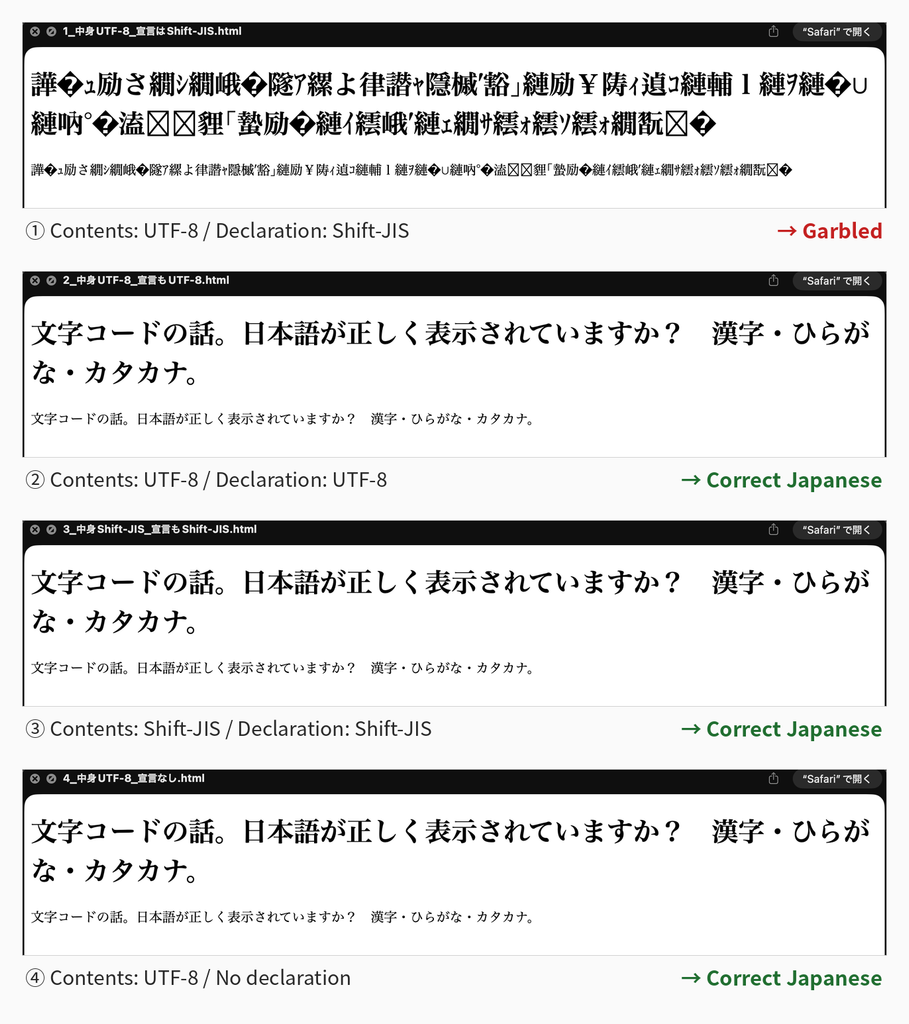
    This “gap between the declaration and the actual encoding” is not limited to browsers. As I touched on briefly in Part 1 of this series, the same thing happens in the preview that appears when you select a file in the macOS Finder and press the space bar. To confirm it, I made four files and checked.

    A file whose contents are UTF-8 and whose declaration says “Shift-JIS” — garbled in the preview too. If both the contents and the declaration are UTF-8, it reads fine. If both the contents and the declaration are Shift-JIS, that reads fine too. And the file with the declaration itself removed read correctly.

    In other words, the preview can guess correctly by looking at the contents. Even though it can guess, when there is a declaration, it believes that instead and breaks. The result is a somewhat perverse one: it displays correctly when there is no declaration.

    The four screenshots I actually took. ①, where only the declaration disagrees, cannot be read; ④, which has no declaration at all, can be read.

    Four HTML files opened in the macOS preview, stacked vertically. Only the first — contents UTF-8, declaration Shift-JIS — is a string of unreadable characters; the remaining three (contents and declaration both UTF-8 / contents and declaration both Shift-JIS / no declaration) all display the Japanese correctly
    How the standard macOS preview behaves depending on the encoding and the declaration. ②–④ show the same sentence, correctly: “A note on character encodings. Is the Japanese displayed correctly? Kanji, hiragana, katakana.” ① is the same file content, garbled.

    This Is What utf8conv Wanted to Solve

    utf8conv has a feature for this problem. I added it to the requirements document Rev.2 as “the target of the next work,” and implemented it the following day, March 9. This feature does two things.

    The first is to convert the body’s byte sequence from the detected character encoding to UTF-8 (up to here, it is an ordinary conversion). The second is to rewrite the declarations inside the file — <meta charset>, <?xml encoding>, @charset, and the like — so that they point to UTF-8. The targets of the rewrite are four extensions: .html .htm .xml .css.

    By doing these two things at the same time, it can produce the state “both the actual contents and the declaration are UTF-8.” Open it in a browser and it is not garbled.

    There are, however, declarations it does not rewrite. The line # -*- coding: shift_jis -*- that is sometimes written at the top of Python source code. utf8conv does not rewrite this line, because doing so would count as modifying source code.

    This is easy to misunderstand, so let me state it clearly. The role of this line is the same as HTML’s <meta charset>. A Python specification called PEP 263 defines it as the declaration, placed on line 1 or line 2 of a source file, of “what this file itself is written in.” That means that if you include .py in utf8conv’s targets and convert, the body becomes UTF-8 while this line remains, pointing at Shift-JIS. Python reads that file as Shift-JIS, as declared, so either it fails to read it and raises an error, or it raises no error and turns into different characters. The gap between declaration and actual encoding occurs here in just the same way.

    Also, with HTML and the like, the purpose is basically only to read the file out and display it. A program such as Python, on the other hand, is required, once read in, to “run correctly as a program.”

    At first glance it looks like merely rewriting the declaration so that it matches, but the behavior of a program with that modification in it cannot be guaranteed, and there is a considerable risk of contributing to the creation of unintended bugs. For that reason, I excluded the declaration line inside programs that are run from the targets of the rewrite.

    Later, after various deliberations, I changed it so that .py files themselves can also be converted. I assumed there would be demand along the lines of “there are many files, so I want them changed all at once.” However, when a conversion is done, the encoding of the body becomes UTF-8 while the declaration remains as it was, leaving a mismatch in place; so I decided to notify the user of that fact and prompt them to deal with it individually.

    What It Means to Read the Whole File

    utf8conv reads the byte sequence of a file it is detecting from beginning to end, not just the head. Having read it, it tries, in order, “can this be read through, without contradiction, as this character encoding?” It can happen that a file reads fine partway and then breaks down in the last few bytes, so nothing certain can be said without reading all of it. Consequently, a large file takes correspondingly more time.

    On the other hand, files outside the targets are sifted out by extension before their contents are read. Even if a 1 GB video file is mixed into the folder, no time is spent there.

    For this reason, to the “How It Works” section of the requirements document Rev.2, I added: narrow down the target folder before running; check with a dry run first; and avoid system folders such as /Library and /System (which can run to tens of thousands of files or more).

    Knowing the Limits of Detection

    utf8conv’s detection works like this: it first tries “can this be read as UTF-8?”, and if it cannot, it tries the candidates in a set order and takes the first one that can read the file as the answer.

    Here there is a limit that comes from first principles. A file consisting only of ASCII (letters, digits, and symbols) has exactly the same byte sequence whether it is UTF-8, Shift-JIS, or EUC-JP. That is because all of these character encodings use the same numbers for the ASCII range. In other words, for a file of nothing but letters and digits, “which character encoding it was saved in” cannot be distinguished in principle. Whatever tool you use, it is the same. The numbers that would serve as a clue do not exist inside the file.

    In the work of March 9, this actually happened. When I wrote a test that runs all 252 pairs of test files made the day before, some of the files made in Western and Eastern European character encodings were detected as “UTF-8.” That was because their contents were only in the ASCII range. I decided to treat these files as “skipped” in the tests.

    utf8conv treats files expressed only within the ASCII range like this as “detected as UTF-8, no conversion needed.” Since an ASCII-only file has the same byte sequence whatever character encoding it was saved in, nothing breaks by treating it as UTF-8.

    In the README, I wrote this behavior not under “Limitations” but under “How It Works.” It is not that it cannot distinguish; it is that there is no need to distinguish. Since treating it as UTF-8 is fine whatever the character encoding, it is not “failing to distinguish” but “correctly skipping.”

    Something I learned after writing this article: ISO-2022-JP, an old Japanese character encoding (the one used in email in the old days), keeps every byte within the ASCII range even when Japanese is written in it. That is because it works by inserting signal bytes before and after kanji that say “kanji start here” and “kanji end here.” In other words, though the contents are Japanese, it looks the same as the “ASCII-only file” I just described. utf8conv at this point, while it had ISO-2022-JP among its candidates, let such files pass straight through at the earlier step “it could be read as UTF-8 = no conversion needed.” I will continue this story in a future blog post.

    Coming Up Next

    Next time returns to implementation. The story of actually building the declaration rewrite described in this installment, and the story of writing the tests as data rather than as code.


    About Soul Resonant Works

    Soul Resonant Works is a solo venture developing seven local AI systems.
    Starting from zero programming experience, the development is progressing through collaboration with AI.

    🌐 Soul Resonant Works:
    → https://sr-works.net/en/index.html

    📝 This blog publishes the entire development process as a serialized journal.


    CubePlot (free version available)

    CubePlot is the first product from Soul Resonant Works — it turns a CSV into a 3D scatter plot you can rotate and zoom. No install, no sign-up: it’s a single HTML file you open in your browser, and it works offline. CubePlot itself does not send the data you load outside your machine — external network traffic is blocked at the browser level (CSP). Start with the free version.

    ▶ Product page: https://sr-works.net/en/cubeplot/
    ▶ Get it (commercial license, USD $39 + tax where applicable): https://soulworks8.gumroad.com/l/pzcij


    If you found this article useful, please share it.