This article was originally written in Japanese and translated into English with AI assistance. Please note that some expressions may carry nuances from the original Japanese.
🇯🇵 日本語版はこちら / Japanese version
Series: Special Edition (Part 9)
This article is a sequel to the previous one, “The Day My Project Knowledge Grew Too Large — Why the AI Started Talking About a Different Project, and What I Did About It.” Last time, the story was about “the AI mixing up files from a different project.” This time is its mirror image: a story about “me mixing up which AI I handed my instructions to.”
How It Started: I Had Handed the Translation Instructions to a Different AI
It happened on August 1, 2026. That day, I was trying to create the English version of the previous article. I meant to hand a work instruction sheet — for the translation and the creation of a new file — to the Claude Code in charge of the blog repository (a repository is a place where files live).
But the one that actually received the instruction sheet was a different Claude Code — the one in charge of the website.
In other words, what got misdelivered was an instruction sheet saying “translate the previous article into English.” The previous article was about an AI crossing project boundaries and mixing up files. And the instruction sheet ordering its translation was delivered, by me, across a project boundary. The person who wrote the article tripped over the very same thing, right after writing it.
Why I Mixed Them Up
Here’s how I was operating at the time. I had the coordinator Claude (running in Cowork, a desktop-app mode that can read local files directly) write the work instruction sheets and save them on my computer. Then I’d tell each Claude Code in charge: “Read this file in this directory and do the work.”
The important point here is that I’m not pasting the contents of the instructions anywhere. The contents live inside the file. All I do is choose which terminal to type that one line — “read this file in this directory and do the work” — into. Choosing the recipient had effectively been reduced to the act of picking a terminal tab.
And that day, four tabs were open. Each had a Claude Code stationed in it, running in parallel. (Only two of them matter for this story: the blog one and the website one.)
All four terminals were the same color. Every screen was filled with text. And the trickiest part of all was the tab titles.
While writing this article, I checked this again on my own machine. The title of a tab where Claude Code is running is generated automatically from the content of the first request you make in that session. And no matter how much the topic changes afterward, the title never changes. When I tried it, the tab got titled something like “research into software equivalent to X,” and even after I moved through three unrelated topics and ended up discussing dinner, the title stayed exactly as it was.
So what a tab shows isn’t “which project this one is in charge of.” It’s “what was asked first in this tab.” Role names like “HP” or “Blog” appear nowhere.
On top of that, lining up four tabs makes each one narrower, and the beginning of each title gets cut off. Only the tail end remains. And the tail end shows the same word on every tab: claude. The one clue I had — the beginning — gets chopped off, and the four tabs end up wearing the same face.
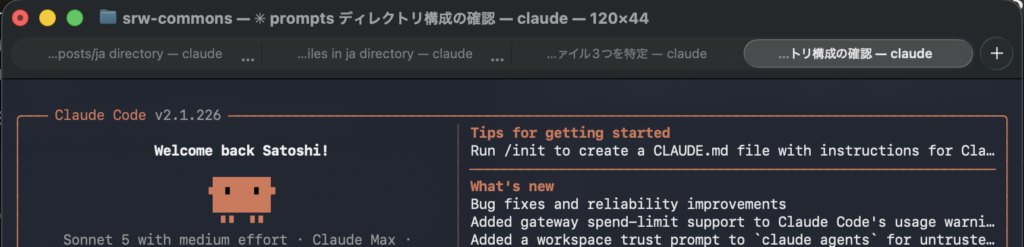
I was choosing between things I couldn’t tell apart. Getting it wrong eventually was just a matter of time. It wasn’t bad luck; the setup was designed to fail, I think. I was the one who increased the number of instances running in parallel, but until that moment it hadn’t occurred to me that every added instance raises the cost of keeping track of “which one am I talking to right now.”
There Were Three Reasons No Harm Was Done
Let me give away the ending: this misdelivery broke nothing. The website’s files never got touched, and the translation landed right where it belonged, on the blog side. But there wasn’t just one reason things turned out fine — there were three. And the third one, while bringing the work to a safe end, was also making the mistake invisible.
The first was that the first command in the instruction sheet was cd ~/dev/srw-blog. cd is a command that moves you to a working location. Wherever the receiving Claude Code happened to be, the first line moved it into the blog repository, so all the work that followed was aimed at the right place. This wasn’t a safeguard I’d prepared for this occasion — it was simply how I’d always written these sheets, out of habit. The habit ended up serving as a safety valve.
The second was that the work I was asking for was generic.
The task this time was “translate an already-finished Japanese manuscript into English.” It’s a job that requires almost none of the project-specific context. Given the manuscript and the previous English version as a model, just about any Claude Code — whatever history it carries — will land on roughly the same result.
If the job had been something like “analyze a bug in the app and work out countermeasures,” or “read the test records and put together an operating procedure,” the story would have been different. That kind of work simply doesn’t hold together without the context accumulated within that project. If the website-side Claude Code had received it, it could have executed the commands, but it would have pushed the work forward on its own judgment and produced something unusable.
In other words, this time I happened to hand a “job anyone could do” to the wrong recipient. If it had been a job that had to go to one specific recipient, I believe real damage would have occurred, cd or no cd.
And the third is the scariest reason.
I had set things up so that each Claude Code could work in parallel while referencing each of the repositories. The coordinator Cowork could see all the directories too. When you want to push multiple projects forward at the same time, that’s faster.
And what was the result? I had created a state in which even if you hand an instruction sheet to a Claude Code that isn’t in charge, it will reference the repository the sheet points to, and the work simply goes through.
If each Claude Code’s permissions had been closed to its own area of responsibility, an error would have stopped everything right at the cd. It would have said “you can’t go there,” and I would have noticed on the spot. But because I’d widened their field of view, handing the sheet to the wrong recipient still got the job done, as if nothing had happened.
Put the other way around: what if the instruction sheet hadn’t had that one cd line? The receiving Claude Code would have started creating the English version of a blog article right where it was — in the website-side repository. An English blog article born in the middle of the website’s files. And most likely, no one would have noticed at the time. Could I — someone with no programming experience — find it later and put things back? Honestly, I’m not very confident I could.
In other words, it was a state in which the mistake wouldn’t appear as a mistake. This was the scariest part of the whole incident. That no harm was done was good fortune, but there’s no guarantee anywhere that the good fortune continues.
And this structure has exactly the same shape as last time. Last time, I kept adding files to the knowledge thinking “this might make article material,” and the AI’s search accuracy dropped. This time, I widened each AI’s field of view thinking “I want them running in parallel,” and the misaddressed delivery became invisible. The very thing I did to make life convenient became the trap. In both cases, with no malice and no malfunction, settings made with the best of intentions turned on me.
The One Who Noticed Was Me, After the Work Was Done
Let me note this just in case: the AI didn’t notice on its own.
After the work was finished, a thought suddenly crossed my mind: “Wait — was that the right Code for this job?” So I asked the coordinator: “Did I hand the instruction sheet to the wrong Code?” The answer that came back was: “You did.”
I noticed not before having the work done. It was after. What’s more, without that nagging feeling, it would have ended without my ever noticing. The detailed work report exists only because I had it written after I asked.
An AI doesn’t question whether the job it’s been handed is addressed to it. It faithfully executes exactly what it’s given. The instruction sheet was concrete, the steps were clear, and the content was entirely executable. “Being able to execute it” and “being the one who should do it” are different things — yet the receiving side had been given not a single piece of material for telling them apart. The correctness of the destination was guaranteed nowhere but inside my own head at that moment.
And my head, faced with four similar-looking tabs, wasn’t much to rely on.
Why Had Things Been Set Up This Way?
At the time, the coordinator role was held by the Claude in charge of the website. The website lead was doubling as the dispatcher of instructions for every project.
Here’s the history. As development of CubePlot progressed, a major overhaul of the website became necessary. The business, which until then had dealt only with the seven local AI systems, had gained Everyday Tools (a separate line I started, positioned as tools for solving small everyday problems; CubePlot is its first product) — so rather than adding a page, the structure of the site itself had to change. Along with that came fixes affecting the whole site: introducing access analytics, the logo image on the top page, the incomplete footer, and so on. There was also talk of putting the free version of CubePlot on the website.
In short, it was a period when the website sat at the center of everything. That’s why I had all work instructions funneled into the website-side Claude, which would then issue instructions to a different Claude Code depending on the timing. At the time, I believed this was a reasonable call. Put the instruction-issuing role where the most information already gathers. Standing up a separate role hardly seemed worth it, I thought.
Looking back now, this couldn’t have worked, structurally. The coordinator lived inside one project, sent instructions from there to the projects outside it, and I carried every hand-off between them by hand. As long as that shape remains, the risk of mixing up recipients never goes away. This misdelivery was an inevitability of the setup before it was ever a matter of my carelessness.
Countermeasures: What I’ve Done, and What I Haven’t
Honestly, in the order I got them done:
1. Write cd as the first line of the instruction sheet. This was a habit I already had. It served as the safety valve this time, so I’ll keep it up rigorously.
2. State the destination at the top of the instruction sheet. I decided to write, at the very top, which repository and which role the sheet is addressed to. cd works as a command, but it offers no cue for me to stop and think before I hand the sheet over. Put the destination where human eyes will land — in human language, not machine syntax. This is already in place.
3. Make the terminals easier to tell apart. This one isn’t done. Not “under consideration” — I simply haven’t gotten to it. What I want to do is perfectly clear. I want the terminal tab titles to explicitly show role names like [HP Code], [CP Code], [Blog Code]. I want each tab to have a different background color, so I can tell them apart at a glance. The direct cause of this incident lives here, so this change should help more than anything else — but I haven’t gotten around to it.
The Real Countermeasure Was Making the Coordinator Independent
Even with countermeasure 3 untouched, the reason this misdelivery has become less likely to happen now is that I changed the structure instead.
First, I stopped having the website lead double as coordinator. The website lead should be exactly that: the lead for the website. On top of that, I launched a new project dedicated to coordination. The role of issuing instructions was carved out into a place that belongs to no project. There was a forward-looking motive as well: I wanted to run more things in parallel and raise efficiency.
Then I introduced a double rule into how instruction sheets are handed over:
- The sender’s rule: write the destination at the top of the sheet. One sheet gets exactly one destination — never bundle instructions for multiple projects into a single sheet
- The receiver’s rule: upon reading a sheet, first check whether the destination is you. If the destination is not you, do not execute — send it back
This, I think, is the heart of what I learned this time. I stopped relying solely on the sender’s attentiveness. Line up four indistinguishable tabs and a human will inevitably get it wrong. So have the receiving side check too: “Is this addressed to me?” Even if it’s technically executable, if the destination is wrong, do not execute. Decide that in advance, and even when I make the mistake, it stops at the next step down the line.
Just as I wrote last time that “noticing the mistake was nothing but good luck,” luck came to my rescue this time as well. Replacing luck with a mechanism — that, I think, is the work to be done after an accident.
In Closing
Finally, let me write down the thing that left me with the strangest feeling in this whole affair.
In the previous article, I wrote this as my third countermeasure: “When a response from the AI feels off, ask where it came from.” Against an AI that’s fluent when it’s wrong, saying out loud that something feels off is the safety valve — that was the point.
Where that countermeasure took effect was right in the middle of translating that previous article into English. And it took effect not against an AI’s response, but against my own operation. “Wait — was this the right Code?” — that was precisely the ask-where-it-came-from question, aimed at myself.
Probably it was because I’d only just finished writing it. That perspective was still close at hand, and that’s why I was able to snag on something after the work was done. If I hadn’t written it, I suspect I would have passed right by without a second thought.
Being saved by a countermeasure you wrote yourself. Writing a blog, I learned, can work on you in this way too.
About Soul Resonant Works
Soul Resonant Works is a solo venture developing seven local AI systems.
Starting from zero programming experience, the development is progressing through collaboration with AI.
🌐 Soul Resonant Works:
→ https://sr-works.net/en/index.html
📝 This blog publishes the entire development process as a serialized journal.
CubePlot (free version available)
CubePlot is the first product from Soul Resonant Works — it turns a CSV into a 3D scatter plot you can rotate and zoom. No install, no sign-up: it’s a single HTML file you open in your browser, and it works offline. CubePlot itself does not send the data you load outside your machine — external network traffic is blocked at the browser level (CSP). Start with the free version.
▶ Product page: https://sr-works.net/en/cubeplot/
▶ Get it (commercial license, USD $39 + tax where applicable): https://soulworks8.gumroad.com/l/pzcij
If you found this article useful, please share it.
Leave a Reply