This article was originally written in Japanese and translated into English with AI assistance. Please note that some expressions may carry nuances from the original Japanese.
At the end of last time, utf8conv had become “the smallest thing that’s usable for now (an MVP).” However, the candidate character encodings it tried when converting to UTF-8 were only five: the four Japanese-related ones (Shift-JIS, CP932, EUC-JP, ISO-2022-JP) and the final catch-all, latin-1 (UTF-8 is outside the candidates. Before trying the candidates, it first checks separately whether the file “can be read as UTF-8”).
This time continues the same March 8 — the fourth round of work on that day. I did four things. I widened the candidates to 16 kinds. I exported utf8conv in the form of a Mac app (.app). I rewrote the requirements document as Rev.2. And I generated 518 test files all at once.
Let me state up front the one thing I want to say in this installment. On the day I added candidates, it became clear that “even for the same file, the answer changes depending on the order in which you try.” I did not fix that on the detection side; I wrote it into what the tests demand, and into the “Limitations” section of the requirements document.
Adding 11 to Make 16
If utf8conv’s future expansion overseas is to be kept in view, I want it to handle not only Japanese but also Chinese, Korean, and Eastern and Western European character encodings. With that in mind, I decided to do “international character encoding support.” I added 11 kinds. For Chinese, GBK, GB2312, and Big5; for Korean, EUC-KR and CP949; for Cyrillic (Russian and others), CP1251 and KOI8-R; for Eastern European languages, CP1250 and ISO-8859-2; for Western European languages, CP1252 and ISO-8859-1. Together with the original five, the candidates to try came to 16.
The ordering is: the Japanese-related ones first, followed by Chinese, Korean, Cyrillic, Eastern European, and Western European, with latin-1 placed last. utf8conv tries them in this order from the top and takes the first one that can read the file as the answer.
The Same Byte Sequence Can Be Read Two Ways
When I added the candidates, the tests caught on two things.
The first was that text written in Chinese (GBK) was detected as EUC-JP (Japanese).
Let me explain a little. The contents of a file are, when you get right down to it, a sequence of numbers (a byte sequence). For example, if you save the Chinese word “中文” in GBK, the contents look like this.
d6 d0 ce c4
This is a way of writing called hexadecimal, which expresses numbers using 16 symbols: 0 through 9 plus a through f. One byte on a computer can be written in exactly these two characters, so it has become the custom for showing byte sequences. Here, just read it as “four numbers in a row.”
If you read this byte sequence as EUC-JP, no error occurs. It reads as the two kanji characters “嶄猟.”
Chinese (saved in GBK)
Byte sequence
Read as EUC-JP
中文
d6 d0 ce c4
嶄猟
日本
c8 d5 b1 be
晩云
北京
b1 b1 be a9
臼奨
GBK and EUC-JP overlap in the range of bytes they use. Since neither produces an error, if you judge only by “whether it could be read,” whichever is tried first wins. utf8conv tries EUC-JP before GBK, so the Chinese file was answered with “this is Japanese.”
What I fixed at this point was not the detection, but the test. I changed the result the Chinese test demands from “detected as GBK” to “detected as something that is not UTF-8, and the contents can be read out.”
The second was the test with the four bytes 80 81 82 83. Until then it had been read as latin-1, but now it came to be read first by the newly added CP1251 (Cyrillic). Here too, I changed the test, to “it is fine as long as one of the final catch-alls can read it.”
In that day’s work, I sorted these two out as follows. In detection where the order of trying decides the answer, every time you add an encoding, it affects the tests that came before. As long as we do not use an additional part that detects statistically, checking “that it can be read out correctly as something that is not UTF-8” holds up better than “hitting the exact encoding name.”
Looking back now, the second one had a sequel. Three of the added ones — KOI8-R, ISO-8859-2, and ISO-8859-1 — can, like latin-1, read any byte sequence whatsoever. One of them answers “I could read it” first, so latin-1, at the very end, never gets its turn anymore. At this point, the catch-all was not working as a catch-all. How that story was settled, I will cover in a future blog post.
Exporting as a Mac App
The next task was exporting utf8conv in the form of a Mac .app, using a tool called PyInstaller. A .app is that thing with an icon that sits in the Mac’s Applications folder. Once this exists, just double-clicking in the Finder opens the utf8conv screen.
This work of assembling the code you have written into a single bundle you can hand to someone is called a build. The finished bundle, for its part, is a distributable. These two words will come up again and again from here on.
PyInstaller went into the category of tools used only during development, the same as pytest and the like.
The Tcl/Tk story also had a sequel. As I wrote in Part 1 of this series, on day one the Python that uv provides did not include Tcl/Tk (the part tkinter uses to draw the screen), so I switched to the Homebrew version of Python to get it running. PyInstaller found Tcl/Tk on its own from that Homebrew version of Python and packed it into the .app along with everything else.
On this day, dist/UTF-8 Converter.app came into being. I added the export command to the README.
Rewriting the Requirements Document as Rev.2
An hour later, I rewrote the requirements document from Rev.1 to Rev.2. Compared with Rev.1, written the day before, there were four main changes.
The first is the background. To the list of situations where mojibake occurs, I added “cases that are not resolved even when you tell an editor such as VS Code to ‘save as UTF-8’ (a mismatch between the encoding declaration and the actual encoding).” This is the problem I ran into first, the one I wrote about in Part 1 of this series.
The second is the intended users. Rev.1 listed three: “Japanese-language users,” “multilingual users,” and “non-engineers.” In Rev.2, I added a fourth: “developers, such as Vibe Coders.” These are the people who, even when an AI prompts them to re-save as UTF-8, find that it does not fix things.
The third is the plan for the next work. I added a feature for rewriting the character-encoding declaration written inside a file, under the number F-14 (a serial number assigned to each feature), and made it the target of the next work. At the same time, I marked this day’s international character encoding support (F-10) as “done.”
The fourth is that I newly created the “How It Works” and “Limitations” sections. In the limitations table, I wrote the two items corresponding to what the tests had caught that day: “GBK and EUC-JP overlap in byte range, so short texts can be mistaken for one another” and “candidates earlier in the trial order take priority.”
518 Test Files
Saved at the same time as the requirements document were the test files (fixtures). Rather than making them by hand, I ran a single generation script that Claude Code wrote, and made them all at once. The script is built only from parts that come with Python from the start.
Here is what’s in it. 14 kinds of character encoding × 3 kinds of text × 6 kinds of extension (.txt .html .xml .css .csv .md), each as one pair: the file before conversion, and the answer file saying what it should become after conversion (.expected). That makes 504. To that, 12 files that are UTF-8 to begin with, and 2 broken files. That comes to 518 in total. The ones paired with an answer file number 252 pairs.
These 518 files will play an active part in the blog posts that follow. I will leave that story for later.
At the End of That Day
The work of this installment was saved at 11:41 and 12:41 on March 8. The tests came to 25, all passing. That is the previous 23, plus one Chinese test and one Cyrillic test.
Coming Up Next
Next time steps away from the timeline a little. Why is it that, as I added to Rev.2’s background, mojibake does not get fixed even when you “save as UTF-8” in VS Code? I will write about the mechanism of character encodings itself.
About Soul Resonant Works
Soul Resonant Works is a solo venture developing seven local AI systems.
Starting from zero programming experience, the development is progressing through collaboration with AI.
📝 This blog publishes the entire development process as a serialized journal.
CubePlot (free version available)
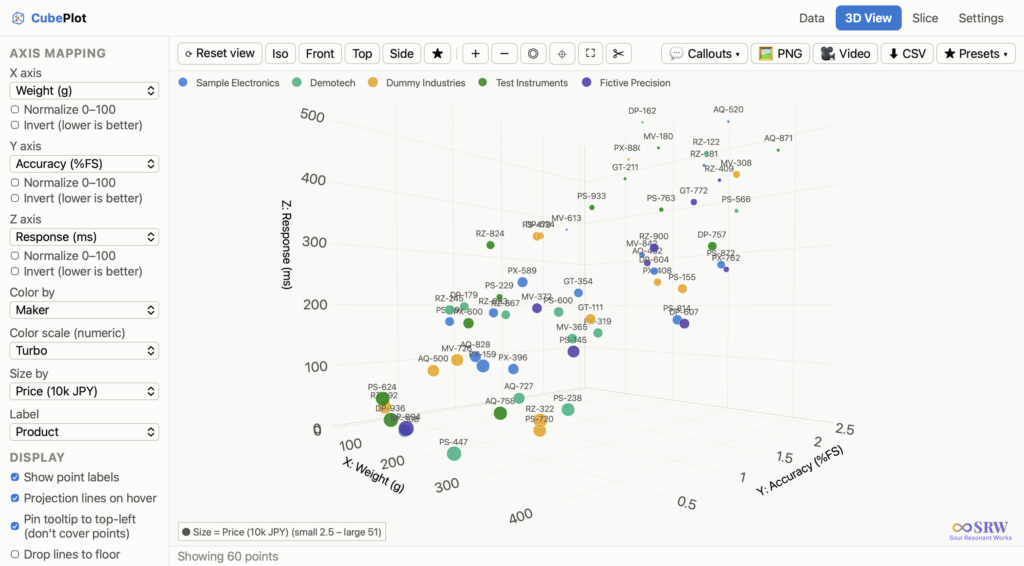
CubePlot is the first product from Soul Resonant Works — it turns a CSV into a 3D scatter plot you can rotate and zoom. No install, no sign-up: it’s a single HTML file you open in your browser, and it works offline. CubePlot itself does not send the data you load outside your machine — external network traffic is blocked at the browser level (CSP). Start with the free version.
This article was originally written in Japanese and translated into English with AI assistance. Please note that some expressions may carry nuances from the original Japanese.
Last time, we got as far as splitting utf8conv’s conversion internals (the core) and its screen (the GUI) into separate files, so that tests would be easier to write. This time picks up from there. The date is the same as last time: March 8 (a Sunday). In this series I call it “day three,” but strictly speaking, it was the third round of work (session) carried out on that same day.
If I had to give day three’s work a title, it would be “GUI completion, integration tests, MVP finishing touches.” MVP is an acronym for “Minimum Viable Product,” and it means “the smallest thing that’s usable for now.”
Let me state up front the one thing I want to say in this installment. On that day, utf8conv could not make its character-encoding detection perfect. Instead, I made what it was doing visible on screen, and shaped it so that a person could check before anything got rewritten.
That is what the MVP consisted of that day.
Homework from Last Time — Showing Progress on Screen
The first item on the “next things to do” list I left at the end of the previous session was “brushing up the GUI (progress bar, status improvements, etc.).” That’s where I started on this day.
I did three things.
First, I put the progress bar (a horizontal bar that shows how far along things are) on the same row as the run button. Second, I moved the one line that reports the current state (the status bar) to the very bottom of the window, and during processing I made it show which item out of how many it’s on — for example, “Processing… 3/10 items.” Third, I finished the color coding of the log. Converted files are green, dry run (a trial run that doesn’t actually rewrite anything and only checks what would be converted) is blue, errors are red, and headings are yellow. I also prepared gray for skips. However, skipped files weren’t logged one by one; the design was to output only a count at the end, like “UTF-8 (skipped): ○ items,” so a gray line never actually appeared on screen.
All three were work on the screen side; I didn’t change the way conversion itself works. It was work to get “what the conversion is doing right now” in front of the user’s eyes.
Only the One in Charge of the Screen Touches the Screen
Let me take a moment here to talk about how things are put together.
utf8conv runs its conversion processing on a “separate thread.” A thread is a flow of work that proceeds side by side with others inside a program. If there’s only one flow, then while the conversion is running, redrawing the screen and responding to buttons have to line up behind it and wait. So the conversion is handed off to a separate flow, and the screen’s flow is kept free.
This structure — the screen part and the conversion processing on separate threads — wasn’t something added on this day. It was already that way in the code Claude wrote on day one (March 7).
The tool that builds the screen is tkinter (pronounced “tee-kay-inter”; a collection of parts for building screens that comes with Python from the start). On this day, I decided to leave progress-bar updates to the main flow as well. This is so that tkinter can be used safely from more than one flow. The conversion flow doesn’t touch the screen directly; instead, using the form self.after(0, ...), it asks the main flow, “Please display this.” The side that was asked carries it out when it has a free moment.
This way of asking was also already in the day-one code, in two places: when outputting a line of the log, and when announcing that everything had finished. On this day, I added one more — progress-bar updates — using the same way of asking.
Along with that, I also added one opening on the conversion-internals side (core.py) for reporting progress. Because I made this opening something “you can use or not use,” not a single one of the tests I wrote last time had to be changed.
Tests as a Full Run-Through
On this day, I added five “integration tests.” Whereas last time’s unit tests checked the parts one at a time, integration tests check a whole sequence with the parts connected together. In theater terms, it’s the equivalent of a full run-through rehearsal.
The five tests cover the following five things:
A Shift-JIS file gets converted to UTF-8
In a dry run, files are not rewritten
A backup gets created
Files that are already UTF-8 get skipped
And a folder with mixed character encodings can be processed all the way through
In every case, pytest (a tool that runs tests automatically) checks things by calling the conversion-internals functions directly, without opening the screen. Because I’d separated the internals from the screen last time, it had become possible to test the whole flow without launching the screen.
With this fifth test, I stumbled once.
A short piece of text written in EUC-JP was detected as Shift-JIS. utf8conv at the time was built to try candidate encodings in a fixed order and take the first one that could read the file as the answer. In that order, Shift-JIS comes before EUC-JP. A short EUC-JP text can sometimes be read as Shift-JIS as well.
What I fixed at that point was not the detection, but the test. I changed the result the test demands from “which encoding it was detected as” to “the converted file can be read as UTF-8,” and got it to pass that way.
Where to Catch What Cannot Be Fully Fixed
About this stumble, the work that day sorted things out as follows. Misdetections like this are inherently unavoidable unless you use an additional part that detects statistically. And since we have decided not to use additional parts, the flow in which the user checks the results with a dry run becomes important.
From the very beginning, utf8conv had a rule that it would run using only the parts that come with Python out of the box (I called this “zero additional packages”). Within that rule, detection cannot be made perfect. So on this day, I decided to put a place for checking not on the detection side, but on the user’s side. In the instruction manual (README) I wrote that day, I also included “Dry run first — check only by default. Actual conversion only when explicitly instructed.”
Reading it back now, that day’s work looks connected by a single line. Show the progress, color the log, and make what’s happening visible on screen. Before rewriting anything, have a person check with a dry run. In other words, on the premise that detection can be wrong, I prepared a place where mistakes can be noticed.
Running a Dry Run on My Own Folder
In this session, I also tried it on a real folder of my own. The target was the SRW (Soul Resonant Works) folder, ~/Documents/SRW, which contained 51 files. Running it as a dry run, all 51 files were detected as UTF-8, and none needed converting. Since it was a dry run, nothing was written to the files.
Finishing Touches — CI and README
Finally, there were two small finishing touches.
One was revisiting the CI settings. CI (continuous integration) is a mechanism that automatically runs the tests every time you send code to GitHub, the place where the whole set of code is kept (the repository); here, it uses a service called GitHub Actions. This had been set up on day one, and at that time it was configured to run the tests on two versions of Python: 3.8 and 3.12. In the previous session, I had aligned the whole project on Python 3.12, so on this day I narrowed CI down to 3.12 only.
The other was writing a new README (the instruction manual placed at the very top of the repository). It sums up on a single page what the tool does, which character encodings it supports, and how to launch and use it.
At the End of That Day
The work of this session was saved at 8:49 on March 8. The previous session’s work had been saved at 8:30.
At this point, there were 23 tests in total, all passing. The breakdown: 17 unit tests from last time, 1 version check from day one, and 5 integration tests from this day. Of the conversion internals (core.py), the proportion of lines that actually ran during the tests (coverage) was 95%.
utf8conv at the end of this day was in this state: you pick a folder, check with a dry run what would be converted, and when you actually convert, the original files remain as backups, and you can watch it all happen through the progress bar and the color-coded log. There were still things it didn’t have. The candidate encodings to try were just five: four Japanese-related ones and the final catch-all (latin-1). There was no saving of the log, and no feature for picking just one file and converting it.
Coming Up Next
Next time continues the same March 8. It’s the story of adding 11 more candidate encodings — Chinese, Korean, Cyrillic, Eastern European, and Western European — for a total of 16. The story of using a tool called PyInstaller to export utf8conv in the form of a Mac app (.app). And the story of rewriting the requirements document as Rev.2 and automatically generating 518 test files all at once.
About Soul Resonant Works
Soul Resonant Works is a solo venture developing seven local AI systems. Starting from zero programming experience, the development is progressing through collaboration with AI.
📝 This blog publishes the entire development process as a serialized journal.
CubePlot (free version available)
CubePlot is the first product from Soul Resonant Works — it turns a CSV into a 3D scatter plot you can rotate and zoom. No install, no sign-up: it’s a single HTML file you open in your browser, and it works offline. CubePlot itself does not send the data you load outside your machine — external network traffic is blocked at the browser level (CSP). Start with the free version.
This article was originally written in Japanese and translated into English with AI assistance. Please note that some expressions may carry nuances from the original Japanese.
Last time, I wrote about utf8conv’s first day. It ended at the point where, despite losing half a day to the compatibility problem between uv and tkinter, I’d managed to get at least as far as “an empty window opens, and you can pick files and do a dry run.” This time is the story of the following day — day two.
As the title says, the theme of that day was a design change: “separating the core from the GUI.” Honestly, it’s a little embarrassing for someone with no programming experience to talk about “redoing the design.” Even so, the sense that “if I keep growing the day-one code as it is, I’ll hit a dead end” is something you can vaguely pick up on once you’re actually doing the work, even as a non-engineer. I think this installment is worth writing as a way of bringing that vague sense into sharper focus.
A Bad Feeling Was Mixed into the Day-One Code
What I had at the end of day one was a single file called utf8_converter_gui.py. Inside that one file, everything was bundled together: “a function that detects the character encoding,” “a function that gathers the target files,” “a function that actually does the conversion,” “the part that builds the GUI with tkinter,” and “what happens when a button is pressed.”
A function is a single chunk of work that’s been given a name so it can be called from outside. If you ask for it by name — “detect the encoding of this file” — you get an answer back without needing to know what goes on inside. Think of it like cutting out one step of a recipe and giving that step its own name.
It works. And since it works, I could have kept adding features to it as it was. In fact, on day one, when I asked Claude Code, “Shall we grow this a bit more and add a real conversion mode and a backup feature?”, the answer came back, “Yes, we can.”
But when I reported that exchange to the Claude.ai side (the chat version of Claude), a slightly different perspective came up. “As things stand, you’d have to launch the GUI every single time just to check whether the conversion logic works. Doesn’t that make tests hard to write?”
Now that it had been pointed out, it was exactly right. In the current structure, the only way to check whether a conversion works correctly was for a human to click a button with the mouse. Even if I tried to automate an action like “convert a Shift-JIS file and check the result,” the GUI sitting in the middle meant it couldn’t easily be turned into a script (something like a written procedure that runs automatically from top to bottom, without waiting for anyone to operate it). In other words, it was a structure that didn’t get along well with the whole idea of automated testing.
I’d faintly sensed this “tests are going to be hard to write” feeling myself on day one. But I’d left it alone, thinking, “Tests can wait.” Claude.ai didn’t let that slide, and gave me a gentle push: “If you separate them now, things will be easier later.”
What One Word, “Separation,” Really Means
The structure Claude.ai proposed was simple. Split the file in two. One is core.py, dedicated to logic — everything that “works without opening a screen,” like encoding detection and the conversion process, goes in there. The other stays as utf8_converter_gui.py, and keeps only the part that builds the screen with tkinter and the part that calls core.py when a button is pressed.
According to Claude.ai, this way of thinking — “separating into layers” — is one of the classic basic patterns in software engineering. It also explained that this is essentially the same thing as the three-layer architecture — “GUI layer, business logic layer, data access layer” — that I’d been designing for DataMigrator up to the previous articles. The difference is the order: with DataMigrator, I split things into three layers at the design-document stage, whereas with utf8conv, I wrote everything as one piece first and split it apart afterward.
At that moment, one thing clicked for me. There are probably people who can write things cleanly separated from the very start, but when you write your first GUI app on your own, it inevitably ends up as one lump at first. Then, somewhere around the point where it starts working, you realize “this might not be good enough,” and you end up splitting it again. This redo isn’t a “failure” — if anything, it’s just part of the normal development process. Naturally, the same thing happens in vibe coding too.
Giving Functions Precise Names Again
While doing the separation, there was one more small discussion: about function names.
In the day-one code, the main processing was bundled into a function called detect_and_convert. As the name says, it’s a function that does both “detect” and “convert.”
As the separation work went on, Claude.ai pointed out, “This function name doesn’t make its responsibility clear.” “Detecting” and “converting” are separate responsibilities. For example, in dry run mode you only want to detect. In real mode, you take the detection result and convert as well. A function that does both ends up branching internally, which makes it harder to read. In that case, it’s better to split the function in two and give each its own name.
As a result of that discussion, the functions were organized like this: detect_encoding(path) is a function that only detects the encoding and returns it. run_conversion(...) is a function that actually runs the entire conversion process. The two combine to handle both the dry run and the real conversion.
A “discussion about function names” may sound technical and dull, but for me it was a small discovery. A function name is “a signboard that tells others (or your future self) what that code does,” and if the lettering on the signboard is vague, the work inside becomes vague too. There’s something a little similar here to the feeling of deciding on the title of a stage play or the name of a band’s song. Once the title is settled, the content stops wobbling. I found myself oddly convinced that function names in software had the same effect.
The latin-1 Fallback as a “Catch-All”
While doing the separation, I also sorted out the encoding-detection logic. Since utf8conv follows the zero-additional-packages policy, high-accuracy automatic detection like chardet isn’t available. Instead, it detects with simple logic: “try several encodings in a predetermined order, and adopt the first one that reads successfully.”
The order goes like this. First, it tries whether the file can be read as UTF-8. If it can, that file doesn’t need converting, and that’s the end of it. Only when it can’t does it start trying the candidate list from the top, in order. My initial list was something like “Shift-JIS, CP932, EUC-JP.” If the target was Japanese files, that seemed like plenty.
But here I noticed something: the problem that if it ran into a file that “can’t be read with any of the encodings,” processing would stop. An ordinary text file should almost certainly be readable with one of them, but there’s a chance that, very rarely, a file comes along where “every one of them errors out.”
The solution that came up was the idea of placing an encoding called latin-1 (ISO-8859-1) at the very end of the trial order. latin-1 maps every byte (0x00-0xFF) to some character, so it has the property of “being able to read any byte sequence without raising an error.” In other words, if you keep it there as the very last fallback — a backup measure you prepare for when all the main candidates have failed — you can at least prevent the situation of “processing stopping.”
However, when a file is forced through latin-1, the characters may not be accurate. If a file that was really Japanese gets read as latin-1, a garbled result gets output as “converted.” So latin-1 is strictly “the last-resort fallback for when nothing else could read it,” and in day-to-day use the expectation is that files get read by the Japanese encodings earlier in the list.
This, too, was something where I only thought “I see” once it was pointed out to me. The idea of “deliberately putting a weak rule at the end” simply wasn’t in me. I came to vaguely understand that design isn’t just lining up the strong parts — it’s work that includes deciding where to place the weak parts, too.
★ That said, let me say up front: this decision gets overturned later. Keeping latin-1 there makes the state of “nothing could read it” itself disappear, which creates a different problem — the tool silently converts even files that aren’t text. Today’s utf8conv doesn’t include latin-1 as a candidate. I’ll write about how that came about in a later installment.
The [build-system] Section — an Unglamorous Trap
Let me write about one more pitfall I ran into that day. Technically it’s a very small thing, but it left an impression on me.
After separating the core from the GUI, at some point that day, I got an error where import utf8conv failed.
★ To be honest, I couldn’t pin down whether this happened right after the separation work or a bit later that same day. When I cross-checked the records from that time while writing this article, two records said different things (the work log said it was during the later work; the summary said it was during the separation work). That day, I ran three sessions all within the same March 8, and the boundaries between them have blurred. Either way, it’s something that happened that day and got resolved that day.
I’ll start from digging into the cause.
First, there’s a file called pyproject.toml. It’s a file that gathers a project’s settings in one place — the project’s name, its version, the parts it needs, and so on. And uv (pronounced “you-vee”) is the tool that also appeared last time. It prepares Python itself and the parts you need, and runs your program.
The single line import utf8conv means “load the bundle named utf8conv.” This “bundle” is called a package.
The problem was that utf8conv’s pyproject.toml had no section with the heading [build-system]. Roughly speaking, this section is a statement that says, “This folder can be assembled into a distributable part.” uv uses whether this statement is present to decide “whether it’s okay to treat this as a package.” If there’s no statement, it considers “this isn’t a package,” so import utf8conv can’t find where to go, and you get an error.
What’s interesting is that I had never once run into this problem on the DataMigrator side. When I later lined up the two pyproject.toml files side by side, DataMigrator didn’t have [build-system] written in it either.
Instead, in the test settings, there was just one single line written like this:
pythonpath = ["src"]
It means “the main body of the program is inside a folder called src.” Before starting the tests, the tool that runs them (pytest) builds a list of “places to look for the main body” (the search path). This one line adds the src folder to that list. Then import utf8conv ends up in a state where it gets found even without being stated as a package, because the tool has been told directly where to look.
Either state that it’s a package and let it be found, or tell the tool directly where to look. Either way, the test’s import goes through. However, the latter (pythonpath) only works while the tests are running — it has no effect when people use what you’ve distributed. DataMigrator happened to get through with the latter, and utf8conv had neither.
In other words, I had simply been sidestepping the same problem by a different method, by chance. Even though utf8conv was started using DataMigrator as a template, it hadn’t inherited that one line. And I hadn’t noticed on my own that it hadn’t been inherited.
The reason this was a slightly painful experience is that what tripped me up was the assumption that “it worked in DataMigrator, so it should be fine.” Carry the success of your first project straight into your second, and you won’t notice the differences in the settings files. Looking back, “the second project leans too heavily on the success of the first” may be a lesson that applies to anything, not just vibe coding.
The End of Day Two
By the end of that day, the core and the GUI had been separated, the conversion logic had proper tests, the latin-1 fallback was built in, and the [build-system] trap had been dealt with. 17 tests, all passing. Test coverage for core.py: 95%. I still don’t properly understand what the numbers mean, but I do at least understand that “apparently it’s high.”
Compared to day one, as code it was an unglamorous kind of progress. No new features had been added, and from the user’s point of view, nothing had changed. Even so, the internal structure had changed a great deal, and from here on it had moved into a state where “features are easy to add,” “tests are easy to write,” and “bugs are easy to find.”
Day one was “build something that works”; day two was “reshape it into a form that’s easy to grow.” Thinking back, I believe that order was just right. If I’d tried to write it in an “easy-to-grow form” from the start, I probably wouldn’t have had anything working by the end of day one — and even if I had, I’d surely have been working without any confidence that “this is the right way.”
Coming Up Next
Next time (UC03) is utf8conv’s third day. In terms of the date, it’s actually the same March 8 as this one. This is the day the MVP (minimum viable product) finally gets completed. The themes are: showing the progress of the conversion on screen, writing integration tests to “check the whole flow without launching the GUI,” and the episode of what happened when I ran a dry run on my own real data (the SRW folder) for the first time.
About Soul Resonant Works
Soul Resonant Works is a solo venture developing seven local AI systems. Starting from zero programming experience, the development is progressing through collaboration with AI.
📝 This blog publishes the entire development process as a serialized journal.
CubePlot (free version available)
CubePlot is the first product from Soul Resonant Works — it turns a CSV into a 3D scatter plot you can rotate and zoom. No install, no sign-up: it’s a single HTML file you open in your browser, and it works offline. CubePlot itself does not send the data you load outside your machine — external network traffic is blocked at the browser level (CSP). Start with the free version.
This article was originally written in Japanese and translated into English with AI assistance. Please note that some expressions may carry nuances from the original Japanese.
Starting with this installment, I’m beginning the development journal for another product that grew up alongside DataMigrator: “utf8conv” (UC for short).
utf8conv is a very simple GUI tool that does nothing more than batch-converting files saved in a non-UTF-8 encoding into UTF-8. The name is exactly what it sounds like: “utf-8 converter.” Unlike DataMigrator, there’s no lengthy design document behind it, and in scale the two aren’t remotely comparable — utf8conv is much smaller.
Still, being small didn’t mean it was easy. Right from day one I ran into a compatibility problem between uv and tkinter that ate half a day, and partway through I struggled under a “zero additional packages” constraint I’d set for myself — there were a fair number of stumbles along the way. This first installment starts with the story of why I decided to build this tool in the first place.
While Talking with Claude, Mojibake Was Quietly Happening
Around February 2026, alongside developing DataMigrator, I was also doing other work while chatting with Claude — tweaking HTML files here and there, tidying up old documents, that kind of miscellaneous task.
One day, in the middle of asking Claude for advice on something, I found a garbled file on my PC. Opening it, the Japanese parts had turned into something like “譁?ュ怜喧縺” — a string of symbols that unmistakably screamed “the character encoding is broken.” Having used a Mac for 20 years, this kind of mojibake is a familiar sight I’d run into more than a few times.
Normally I’d have shrugged it off with an “ugh, again” and dealt with it however. But this time, since I happened to be in the middle of migrating data from my old iMac to a MacBook Pro, and had Claude on hand to ask, I tried “How do I fix this file?” Claude’s answer was straight out of the textbook: “The original file is probably saved in a different encoding, like Shift-JIS. Please re-save it as UTF-8 in VS Code.”
So I did as told: opened it in VS Code, chose “Save with Encoding” → UTF-8, saved it, and reopened it in the browser.
—It didn’t fix it.
On screen, the mojibake was still dancing around, unchanged. VS Code’s own status bar at the bottom said “UTF-8,” so the file was surely UTF-8 now. When I told Claude, “I saved it but it’s still not fixed,” Claude thought for a moment and suggested, “Try explicitly specifying the encoding again when you reopen and save it.” I tried that too. Still no fix.
At this point, doubts were starting to creep in: “Is this a VS Code bug?” “Is the AI telling me something wrong?” Doubting one or the other is one thing, but once you start doubting both at once, you lose your footing entirely.
So, What Is a Character Encoding, Anyway?
Let me back up for a moment and lay out some groundwork.
Inside a computer, every character is stored as numbers — a sequence of bytes. The rule for how to read that byte sequence and map it to characters is what we call a “character encoding.” There isn’t just one such rule; many have been created over the years, for different languages and eras — Shift-JIS or EUC-JP for Japanese, GBK for Chinese, CP1252 for Western European languages, and today’s standard, UTF-8.
The same character will produce a different byte sequence depending on which rule you use. Put the other way around: read the same byte sequence under a different rule, and you get something completely different. That’s mojibake.
Let’s actually try it. Take a string saved under one language’s character encoding, then read it as if it were a different language’s encoding, and here’s what you get:
Below, a Japanese file is read as Chinese (GBK), a Chinese file as Japanese (EUC-JP), and a German file as Cyrillic (CP1251).
Japanese こんにちは 文字化け     →  偙傫偵偪偼 暥帤壔偗
Chinese  你好 世界 编码          →  低挫 弊順 園鷹
German   Grüße Straße Fußball  →  GrьЯe StraЯe FuЯball
Look at the German example. Grüße has become GrьЯe. The alphabetic letters survive intact; only the characters carrying an umlaut or an eszett break, turning into Cyrillic letters. Unlike the Japanese case, where the whole string turns unreadable, here only part of it corrupts. Exactly which parts the two rules share, and which parts differ, shows up directly in the result.
And the mojibake that opened this article runs in the opposite direction. Take something saved in UTF-8 and read it as if it were Shift-JIS, and you get this:
Japanese "mojibake" (文字化け) → 譁蟄怜喧縺
In both directions, the file itself isn’t broken. The byte sequence is intact, safely saved exactly as it was. What’s broken is the “how to read it.”
The Cause: A Mismatch Between the Byte Sequence and the Declaration
Digging into the cause together with Claude, here’s what it eventually turned out to be.
The problem file was an HTML file. HTML files carry a declaration line near the top of the file that says, in effect, “this file is written in this encoding” — specifically, something like <meta charset="Shift_JIS">. The browser sees this declaration and decides, “ah, then I’ll read it as Shift-JIS.”
When you choose “Save with Encoding: UTF-8” in VS Code, the file’s contents — the actual byte sequence — really are converted to UTF-8. VS Code isn’t lying about that part. But the line that says <meta charset="Shift_JIS"> is left exactly as it was.
That’s because an editor’s “save with a different encoding” feature converts the file’s byte sequence — it doesn’t read the document’s contents and rewrite them. So the string <meta charset="Shift_JIS"> just gets stored, unchanged, inside a UTF-8-encoded file. And I don’t think that’s careless of the editor — I think it’s the correct behavior. An editor that took it upon itself to rewrite the body text because “this declaration doesn’t seem to match reality, so I’ll fix it for you” would be far more alarming.
Still, the upshot is that the file is left holding nothing but a contradiction.
The result is a mismatch like this: the file’s actual contents are UTF-8. But the top of the file declares “this is Shift-JIS.” The browser trusts the declaration first. Believing it’s Shift-JIS, it tries to interpret the UTF-8 byte sequence as Shift-JIS. Naturally, the result isn’t meaningful Japanese. That result is the mojibake from the start of this article.
The moment I heard this explanation, two thoughts rose up in me at once: “I see,” and “wait, couldn’t this be turned into a tool?” The problem I’d run into was probably one that plenty of VS Code users out there, somewhere, had also run into — and given that it even included the situation of “an AI kindly walking you through the wrong fix,” it seemed like something with real reproducibility. In particular, since I was already building DataMigrator, a product for organizing and migrating data files, with the underlying premise of getting file migration between my own Macs properly sorted out, I was going to need to correctly interpret the encodings of a large, disorganized pile of files anyway. That’s also where requirements like being able to do a dry run in advance, actually changing the encoding properly, handling a large number of files at once, and having a safety net to revert if needed, all found their way into the spec.
To begin with, a tool that just batch-converts files from non-UTF-8 to UTF-8 is the kind of thing that could reasonably have existed for a long time already. But one that’s a GUI, needs no extra installation, can safely do a dry run (check only), and correctly rewrites HTML/XML declarations too — all of that together — I couldn’t find, within the range I searched.
By the way, this problem — mojibake caused by a mismatch between the declaration and the actual encoding — wasn’t limited to browsers. The same thing happens in the Quick Look preview you get on macOS Finder by selecting a file and pressing the space bar. I confirmed this later by making four test files.
A file whose contents are UTF-8 but whose declaration says “Shift-JIS” — garbled, even in Quick Look. A file where both the contents and the declaration are UTF-8 — readable. One where both are Shift-JIS — also readable. And a file with the declaration removed entirely — readable, correctly.
In other words, Quick Look can actually work out the right answer just by looking at the contents. Yet even though it can work it out, when a declaration is present, it trusts the declaration instead and breaks. It displays correctly only when there’s no declaration at all — a slightly perverse result.
From here on, this is less about character encoding itself and more about how the software is built. Software that handles character encodings is, for the most part, built to “auto-detect by default, but let you choose manually if needed.” Browsers work this way too. But the lightweight preview feature built into the OS — the one that doesn’t even count as launching an app, that opens instantly when you select a file — doesn’t seem to have that manual entry point anywhere. Maybe it exists somewhere if I looked hard enough. But the act of hunting for it is a hassle in itself, and even if I found the setting and changed it, some other encoding would stop displaying correctly instead — which would defeat the purpose.
Rather than fiddling with the display side to fix it, fix the file itself. That, in the end, is what utf8conv is trying to do.
UC’s Direction
And so, right as DataMigrator’s M1 wrapped up, another small project — “utf8conv” — got underway.
I wrote a requirements document for it too, but it never grew past 30-plus chapters the way DataMigrator’s did. It’s a modest requirements document, running to just a few chapters at most. Even so, I settled a few important policies right at the start.
The first was “zero additional packages” — a constraint that everything had to be done using nothing but Python’s standard library. I initially considered using a well-known library called chardet for encoding detection, but I judged that skipping chardet would buy me benefits like “it runs the moment it’s installed,” “no dependency headaches,” and “distribution stays simple.” Detection accuracy might suffer a little as a result, but I figured I’d make up for that with the “try encodings in order from the top” approach described later.
The second was “dry run first.” By default, the tool doesn’t convert anything — it just runs in a mode that logs what would happen if you converted, and only performs an actual conversion once the user explicitly chooses “really convert.” Just like DataMigrator’s “never delete” philosophy, this leans toward the safe side. Since undoing a character-encoding conversion once it’s done is a hassle, I judged that a confirm-first mechanism was indispensable.
The third was “automatic backups.” When an actual conversion runs, the pre-conversion file is automatically moved into a backup folder. Even if a user chooses to skip the dry run and go straight to a real conversion, having a backup means they can still roll back — a last line of defense.
Written out, these three policies come to only three lines, but they ended up defining utf8conv’s character down the line.
On Day One, uv and tkinter Get Into a Fight
Once the requirements document was done, I started actually moving my hands in Claude Code. Same as with DataMigrator: create the project’s box, spin up a Python environment, get a minimal GUI showing — that route. For the GUI, in keeping with the zero-additional-packages policy, I decided to use tkinter from Python’s standard library.
But when I tried to run it, the window wouldn’t open. The error wasn’t particularly helpful either — all I got back was a message to the effect of “Tcl/Tk not found.”
Having Claude Code dig into it, the cause became clear. uv (the Python environment manager I’d adopted during DataMigrator’s M1) ships its own Python binaries, and those binaries don’t bundle Tcl/Tk — the GUI library tkinter relies on internally. The Python that uv distributes is, strictly speaking, “just the Python interpreter” — it doesn’t include GUI-related extra runtimes. That’s a reasonable design choice on uv’s part, but it’s a trap if you’re trying to use tkinter.
The fix was to install Python and python-tk via Homebrew, then rebuild uv’s virtual environment on top of that Homebrew Python. Written as commands, the flow looks roughly like this:
Written down, it’s only a couple of lines, but it took about half a day of trial and error to pin down the cause. Neither uv nor tkinter is at fault — it’s the specific combination that’s unusual, the kind of problem that’s genuinely hard to reach on a first encounter.
Still, this experience paid off later. From then on, every Python project with a GUI — both utf8conv and DataMigrator — got standardized on this “uv virtual environment built on Homebrew Python” setup, and I never ran into the same problem again. One more piece of experience banked, so I wouldn’t hit the same wall twice.
The End of Day One
By the end of day one, a directory structure suited to software development was in place, and the source file utf8_converter_gui.py was up and running.
Launching utf8_converter_gui.py opened a tkinter window. The conversion logic itself was already written by this point. I could already select which file extensions to target for conversion, and there was already an “add custom extension” input field where I could add my own. On top of that, the GitHub Actions test automation was running, and the first push to the private repository was done.
That said, the current source code has the conversion logic and the GUI mixed together in a single file. In this shape, there’s no way to pull out just the conversion logic and verify it on its own. In fact, the only test I managed to write that day was a single one checking whether the version number could be read correctly. Splitting these apart so each piece could be tested individually — that became the next day’s homework.
Oddly enough, I didn’t get the same heavy sense of “taking the first big step into a large development effort” that I’d felt when M1 wrapped up on DataMigrator. utf8conv’s first day felt lighter than that — more like an oddly optimistic “maybe this’ll be done in three days.” Maybe it’s because the smaller scope let me picture the finished product right away.
And in fact, utf8conv’s development would go on to produce a working MVP within a genuine handful of days after this. Three days including a weekend, six chat sessions (U1 through U6), and all the features were implemented — that was the pace. Along the way, I went through a few design decisions that pushed a bit further than typical vibe coding, like “separate the core from the GUI,” “put the latin-1 fallback last,” and “write tests as data instead of code.” I’ll get into those starting next time.
Coming Up Next
Next time is the story of utf8conv’s second day (session U2). As of day one, the conversion logic and the GUI were still mixed together in one file. Since that makes it impossible to write tests (you can’t check the logic without launching the GUI), I end up separating the core (logic) from the GUI (screen). Changing a design for the sake of “so we can write tests” was, for me, a first. Along the way, I also get into an idea called the “latin-1 fallback,” for implementing character-encoding detection using nothing but Python’s standard library.
About Soul Resonant Works
Soul Resonant Works is a solo venture developing seven local AI systems. Starting from zero programming experience, the development is progressing through collaboration with AI.
📝 This blog publishes the entire development process as a serialized journal.
CubePlot (free version available)
CubePlot is the first product from Soul Resonant Works — it turns a CSV into a 3D scatter plot you can rotate and zoom. No install, no sign-up: it’s a single HTML file you open in your browser, and it works offline. CubePlot itself does not send the data you load outside your machine — external network traffic is blocked at the browser level (CSP). Start with the free version.
This article was originally written in Japanese and translated into English with AI assistance. Please note that some expressions may carry nuances from the original Japanese.
In SP08, I wrote about how my project knowledge grew too large, and Claude ended up talking about a completely different project. This time is the continuation of that story, and the theme is the trap that opens up the moment you try to carry a system that’s working well into a different project.
Let me give away the conclusion first: “a system works well precisely because the explanation of why it works has been left out, and the part that’s left out exists only inside the heads of the people (and the AI) who are there. Carry it somewhere else, and exactly the omitted part disappears cleanly, leaving the AI to faithfully misread what remains.” That’s the gist of it.
That’s the whole story. Before the main part, let me briefly explain two mechanisms that will come up repeatedly.
Premise: A Mechanism That Has AI Write the Record of Each Session
Every time a session ends, I have an AI write up the record of it (a journal). The mechanism has two layers: the ground floor is a generic template (items common to every project), and the second floor is a specialization layer (a single file collecting only the elements specific to that project). Combine the two and you get a prompt custom-built for that project.
One more thing. The Chat side (why a given decision was made) and the Code side (what was actually done) each write their own journal separately, so I tie the two together with a matching number called a session_id. If they drift apart, you can’t cross-reference them later, so there was also a rule for which side assigns the number.
For this article, all you need to know is three things: “it’s a two-layer structure,” “the two sides are tied together by a session_id,” and “there’s a numbering rule.”
Now, on to the main story.
How It Started: Digging Up a Stalled Development Idea
One day, I dug up a development idea I’d started on in the past and left stalled partway through. Looking it over, it was further along than I’d remembered, and it seemed worth restarting.
It happened to be right around the time the journaling mechanism for this blog’s project had settled down and was working quite well — a fairly mature setup, polished over dozens of sessions. So I thought:
“Let me spin up the idea I’m restarting as a new project in Claude.ai too, and put the journaling workflow in place from the very start. If the mechanism works well on the blog side, it should work for a different piece of development too.”
So I fed the journal-creation prompt I use on the blog side (the latest version at the time — I’ll later call this “the second edition”) into the new project.
The environment at that point had the blog project running in the desktop Claude app and the new development project running in the browser version, side by side. Same Claude, but since the projects were different, they were running as completely independent, separate entities. This turns out to matter later.
The result was more confusion than I’d imagined.
What Happened: Five Missteps, Chained Together
Right after starting the session in the new project, I fed the AI the “specialization-layer creation prompt” (the one for building the second floor of the two-layer structure). The AI’s response looked polite and sincere on the surface. But looking at the output, I froze.
Misstep 1: The Specialization Layer Came Out as Two Files
The AI created two files: “Specialization Layer_chat_(project name).md” and “Specialization Layer_code_(project name).md.” It’s supposed to be one file. The specialization layer is shared material referenced by both custom versions, and the design called for keeping it consolidated in one place.
Why the split? Because the prompt said, “Please produce both a version for Claude.ai chat and a version for Claude Code.” What I meant was “since both will be used in a later step, please make material that both can reference” — but in Japanese, that line can also be read as “please produce two files.”
I was writing from inside my own context, so I knew what I meant. The AI in the new project had none of that context at all.
Misstep 2: It Asked for the Generic Template — Twice
While building the specialization layer, the AI asked, “Could you show me the generic version of the template?” There was no need to see the generic version at this stage. Combining the two happens in the next step. The AI was trying to get ahead of itself and look at it before building the combined custom version — a sincere enough suggestion, but it didn’t mesh with the three-step structure I had in mind.
Misstep 3: It Read a Neutral Explanation as “Pointing Out a Failure”
When I explained, “At the step-1 stage, I won’t be handing over the generic version,” the AI started apologizing: “I’m sorry, I misunderstood.” But I wasn’t pointing out a failure — I was neutrally explaining an operating rule. AIs have a near-reflexive tendency to process any explanation from the user as “my own mistake.” It’s a sign of politeness, but excessive self-blame breeds the next misunderstanding.
Misstep 4: It Couldn’t See the Three-Part Structure
To begin with, the journal-creation prompt I was operating had a three-part structure — Part 1 builds the specialization layer, Part 2 builds the Chat custom version, Part 3 builds the Code custom version — and within the blog’s project, these three parts were bundled together into “a single notepad.” I meant to cut out and feed in only “Part 1,” but from the AI’s point of view, what landed on it was “a fragment with no visible whole.”
The AI has no choice but to guess “what is this work for” and “how far does the scope go” from nothing but the text in front of it. Since I hadn’t conveyed the three-part structure, it assembled a different interpretation instead: “split it in two, get shown the generic version too, and go all the way through to combining them.”
Misstep 5: The Numbering Rule Never Got Through
The session_id needs to match exactly between the Chat side and the Code side. The numbering rule was well established on the blog side, but it had never been conveyed to the AI in the new project at all — I hadn’t written it down, taking it for granted, and I hadn’t spelled it out in the prompt either. As a result, the AI started guessing at its own numbering rule, and its behavior drifted subtly out of step with how things ran on the blog side.
All Five Missteps Traced Back to the Same Root
The five malfunctions look like separate stories, but sorted out, they all arose from the same underlying structure.
Root Cause: A New Project Shares No Context
Claude.ai’s project feature is completely independent, project by project. I think that’s the right design. If chat history from Project A leaked into Project B, that would be a serious information-management problem.
But there’s a side effect. The implicit context built up over dozens of sessions carries over to a new project not at all. “The specialization layer is one file,” “the three-part structure,” “the numbering rule” — every one of these was an implicit premise that had settled into place only after repeated back-and-forth. The moment they’re fed into a new project, they all vanish. The new project knows nothing of the context the blog project had accumulated. Information not written into the prompt is treated exactly as if it doesn’t exist.
Whatever Isn’t Written Down, All Disappears
To run a prompt that worked well in one project inside a different one, every implicit premise had to be written explicitly into the prompt itself: what it’s for (its operational purpose), what to build, what not to build (out of scope), where it sits within the overall structure, in what order it runs, how metadata like the session_id gets numbered, what other related prompts exist — information that never needed spelling out in its original home now has to be fully put into words, or it doesn’t get through at all, in the new project.
What started this all off was porting the system into a development project in a different domain from the blog. But it wasn’t the difference in domain that actually mattered. Whatever a newly spun-up project happens to be, it simply doesn’t carry the context I’d built up.
Which is to say, the five missteps this time were a structural problem, unrelated to the content of the project. The moment you launch a new project, the same trap sits there waiting, jaws open.
The Cost of Course-Correcting Is on a Whole Different Order
And one more thing. Once a misunderstanding sets in, correcting it takes an enormous amount of additional prompting. Since all five were happening at once, even when I pointed out individually, “that’s not it,” or “here’s what I want instead,” the AI would respond politely and then trip into a different misunderstanding somewhere else. The chain wouldn’t stop.
In the end, I took the long way around. That’s the repair process I’ll write about next. In short: getting things onto the right track within the first few exchanges is cheaper by an order of magnitude.
The Repair: Revisions From the First to the Third Edition
Here, let me lay out the revision history of the journal-creation prompt.
First and Second Editions: Both Still Assumed the Blog’s Context
The first edition was the version made at the very start. The three-part structure already existed, but the explanation of each part, the operating flow, and explicit statements of what not to do were all unrefined, and it carried a lot of unspoken understanding.
In the second edition, I made a first round of fixes in the main session (desktop Claude). The three-part structure got clearer, and the metadata block got more organized. But even at this stage, “being fed into a different project on its own” still wasn’t something the design accounted for. This is the version I fed into the new development project, and that’s what set off the chain of five missteps.
Having the One Who Tripped Write a Retrospective
I had the Claude in the new project look back over its own behavior in chronological order. It produced a report: “Here’s where I misunderstood, and here’s what I infer the original intent actually was.” The party that had tripped put its own pattern into words. It wasn’t an outside evaluation — it was self-analysis by the party involved.
The Third Edition: Fixed on the Managing Side
I brought that report over to the blog’s main session (desktop Claude) and worked out a revision plan there. What mattered was that the one doing the fixing wasn’t “the party that had tripped” but “the one managing the journaling mechanism.” I judged that designing an improvement is properly the job of whoever can see the whole picture in an integrated way.
The third edition changed the design philosophy itself, rewritten around the premise of “working without misunderstanding even when fed in on its own,” rather than “working within the blog’s own setting.” Four changes went in.
Improvement 1: A “Four-Block Structure” at the Start of Each Part
I designed each part to always open with the following four blocks:
Why this work is being done (the operational purpose, this part’s position)
What the AI does in this part (inside the scope)
What the AI does not do in this part (outside the scope, the boundary with other parts)
The expected operating flow (where this sits within the whole)
These four blocks are everything implicit, put fully into words. What proved especially effective was “what not to do.” Spelling out “the specialization layer is to be created as a single file only” structurally prevents Misstep 1, and writing “displaying or quoting the generic prompt itself is out of scope” prevents Misstep 2 as well.
Improvement 2: Splitting the Three Parts Into Separate Files
Keeping the three parts bundled in one notepad was convenient for running things on the blog side, but it becomes a liability when fed into a different project. Feeding in the whole thing increases confusion, and cutting out only Part 1 leaves the context invisible, which increases misunderstanding in the other direction.
So I split the three parts into three independent files. Each file is self-contained enough to be fed in on its own, with the four-block structure above placed at the top. At launch time, you feed in Part 1 first, then Part 2 when it’s done, then Part 3. The order became visible.
Improvement 3: Adding “Three-Way Judgment Criteria” to the Sync Metadata
The specialization layer holds a list of project-specific fields written into the journal. In the third edition, I had these broken down into three categories — “Chat-side only,” written only into the Chat journal; “Code-side only,” written only into the Code journal; and “shared,” written with the same value into both — and asked for example criteria to be given for each. This makes the sorting mechanical, leaving no room for judgment calls.
Improvement 4: Spelling Out the Numbering Rule as a Table
I placed a numbering-rule table (the same table shown under “which side assigns the number for which session type”) at the top of each part. This lets the AI in a new project immediately judge “what type of session am I in right now” and “whose turn is it to assign the number.” Operational knowledge established over dozens of sessions had been compressed into a single table.
Verification: Showing the Fixed Version to the One Who Had Tripped
Once the third edition was ready, I had the Claude in the new project — the one that had experienced the missteps — run the final verification. “Here are the five missteps you ran into the other day. Please read this third revision and evaluate whether each one is structurally prevented.” I think it mattered that this was shown to the party involved, not to some newly spun-up AI. The results were as follows:
Misstep 1 (splitting into two files): fully prevented (spelled out under “what not to do”)
Misstep 2 (asking for the generic template): fully prevented (same as above)
Misstep 3 (misreading a neutral explanation): partially addressed (fully preventing this through the prompt alone is difficult)
Misstep 4 (the three-part structure being invisible): fully prevented (each part is self-contained, with the operating flow diagrammed)
Misstep 5 (the numbering rule): fully prevented (the numbering-rule table is now in place)
Four out of five fully prevented, one partially addressed. As a practical landing point, I didn’t think that was bad. The remaining Misstep 3 is less something to fix through the prompt and more something to absorb through how the human side responds — adding a line like “this isn’t pointing out a failure, it’s a neutral explanation.”
Once confirmed, I finalized the third edition as the official version and placed it in SRW’s shared-assets repository. From now on, this is what I’ll feed into any new project I launch.
Lessons — What Isn’t Written in the Prompt Doesn’t Exist
I drew three lessons from this experience.
Lesson 1: Implicit Context Doesn’t Exist in a New Project
The “unspoken rules” and “premises that go without saying,” settled into place after dozens of conversations, don’t exist for the AI in a new project. When carrying a mechanism somewhere else, writing every implicit premise explicitly into the prompt becomes mandatory. This isn’t a matter of “writing carefully” — it means setting the design goal itself at “working without misunderstanding even when fed in on its own.”
Lesson 2: The Power of Writing “What Not to Do”
What proved surprisingly effective was writing down “what not to do.” If you write only “what to do,” the AI fills in the gaps with its own interpretation. Given “build the specialization layer,” it will, with the best of intentions, expand its own judgment into “split it,” “look at the generic version too,” “go all the way through to combining them.” A sincere move, but it drifts from the intent.
Spell out “what not to do,” and you can deliberately narrow the room for the AI’s own judgment. This isn’t a restriction — it’s the prevention of misunderstanding.
Lesson 3: Have the Party That Tripped Do the Review
Once you’ve made an improvement plan, have it reviewed not by a newly spun-up AI but by the AI that experienced the missteps. A new AI can judge whether a document reads as well-organized, but it can’t judge whether it actually addresses its own pattern of tripping. There are blind spots only the party involved can see.
That said, I felt the one making the improvement plan should be the manager, not the party involved. A design that resolves things in an integrated way can only be done by whoever is looking at the whole picture. “The party involved writes a report → the manager makes the fix → the party involved reviews it” — this three-stage process turned out to produce the most precise improvement.
I think this applies to human organizations too. Rather than sidelining the person who failed, have exactly the person who failed do the final review.
Summary
This misstep unfolded in the following structure:
Origin: I tried to port a system that was working well into a new project
Blind spot: implicit context doesn’t carry over to a new project (a side effect of the independence of the project feature)
Result: five missteps occurred at the same time, in parallel
Repair cost: once a misunderstanding sets in, it takes multiple sessions to undo
The repair proceeded as follows: the first edition (the original version) → the second edition (rewritten, but still assuming the original context) → put into practice in a different project, where the five missteps occurred → having the party involved write a retrospective → the third edition (fixed on the managing side, shifting the design philosophy to “works when fed in on its own”) → reviewed by the party involved → finalized as the official version.
Collaborating with AI tends to get discussed in terms of how good or bad a given prompt is. But what actually breaks down in practice, I’ve come to feel, is most often the moment a prompt gets carried into a different context. The mechanism running well on the blog side was optimized for the blog’s own context. The moment it moved to a different project, the implicit premises hidden inside that optimization all surfaced at once.
If you sense “this mechanism could work elsewhere too,” the first thing to doubt is “is it really written in a form that works elsewhere?” If it only runs on the assumption of its original context, it isn’t a generic mechanism — it’s a mechanism built for that one place.
Making a mechanism generic also means putting everything implicit into words. Tedious, unglamorous work — and it pays off. I have a feeling that most of the operational know-how of working with AI accumulates in exactly this area.
About Soul Resonant Works
Soul Resonant Works is a solo venture developing seven local AI systems. Starting from zero programming experience, the development is progressing through collaboration with AI.
📝 This blog publishes the entire development process as a serialized journal.
CubePlot (free version available)
CubePlot is the first product from Soul Resonant Works — it turns a CSV into a 3D scatter plot you can rotate and zoom. No install, no sign-up: it’s a single HTML file you open in your browser, and it works offline. CubePlot itself does not send the data you load outside your machine — external network traffic is blocked at the browser level (CSP). Start with the free version.
This article was originally written in Japanese and translated into English with AI assistance. Please note that some expressions may carry nuances from the original Japanese.
Chapter 1: Running the Benchmark on a Newly Released Open-Source LLM
On August 10, 2026, Meta released a new open-source model called “Muse Glimmer.” I previously ran a test measuring whether a local LLM can handle the judgment of confidential information, and published the results as an article. This time, I measured Muse Glimmer with the same method and the same tools as that test.
Let me lay out the timeline first. The previous test was run on May 26, 2026; the previous article was published on July 27, 2026; Muse Glimmer was released on August 10, 2026; and this round of measurements was taken on August 15, 2026. About three weeks have passed since the previous article, and about two and a half months since the previous measurements.
For those who haven’t read the previous article, here are its three conclusions again:
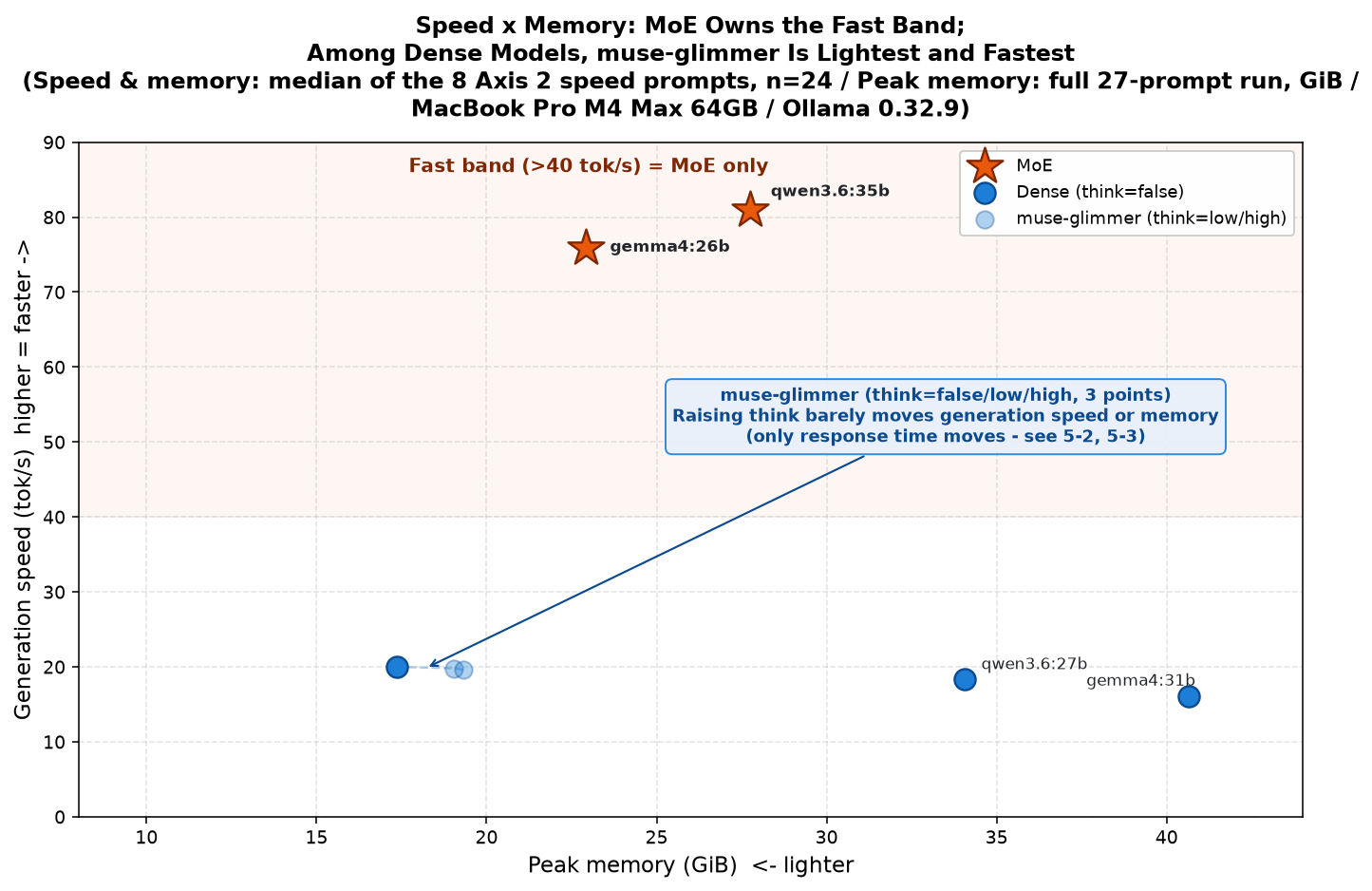
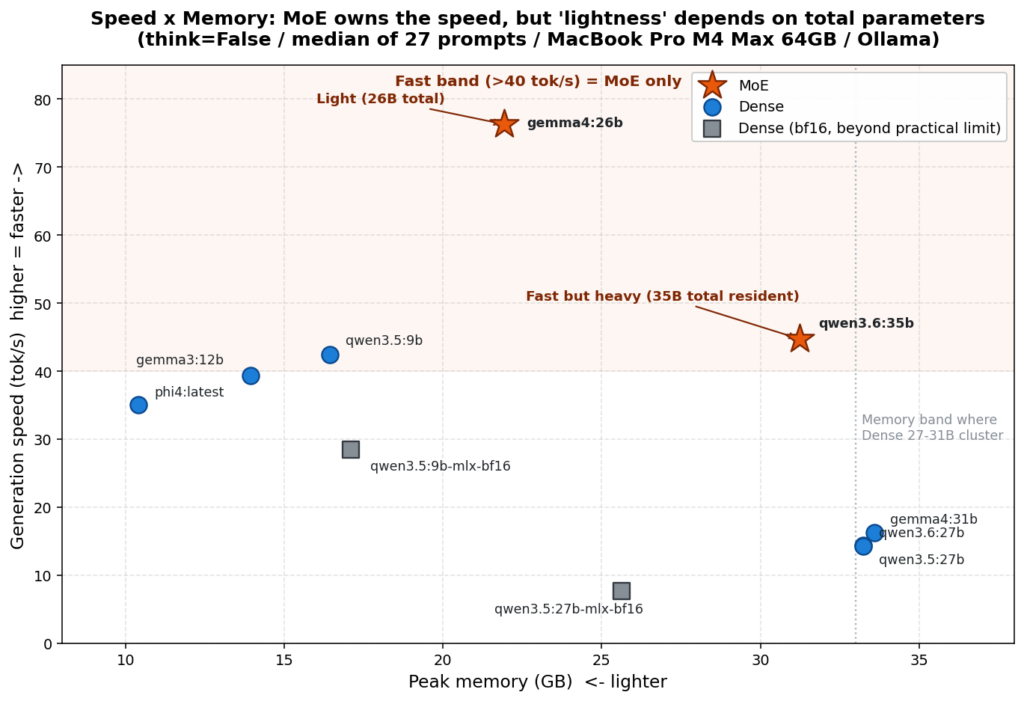
“MoE was a strict upgrade over Dense” — more precisely, “MoE = fast. Whether it’s also light depends on the total parameter count”
“For convergent tasks, thinking is a tax” — for jobs where the answer converges to a single point, defaulting thinking off is the right move
“Even at temperature=0, output still wobbles — though it depends on the vendor” — if you need bit-level reproducibility, choosing Qwen is the right move
This article reports the results of adding Muse Glimmer to that test. I’ll cover the method, the results, and the discussion, in that order.
Chapter 2: What Muse Glimmer Is
First, how Muse Glimmer is being described. Sebastian Raschka’s explainer, “Muse Glimmer 30B Architecture Notes,” says the following:
It’s a dense model, not a mixture-of-experts
The Hugging Face model card (meta-models/Muse-Glimmer-30B) says the following:
Dense Causal Transformer with Perception Encoder
Since the two sources agree, I treat “it is a Dense model” as fact. Here is a table of what I could confirm from primary sources.
Item
Content
Architecture
Dense model (not MoE)
Total parameters
About 29.6B per the Hugging Face model card. Ollama displays 27.9B (+ a 1.9B vision projector). The two do not match. What each is counting is unconfirmed
License
Apache 2.0
Context
131,072 tokens or more
Input/output
Input is text + images / output is text only
Release
2026-08-10 (Meta)
Quantization measured this time
Ollama default tag muse-glimmer:latest (Q4_K_M, 18GB)
For the difference between Dense and MoE, let me reuse the metaphor from the previous article as-is. Picture academic peer review: Dense is the setup where every reviewer reads the same paper; MoE is the setup where only the 3–4 people in the relevant field read it. MoE is fast because fewer people are working. But the conference’s upkeep cost — that is, memory — is incurred for every member on the roster.
Quantization is a technique that re-stores a model’s weights (the enormous set of numbers inside it) at a lower bit width, reducing memory usage and the volume of reads. The file gets smaller too. The Q4_K_M measured here is a mixed scheme that holds mostly 4-bit weights while keeping some layers at higher precision. Whether this Q4_K_M 18GB build is identical to the “K-Quant-17GB” that Meta has published, I have not been able to confirm (restated in Chapter 9).
Note also that Raschka’s explainer reports the attention mechanism as hybrid (GQA + sliding window), with GQA at an extreme ratio of 32 query heads : 2 KV heads. I have not measured this internal structure myself. In this article I treat it as “so it is reported.”
Chapter 3: The Test Environment, and the Changes Since Last Time
This round of testing was run on the foundation of the previous harness (run_benchmark.py and company). It is not, however, in exactly the same state as last time. On top of a macOS update and an Ollama update (0.24.0 → 0.32.9; Muse Glimmer would not run without the latest version), I also put my hands on the measurement scripts themselves. A SIGTERM/SIGINT handler was added to run_benchmark.py (on 2026-08-14, in response to an incident where a process was orphaned mid-measurement); because muse-glimmer’s think setting is typed as a string (false/low/high), it was run through a separate harness, run_benchmark_muse_glimmer.py; _memory_monitor.py itself was modified during the measurements (5-8); and three aggregation scripts were also fixed (likewise 5-8).
“Measured with the same tools as last time” is not a claim I can make. The accurate statement is that I used the previous harness as the foundation and kept fixing it as I went, over the course of this round of measurements.
The four models from last time that serve as comparison targets — gemma4:26b, gemma4:31b, qwen3.6:27b, and qwen3.6:35b — were all re-measured this time on the same Ollama 0.32.9. The values in the previous article’s tables are values from Ollama 0.24.0 at the time, and lining them up directly would make for a comparison under mismatched conditions. Whenever this article cites a value from last time, I explicitly mark it as a “value at the time.”
Scope Declaration — What This Test Can’t Answer
At the start of Chapter 1 of the previous article, I declared the following. I quote it here as published:
This benchmark is designed primarily around the judgment of confidential information as a convergent task — a classification where, given an input, the correct answer converges to one point among “confidential / safe / gray.” […] So the conclusions of this article are limited to this kind of convergent task.
I expect that a different use case would call for an entirely different test design, and a different conclusion. For instance, for divergent/exploratory tasks like “reflect on a philosophical question to gain insight” or “solve a hard problem requiring multi-step reasoning,” the evaluation axis (depth of thought over speed), the prompts, and the judgment criteria would all be different animals. The “thinking” that this article, in its latter half, concludes is a “tax,” could instead be exactly the source of value in that other context. This article doesn’t test that part. Please read it not as “a conclusion about local LLMs in general” but as “a conclusion about whether a local confidentiality checker is viable.”
The scope is exactly the same this time. Every result and every piece of discussion in this article lives on top of the convergent task of confidentiality judgment; this is neither “an evaluation of Muse Glimmer as a model in general” nor “a conclusion about local LLMs in general.” I will repeat this declaration once more at the end of the article.
Chapter 4: The Scale of the Test, and Its Constraints
The skeleton of the test is the same as last time.
Axis 1 (confidentiality judgment): The model is shown five documents containing confidential information (B-01 through B-05), safe documents, and three gray documents that can’t be called either, and is asked to judge “confidential / safe / gray”
Axis 2 (speed and resources): Response time, generation speed, and peak memory are recorded
Axis 3 (response quality): Evaluation of the response bodies themselves. I read 7 sets × 6 prompts = 42 responses (see 5-10)
temperature is 0.0, with 3 trials per condition
The thinking setting is the two-valued True/False for the four models from last time, and the three-valued false/low/high for muse-glimmer
The total number of inferences run this time is 1,500. Here is the breakdown:
Measurement
Breakdown
Inferences
Main measurement
7 sets × 27 prompts × 3 trials
567
Memory-only re-measurement
7 sets × 27 prompts × 1 trial
189
Dense same-condition measurement
3 sets × 27 prompts × 3 trials
243
TTFT reproduction measurement
3 states × 8 prompts × 3 trials
72
Dense think=True
2 sets × 27 prompts × 3 trials
162
num_ctx 32768 measurement
3 sets × 27 prompts × 3 trials
243
DFlash measurement
1 set × 8 prompts × 3 trials
24
Total
1,500
Thinking is the feature where the model generates a “draft-thoughts” passage before writing its final answer. Temperature is the setting that controls output randomness: an LLM holds “candidates for the next token” with probabilities attached, and temperature 0.0 means “pick the highest-probability candidate” (the previous article has an explanation in terms of sharpening or flattening the probability peak). A token is a fragment of text finer than a word; in Japanese, roughly one to a few characters correspond to one token. All the units in this article like “tok/s” and “TTFT” are counting these tokens.
Scores are shown with a metric called F1. F1 rolls “the power to not miss confidential material (Recall)” and “the hit rate of the warnings raised (Precision)” into one value, with 1.0 as a perfect score (it is the harmonic mean of the two — an average that drops sharply when either side is low). Precision is “of the things judged confidential, the fraction that actually were confidential”; FPR is “of the documents that are actually safe, the fraction mistakenly judged confidential.” Both are metrics about false alarms, but they differ in the denominator: “the number judged confidential” versus “the number actually safe.” FPR is better the lower it is.
Let me state up front how the three gray prompts are handled. F1, Recall, Precision, and FPR are metrics over the five confidential documents and the safe documents — that is, the questions whose correct answer is definitively “confidential” or “safe.” Since no correct answer can be defined for the three gray prompts, they are excluded from the calculation of these metrics. Gray is tallied separately, to observe judgment tendencies.
One more important caveat. There are only five confidential prompts (three trials each, so 15 records in the tallies). The difference between Recall 1.0 and 0.8 is the difference between “5 out of 5” and “4 out of 5” — that is, a single prompt. The difference between F1 1.0 and 0.8889 likewise arises from one prompt. At this scale, you cannot declare “it degraded” or “it improved.” Please read every number in this article within that constraint.
Chapter 5: The Test Results
5-1 Axis 1 (Confidentiality Judgment) — Main Measurement, 7 Sets
The scores from the main measurement (7 sets; all on Ollama 0.32.9). The Dense measurements (gemma4:31b and qwen3.6:27b) are shown separately in 5-2 and 5-5.
Model
think
FPR
Recall
Precision
F1
gemma4:26b
false
0.0000
1.0000
1.0000
1.0000
gemma4:26b
true
0.0000
0.8000
1.0000
0.8889
muse-glimmer
false
0.2000
1.0000
0.8333
0.9091
muse-glimmer
high
0.0000
1.0000
1.0000
1.0000
muse-glimmer
low
0.3333
1.0000
0.7500
0.8571
qwen3.6:35b
false
0.0000
0.8000
1.0000
0.8889
qwen3.6:35b
true
0.0000
1.0000
1.0000
1.0000
The points that can be read off as fact:
muse-glimmer holds Recall 1.0000 in all three states — false/low/high. It missed none of the five confidential prompts. When its score drops, it drops on the Precision side (calling safe things “confidential”)
qwen3.6:35b (think=false) has Recall 0.8000. Its score drops on the missing side. It also judged the three gray prompts 100% “safe” (C_safe_rate 1.0000; of the other six sets, all are at 0.3333 except muse-glimmer (think=high), which alone is at 0.0000)
muse-glimmer (think=high) judged the three gray prompts 100% “confidential” (C_confidential_rate 1.0000; of the other six sets, all are at 0.6667 except qwen3.6:35b (think=false), which alone is at 0.0000). As stated in Chapter 4, the three gray prompts are excluded from the F1 and FPR calculations, so this judgment tendency and the FPR of 0.0000 are not in contradiction
5-2 How Time and Accuracy Change With and Without Thinking
Chapter 3 of the previous article presented the following table (values at the time, on Ollama 0.24.0):
Model
think=False
think=True
Time taken
F1 (False → True)
gemma4:26b
3.20 s
12.23 s
3.8x
1.0 → 0.889
gemma4:31b
13.38 s
54.63 s
4.1x
1.0 → 1.0
qwen3.6:35b
4.81 s
41.37 s
8.6x
1.0 → (6 empty responses)
qwen3.6:27b
14.68 s
97.17 s
6.6x
1.0 → 0.75
The previous conclusion, as published, was this:
On confidentiality judgment, thinking ate 4–9x the time and accuracy either didn’t change or got worse.
To sum up: for convergent tasks like classification, summarization, and QA, it looks like the right move is to default thinking off, and raise accuracy through prompt design and context injection instead.
Now the measurements from this time. Here is muse-glimmer alongside the two Dense models re-measured on the same Ollama 0.32.9. Unless otherwise noted, response time, generation speed, and TTFT throughout this article are medians over the 8 Axis 2 speed prompts (3 trials = n=24). They are not representative values over all 27 prompts. Peak memory alone is the peak across the full 27-prompt run in that think state.
Model (Ollama 0.32.9, same conditions)
think off → on
Time ratio
F1 change
muse-glimmer (false → high)
12.07 s → 31.33 s
2.60x
0.9091 → 1.0000 (went up)
gemma4:31b (False → True)
13.31 s → 48.69 s
3.66x
1.0000 → 1.0000 (unchanged)
qwen3.6:27b (False → True)
11.32 s → 86.34 s
7.63x
1.0000 → 0.8889 (went down)
In this round’s runs, there are two sets whose F1 went up with thinking turned on: muse-glimmer (false → high, 0.9091 → 1.0000), and likewise qwen3.6:35b (false → true, 0.8889 → 1.0000), as seen in 5-1. In the previous round’s runs (Session 04), none of the five models (10 sets) measured at both think=True and think=False showed a rise (only equal or lower). As for time, muse-glimmer’s ratio of 2.60x is smaller than the 3.8–8.6x in the previous table. That said, per the Chapter 4 caveat, keep in mind that the F1 differences are one-prompt differences.
I also recorded the length of the thinking (median):
Set
Thinking length (median)
muse-glimmer (think=high)
1,261 characters
gemma4:31b (think=True)
1,721 characters
gemma4:26b (think=True)
2,129 characters
qwen3.6:35b (think=True)
3,337 characters
qwen3.6:27b (think=True)
3,757.5 characters
muse-glimmer (think=high)’s thinking, at 1,261 characters, was the shortest of the five sets.
5-3 TTFT at think=false, and a Stream Observation
First, the reproduction measurement of TTFT (the wait until the first token appears). For muse-glimmer’s three states, I measured 8 prompts × 3 trials × 3 states = 72 inferences.
muse-glimmer think=false   TTFT median 3,295.6 ms (n=24)
muse-glimmer think=low     TTFT median   560.6 ms (n=24)
muse-glimmer think=high    TTFT median   561.2 ms (n=24)
The inversion — think=false, with thinking cut off, taking longer to produce its first token than think=low or high — reproduced in this reproduction measurement as well.
Next, to look inside that long wait, I took a single prompt and recorded, one by one, the arrival times of the chunks in the stream (the mechanism by which the response flows in bit by bit). The results:
think=false        first chunk arrived at 2,942 ms (3 characters) → then 6 chunks at 39 ms intervals
                   of the 2,566 ms Ollama reports as eval, about 2,330 ms were silent
think=low          first chunk arrived at   738 ms (3 characters) → then 54 chunks at 39 ms intervals
                   the 2,495 ms Ollama reports as eval flowed out almost entirely as chunks
think unspecified  first chunk arrived at   749 ms (starting with thinking)
                   → the default is thinking enabled
Here, “eval” is the time Ollama reports as “spent generating (decoding) the response.” The processing that reads in the input prompt (prompt_eval) is accounted separately and not included in eval. What can be said as fact is the following. The time spent generating (eval) was nearly the same for think=false and think=low (2,566 ms and 2,495 ms). The difference is in how that time was used: in think=low, nearly all of it flowed to the screen as chunks, whereas in think=false, about 2,330 ms — roughly 90% of eval — passed in silence. Also, when think is left unspecified, the default was thinking enabled.
The two Dense models measured under the same conditions this time do get genuinely shorter response times at think=False (as in the 5-2 table: gemma4:31b at 13.31 s versus 48.69 s with thinking on; qwen3.6:27b at 11.32 s versus 86.34 s). The four models from last time (the values at the time, at the top of 5-2) showed the same tendency. With muse-glimmer, setting think=false did not yield a time saving in this form.
5-4 Comparing Responses Across the Runtime Update
Chapter 5 of the previous article presented the following table and prescription about reproducibility at temperature=0:
I ran each model three times under identical conditions and compared the length of the returned text. […] cases where the gap between the longest and shortest exceeded 30 characters (or 5%) — that is, cases where “the answer wobbled under identical conditions” — came up 11 times across the board.
Family
Number of wobbling runs (conditions)
gemma4:26b
5
gemma4:31b
2
gemma3:12b
2
phi4:latest
2
Qwen family (all 7 sets)
0
Qwen is bit-stable at temp=0; Gemma/Phi wobble. […] if bit-level reproducibility is a requirement, Qwen is the better choice.
This time, I matched up the response files from the previous test (Session 04) against this time’s response files, byte for byte. The only thing changed is the runtime version. The model weights are the same, the prompts are the same, and temperature 0.0 is the same. The results:
qwen3.6:35b(think=False)   81 of 81 files differ (0 exact matches)
gemma4:26b (think=False)   78 of 81 files differ (3 exact matches)
gemma4:26b (think=True)    81 of 81 files differ (0 exact matches)
Even qwen3.6:35b (think=False), which was “bit-stable” last time, produced different responses in 81 out of 81 files. However, within a given run, trial 1/2/3 were byte-identical. Determinism itself — same conditions, same answer — is preserved; what changed is “sameness across versions.”
Meanwhile, even though the response text was almost entirely rewritten, the confidentiality-judgment scores came out as follows:
Set
Session 04 (0.24.0)
This time (0.32.9)
gemma4:26b (think=False)
F1 1.0000
F1 1.0000
Exact match
gemma4:26b (think=True)
F1 0.8889
F1 0.8889
Exact match
qwen3.6:35b (think=True)
F1 1.0000
F1 1.0000
Exact match
qwen3.6:35b (think=False)
F1 1.0000
F1 0.8889
The only one that moved
For the three matching sets, not only F1 but FPR, Recall, Precision, and the breakdown of the gray layer all match exactly. What moved was just two prompts in qwen3.6:35b (think=False): B-03 changed from “confidential → safe,” and one gray prompt changed from “confidential → safe.” Both changes are toward the “safe” side — that is, toward missing. Here too, the Chapter 4 caveat applies: there are five confidential prompts, and the difference between F1 1.0 and 0.8889 is one prompt. At n=5, you cannot declare “it degraded.”
5-5 Speed and Memory
Chapter 2 of the previous article compared MoE and Dense with the following table (think=False; values at the time, on Ollama 0.24.0):
Model
Architecture
Active parameters
Response time
Generation speed
Peak memory
Axis 1 F1
gemma4:31b
Dense 31B
31B
13.38 s
16.3 tok/s
33.59 GB
1.0
gemma4:26b
MoE 26B/4B-active
4B
3.20 s
76.3 tok/s
21.93 GB
1.0
qwen3.6:27b
Dense 27B
27B
14.68 s
14.3 tok/s
33.24 GB
1.0
qwen3.6:35b
MoE 35B/3B-active
3B
4.81 s
44.7 tok/s
31.23 GB
1.0
The previous conclusion, as published, was this:
In other words, “MoE = light” is only half true. More precisely: “MoE = fast. Whether it’s also light depends on the total parameter count.”
Now the measurements from this time (all on Ollama 0.32.9, think=False, same conditions):
Model
Architecture
Response time (Axis 2, n=24)
Generation speed (Axis 2, n=24)
Peak memory (full 27 prompts)
Axis 1 F1
qwen3.6:35b
MoE 3B-active
2.34 s
81.0 tok/s
27.76 GB
0.8889
gemma4:26b
MoE 4B-active
2.85 s
75.9 tok/s
22.93 GB
1.0000
qwen3.6:27b
Dense 27B
11.32 s
18.4 tok/s
34.05 GB
1.0000
muse-glimmer
Dense ~30B
12.07 s
20.0 tok/s
17.35 GB
0.9091
gemma4:31b
Dense 31B
13.31 s
16.1 tok/s
40.64 GB
1.0000
Let me state the table’s premises first. All five models are on Ollama’s default tags (all quantized at roughly Q4_K_M), and num_ctx (the context-length setting) is unspecified — i.e., at its default — for all of them. Measurements with num_ctx explicitly specified are shown in 5-9. Peak memory is the recorded peak of the resident memory of the process running the model (the physical memory the process actually occupied), and the measurement script outputs its values in binary (1,024³ bytes = GiB). Throughout the rest of this article they are all written as “GB,” but note that the actual unit is GiB.
One caveat here about units. muse-glimmer’s peak memory of 17.35 GiB appears to come in below the “18GB” displayed as the model’s file size. Converting 17.35 GiB to decimal GB gives about 18.6 GB, so if Ollama’s display is decimal, there is no contradiction. However, I have not confirmed whether Ollama’s “18GB” display is decimal or binary (unverified). So here I go no further than “a difference in unit systems can most likely explain it.”
muse-glimmer (think=false)’s peak memory was 17.35 GB — the lightest of the three Dense models, and 5.6 GB lighter than the MoE gemma4:26b (22.93 GB).
Next, the wait time. Here are the medians of TTFT (the wait until the first token appears), on the 8 Axis 2 speed prompts, n=24, think=False (as stated at the top of this section, these are not representative values over all 27 prompts):
Model
TTFT (median)
gemma4:26b
306 ms
qwen3.6:27b
397 ms
gemma4:31b
535 ms
muse-glimmer
2,972 ms
The TTFT of gemma4:26b, qwen3.6:27b, and gemma4:31b fits almost entirely within “load (loading the model) + prefill (reading in the input prompt).” Only muse-glimmer greatly exceeds that sum (about 411 ms), with its TTFT eating into the eval (generation) period. This is the silent time we saw in 5-3.
For reference, muse-glimmer (think=false)’s TTFT also moves with the type of prompt: Axis 1 safe 4,007 ms, Axis 3 quality 4,390 ms, Axis 1 confidential 6,976 ms, and Axis 1 gray 10,885 ms (about 3.7x the Axis 2 speed prompts), with a median of 4,662 ms across all 27 prompts. The between-run difference (2,972 ms versus 3,296 ms; 5-3) falls on the relatively small side within this operating range.
Finally, generation time per token. This value is Ollama’s reported eval — the time it declares as generation (decoding) — divided by the number of output tokens. The calculation “response time minus TTFT, divided by output tokens” cannot be used for muse-glimmer: as shown above, muse-glimmer’s TTFT sits inside eval, and generation is progressing during the silence, so subtracting TTFT would underestimate the generation time.
Model (think=False)
Generation time per token
gemma4:26b (MoE)
13.18 ms/tok
muse-glimmer (Dense)
50.05 ms/tok
qwen3.6:27b (Dense)
54.30 ms/tok
gemma4:31b (Dense)
61.98 ms/tok
muse-glimmer was the fastest per token among the three Dense models. That said, the gap to qwen3.6:27b (54.30 ms/tok) is about 8% — not a large one. The far bigger gap is to the MoE gemma4:26b (13.18 ms/tok). Note that muse-glimmer’s response time (12.07 s) being longer than qwen3.6:27b’s (11.32 s) is not because it is slower per token, but because it outputs more tokens (median 221 tokens versus 192).
5-6 DFlash (Speculative Decoding)
DFlash is an implementation of speculative decoding — a speed-up technique in which a small draft model proposes candidates first, and the main model inspects them and decides whether to accept them. Here are the measurements on the muse-glimmer:30b-mlx tag, which uses DFlash:
standard tag                       19.98 tok/s / response 12.07 s / memory 17.35 GB
muse-glimmer:30b-mlx (DFlash)      30.78 tok/s / response  8.83 s / memory 19.49 GB
                                   ratio 30.78 / 19.98 = 1.54x (ratio of generation speeds)
The standard tag’s 19.98 tok/s is the same value as the 20.0 tok/s in the 5-5 table (a difference of rounding). The 1.54x ratio is computed as the ratio of generation speeds (tok/s). Ollama’s official blog says, “With DFlash, Muse Glimmer runs 1.5×–1.8× faster on Apple Silicon.” Meta’s official blog breaks this down by machine, stating explicitly: “DFlash speculative decoding increasing Muse Glimmer decode speed by 3.1 times on RTX 5090, 1.8 times on M5 Max, and 1.5 times on M4 Max.” The machine measured in this article is an M4 Max, and the measured ratio was 1.54x. That is nearly identical to the published M4 Max figure (1.5x). Note that the “3.1x” on the Hugging Face model card is also, as the quote above shows, a value on an RTX 5090 and must be treated as a different animal. Standard speculative decoding with verification is described as designed so the output does not change — only candidates that pass the main model’s inspection are accepted — but I have not been able to confirm whether DFlash is that implementation. On the DFlash build I measured only speed; accuracy (Axis 1) is unmeasured.
How This Relates to Last Time’s “MLX Is Slower”
In the previous measurements, using MLX came out slower, if anything. That looks like the opposite of this time, but what was measured is different.
What I measured last time was the path that calls mlx-lm directly, bypassing Ollama. Qwen3.6-35B-A3B-4bit had a median response time of 14.03 seconds, while the equivalent weights run through Ollama as qwen3.6:35b (Q4) took 4.81 seconds — about 2.9x slower on the direct path. On top of that, thinking could not be disabled on that path, and there was a problem of misjudging public information as confidential in the confidentiality judgment (a 100% false-positive rate on layer A), so it was rejected. Separately, I also measured qwen3.5:27b-mlx-bf16 (bf16, 54GB), where swap ballooned to 10GB and it came out at 7.65 tok/s — the slowest of all models at the time.
What I measured this time is the muse-glimmer:30b-mlx tag, which goes through the MLX engine that Ollama carries internally. The path is different. And what Ollama’s official blog cites as the reason for the speed gain is DFlash (speculative decoding), not MLX itself.
In other words, the accurate statement is not “MLX used to be slow and got faster,” but “a different mechanism was measured via a different path.” I did not measure the MLX engine with DFlash turned off this time, so I cannot separate how much of the 1.54x comes from DFlash and how much from MLX. Memory is 2.14GB (12.3%) heavier than the standard tag.
5-7 Empty Responses and Anomalies
As a health check, I scanned both runs (the main measurement’s 567 inferences plus the memory-only re-measurement’s 189 — 756 files in total). Anomalous responses — leaked tool-call notation and the like — numbered zero. As for empty responses: muse-glimmer had 0 in all three states; qwen3.6:35b (think=True) had 9 in the main measurement (3 trials) (Session 04 had 6), and 3 in the memory-only re-measurement (1 trial only), on the same three prompts (speed-long-01, quality-summary-01, quality-summary-02). All empty responses occurred on Axis 2 and Axis 3 prompts, with zero on Axis 1, so there is no impact on F1. Note that qwen3.6:27b (think=True)’s 3 empty responses came out in a different run from these 756 files (the Dense think=True measurement, 162 inferences) and are not included here.
5-8 Failures on the Measurement Side
Following the previous article, I record the failures of the measurement itself as well. Last time I wrote about “asking gemma4:26b to list Japan’s prime ministers in order, and watching the count balloon to 732.” This time there are two entries.
Failure 1: The aggregation script was collapsing muse-glimmer’s three states into one. muse-glimmer’s think setting takes the three values false/low/high, which were recorded as strings. The aggregation script converted them to booleans — and in Python, bool('low'), bool('high'), and even bool('False') all come out True, because every non-empty string is truthy. As a result, 243 records got crushed into a single group. No error, no warning — the summary tables looked complete. “Looking plausibly finished” and “being correct” are different things: the same lesson as last time.
Failure 2 (more precisely, a measurement caveat): Memory moves by up to ±2.8GB between runs. gemma4:26b (think=False)’s response time and generation speed did not move much between runs. Measuring gemma4:26b (think=False) three times under the same conditions, peak memory scattered across 22.93 GB / 25.73 GB / 23.36 GB. Meanwhile, the differences in the same gemma4:26b (think=False)’s response time and generation speed stayed within 0.09 seconds / 3.4% under the same conditions. But that is an observation limited to these two metrics on gemma4:26b. muse-glimmer (think=false)’s TTFT, as shown in 5-3 and 5-5, moved between runs from 2,972 ms to 3,296 ms (about 11%), so I cannot go as far as “speed never moves at all, regardless of metric or model.” To discuss small memory differences, you have to compare within the same run. Of the values in the 5-5 table, the three for muse-glimmer, gemma4:26b, and qwen3.6:35b come from a single run — the memory-only re-measurement. The two for gemma4:31b and qwen3.6:27b come from a different run (dense-same-condition). However, the gap between those two and the other three (16–23GB) far exceeds the between-run scatter (±2.8GB), so the runs being different does not affect the conclusion (the ranking: muse-glimmer is the lightest).
5-9 Measurements at num_ctx 32768
The checker built on the previous test assumes a 32k context window, but all measurements so far this time leave num_ctx unspecified (Ollama’s default). So I also measured with tags that explicitly set num_ctx to 32768 (3 sets × 27 prompts × 3 trials = 243 inferences). The 32k build of muse-glimmer was created from a Modelfile adding PARAMETER num_ctx 32768 to FROM muse-glimmer.
Set (num_ctx=32768, think=False)
Response time (Axis 2, n=24)
Generation speed (Axis 2, n=24)
Peak memory (full 27 prompts)
Axis 1 F1
gemma4-26b-32k
2.85 s
75.2 tok/s
23.36 GB
1.0000
qwen36-35b-32k
2.36 s
81.1 tok/s
28.00 GB
0.8889
muse-glimmer-32k
12.68 s
19.0 tok/s
18.71 GB
0.9091
F1 for all three sets was the same as with num_ctx unspecified (5-1).
However, the “increment” over the default num_ctx could not be detected with this design. The default-num_ctx comparison values came from a different run, and between same-condition runs alone, gemma4:26b (think=False) scatters across 22.93 GB / 25.73 GB (5-8). The 32k value of 23.36 GB falls between those two. muse-glimmer likewise scatters at the default across 17.35 GB / 18.27 GB, and its 32k value was 18.71 GB. The measurement scatter is larger than the effect size, and the increment could not be measured. Measuring it correctly would require putting the default tag and the 32k tag side by side within the same run.
5-10 Axis 3 (Response Quality)
I read 7 sets × 6 prompts (2 code, 2 explanation, 2 summarization) = 42 responses — the body text of one representative trial out of each set’s three. Note the scale: three categories at n=2 each.
These are not problems with a single determinate answer, so I assign no scores. I will list only things that are visibly broken and things that clearly differed by setting.
A note for readers of this English edition: the prompts in this test are in Japanese, and the responses are Japanese text. Quoting the responses in translation would alter the evidence itself, so below I keep the original Japanese fragments and add English glosses in parentheses.
Things That Were Broken
gemma4:26b (think=false)’s code example was a syntax error. In its explanation of decorators, it wrote time() — with a full-width opening parenthesis. The full-width parenthesis (U+FF08, FULLWIDTH LEFT PARENTHESIS) is the variant used in Japanese text; it looks nearly identical to the ASCII ( (U+0028), but it is a different character, and Python rejects it: SyntaxError: invalid character '(' (U+FF08). I actually ran the code through py_compile to confirm. It appears in all three trials, so it is not a one-off accident. Across all 756 responses in the runs, these 3 files are the only ones where a full-width parenthesis crept in. It does not appear in the think=true version.
muse-glimmer (think=false)’s response was logically broken. To the question of splitting three apples between two people, it wrote 「残り1個はCが食べる」(“the remaining apple is eaten by C”) — introducing a third party into a problem that only has two people. Elsewhere in the same response, in a calculation splitting by weight, it wrote 「AとBを1人に、BとCをもう1人に」(“A and B to one person, B and C to the other”), putting B on both sides. This breakdown does not appear in think=low or think=high.
This is the fastest of the three states by response time (Axis 2, n=24 median: 12.07 s; see 5-2). However, on Axis 1, the lowest score among the three states belongs to think=low (F1 0.8571 / FPR 0.3333); think=false (F1 0.9091 / FPR 0.2000) sits in between. Being the fastest setting does not mean it is also the lowest-accuracy one. Accuracy drops the most at think=low, while response quality broke down at think=false — so the three do not all point in the same direction.
qwen3.6:35b (think=true) produced zero-character bodies on both summarization prompts. It generated 9,477 and 7,617 characters of thinking respectively, then spent 53 seconds returning nothing. This is the breakdown behind the “9 empty responses” counted in 5-7. The Axis 3 summarization category was wiped out: 2 prompts × 3 trials = 6 records, all empty. Against an instruction to “summarize briefly,” the thinking exceeded 9,000 characters.
Things That Clearly Differed by Setting
The amount of think changed not the correctness of the answers, but the choice of implementation. On the prompt asking for a Sieve of Eratosthenes, all 7 sets produced a correct sieve. But while 6 sets used a list implementation — is_prime = [True] * (n + 1) — only muse-glimmer (think=high) chose a memory-efficient implementation using bytearray and slice assignment. I verified it returns the same results as the standard implementation across the entire range n=0–499.
The same thing happens on the deduplication prompt. think=false made “the version that tracks seen items with a set” the main answer and relegated the dict.fromkeys version to a side note; in think=low, that order was reversed. Which one gets recommended flips.
The direction in which responses lengthen as think increases was reversed between models. Body lengths on the two code prompts (unit: characters):
Deduplication
Prime sieve
muse-glimmer (false / low / high)
939 / 1073 / 852
898 / 858 / 717
gemma4:26b (false → true)
1567 → 1972
1472 → 1508
qwen3.6:35b (false → true)
420 → 963
634 → 1523
gemma4 and qwen3.6 get longer when think is turned on; muse-glimmer is shortest at high. It is not monotonic, though: on deduplication, muse’s low is the longest. The only thing common to both prompts is “high is shortest,” and in the summarization category the direction does not line up (193 / 169 / 175 characters). This is merely a tendency seen on the two code prompts — n=2.
Only gemma4:26b (think=false) self-reported its character count. Against the instruction 「300字程度に要約」(“summarize in about 300 characters”), it appended 「(298文字)」(“(298 characters)”) at the end of its response — but the actual count is 275–286 characters (it varies depending on whether you count line breaks or the self-report string itself, but no way of counting reaches the reported value). On the “about 200 characters” prompt it likewise wrote 「(184文字)」(“(184 characters)”) when the actual count was 174–181. On both prompts it over-reported, and the direction of the discrepancy is toward appearing closer to the instructed target. The think=true version writes no character count, and muse-glimmer and qwen3.6 write none in any state.
The Limits of This Section
The observations above are the result of reading 42 responses, once each. I can point out what is broken, but I have done no ranking of “which response is better.” Please take these as-is as constraints: there is one reader, only two prompts per category, and only one representative trial read per set.
Chapter 6: Differences from Prior Reports
Before publishing, I looked into what others have reported about Muse Glimmer. What I could confirm is six third-party articles — this is not exhaustive. The following is an organization within that range.
What Has Already Been Reported
Speed-up figures for DFlash — Meta officially publishes 1.5x on M4 Max and 1.8x on M5 Max (Meta AI Research, 2026-08-10). wavect.io (around 2026-08-10 to 11) has independently measured speed on M4 Max and M5 Max
That thinking cannot be fully switched off — kotetsu_yama on Qiita (2026-08-11) points out, in an AMD Strix Halo / llama.cpp environment, that “there is no implementation that fully disables thinking; even set to low, a thinking phase executes.” An X post by Tom Turney (around 2026-08-09) makes a similar point that “the reasoning strength default is effectively high” (★ I could not retrieve the text of this post itself; this is confirmed via secondary sources)
General-benchmark scores — Artificial Analysis (Intelligence Index 35) and BenchLM.ai (52.5/100, ranked 112th of 218 models) have published scores. I have not been able to confirm the publication dates of either
What This Article Adds
Putting speed, memory, and classification-task scores side by side in a single test, on Apple Silicon. Within the range I checked, I could not find an article that brings these three together
The numerical inversion that think=false is slower than think=low (TTFT median 3,295.6 ms versus 560.6 ms). There are already two reports that “thinking can’t be switched off,” but I could not find an example showing this direction of inversion in numbers
Matching responses byte-for-byte across a runtime update, and separating sameness of output from sameness of judgment. I could not find a prior example of this observation
Disclaimers
All I checked is six third-party articles. This is not an exhaustive survey
“I could not find it” is not proof that “it does not exist.” It may well simply be that my search did not reach it
Among the six articles checked, the number evaluating Muse Glimmer on confidentiality judgment or classification tasks was zero
Chapter 7: Changes from Last Time’s Conclusions, and a Discussion
Let me set the results against the three conclusions from last time.
(1) On “For Convergent Tasks, Thinking Is a Tax”
The previous prescription — “for convergent tasks, default thinking off” — did not apply to muse-glimmer. The central reason is that, as 5-3 showed, even at think=false about 90% of the eval time passes in silence, so “off” in the time sense never actually materializes.
This time, qwen3.6:35b’s F1 also went up (0.8889 → 1.0000). But its character is different. Whereas muse-glimmer’s rise happened within a single run, as an effect of thinking, qwen3.6:35b’s rise comes from its think=false baseline itself having dropped, from last time’s 1.0000 to this time’s 0.8889 (see Chapter 7, (2)). In the previous round’s runs (Session 04), there was not a single case of F1 rising with thinking.
The two Dense models measured this time do get genuinely faster at think=False, and the four models from last time (values at the time) showed the same tendency. The prescription remains valid — but this time’s observation is that one model has appeared for which the premise “turn it off and you don’t pay the time” does not hold.
(2) On “Even at temperature=0, Output Still Wobbles — Though It Depends on the Vendor”
What became clear this time is that last time’s observation — “Qwen is bit-stable” — only holds within the same runtime. Merely raising Ollama from 0.24.0 to 0.32.9 changed qwen3.6:35b (think=False)’s responses in 81 out of 81 files.
The phenomenon can be explained like this. An LLM searches over “candidates for the next token,” each with a probability, and temperature 0.0 is the setting that picks the highest-probability one. The model is identical, but with a different runtime, what gets picked as the next token changed. The internal computation is floating-point arithmetic, and when the order of operations or the implementation changes, the probability values shift slightly in the low-order digits. For tokens where first and second place are nearly tied, that slight difference can swap the ranking. This time, it was not the model but the runtime version that reached into that gap. Once the top token flips once, the rest of the text follows a different path, so the whole response gets rewritten. Note that a runtime update may also change things other than the numerical implementation, and I have not identified which change mattered this time (Chapter 9). A runtime update changing the numerical-computation path is not unusual in itself, and I don’t intend to attach a good-or-bad judgment to it.
On the other hand, as 5-4 showed, even though the response text was almost entirely rewritten, the confidentiality-judgment scores matched exactly in 3 of 4 sets — down to FPR, Recall, Precision, and the gray-layer breakdown. “Sameness of output” and “sameness of judgment” are different things, and the previous article was only looking at the former. The practical implication, I think, is this: if you need bit-level reproducibility, pinning the model name is not enough — you have to pin the runtime version as well. If your use case only needs the judgments to match, then within this test’s range, 3 of 4 sets matched across the update — but you also need to take home the fact that one set moved on two prompts, and the direction it moved was toward missing.
(3) On “MoE = Fast. Whether It’s Also Light Depends on the Total Parameter Count”
This framing holds up in this time’s table as well. The two MoE models were again fast (qwen3.6:35b (think=False) at 2.34 s, gemma4:26b (think=False) at 2.85 s), and qwen3.6:35b’s memory, at 27.76 GB, was in line with its total parameters. On top of that, muse-glimmer (think=false) — a Dense model with about 30B total parameters — posted 17.35 GB peak memory, the lightest value in the table. I take this as one example added to the earlier framing: “Dense, too, can sometimes be made light, depending on the design.”
(4) On the Direction of Breaking
As 5-1 showed, muse-glimmer holds Recall 1.0000 in all three states, and when its score drops, it drops on the Precision side. It errs by calling safe documents “confidential” — that is, it fails toward stopping whatever is doubtful. By contrast, qwen3.6:35b (think=false) fell on the missing side, with Recall 0.8000, and judged the three gray prompts 100% “safe.” The same “F1 short of perfect” breaks in completely different directions. For the use case of a confidentiality checker, I consider this difference in direction more important than the F1 number itself. And this difference is invisible if you look only at the single number F1.
Chapter 8: Inference — The Parts That Are Not Observation
Everything written in this chapter is inference. The observations end with Chapter 5; from here on, this is my interpretation.
Inference 1: muse-glimmer may be a “model designed on the premise of thinking,” with no real provision for switching thinking off. This is inference. The grounds: even at think=false, about 90% of eval (roughly 2,330 ms out of 2,566 ms) passed in silence; that eval time was nearly identical to think=low’s (2,495 ms); and the default with think unspecified was thinking enabled. I consider this consistent with Meta positioning the model as an “agentic model.” However, I have not observed what is happening during those silent ~2.3 seconds. This remains conjecture from circumstantial evidence.
Inference 2: The reason thinking helped on a convergent task may be that the thinking is short. This too is inference. muse-glimmer (think=high)’s thinking has a median of 1,261 characters — shorter than gemma4:26b (think=True)’s 2,129 and qwen3.6:35b (think=True)’s 3,337. It may simply be that muse-glimmer never reaches the failure mechanism observed in the previous article — thinking eating the output budget until the body gets cut off. If so, this is not “different behavior” but “the same mechanism, just not triggered.” I have only seen a correlation; causation is unverified.
Inference 3: The extreme 32:2 GQA ratio may be the reason for the light memory. This too is inference. It rests on what Raschka’s explainer reports; I have not measured it. Also, what this mechanism mainly reduces is the memory for remembering context (the KV cache), and its size depends on the context-length setting. The default context length in this run is unconfirmed (Chapter 9).
Inference 4: Perhaps only one thing can be called “clearly different from the others.” This too is inference — or rather, a statement of my own judgment. Paying the thinking time even at think=false is the one thing structurally different from the other four models (which genuinely get faster at think=False). The rest — short thinking, light despite being Dense, tipping gray toward confidential — are differences of degree, and the mechanisms themselves may be the same. And this is one model. What can be said at this point is not “this is what the new generation looks like” but “out of five models, one appeared that differs on exactly one point.” Generalizing would require a second model with the same properties.
Chapter 9: Unverified Items — What I Didn’t Read and What I Couldn’t Measure
As in the previous article, I list what I have not been able to confirm, as its own section.
What I read for Axis 3 is only 7 sets × 6 prompts = 42 responses. Last time I read 16 sets × 6 prompts = 96. The way of reading per set (all 6 prompts, one representative trial) is the same; the total shrank because fewer sets were measured. Only one representative trial of each set’s three was read; for the rest I looked only at body length. The 6 prompts are 2 code, 2 explanation, 2 summarization — two per category. The observations in 5-10 were read at this scale
The confidential prompts remain B-01 through B-05 — n=5. Let me stress once again that F1 differences move on the scale of a single prompt
On the total parameter count: why the Hugging Face model card’s ~29.6B and Ollama’s displayed 27.9B + 1.9B vision projector don’t match. What each is counting is unconfirmed
Whether muse-glimmer’s quantization, Q4_K_M at 18GB, is identical to Meta’s published K-Quant-17GB is unconfirmed
I have not confirmed how many tokens Ollama 0.32.9’s default context length is. This round’s main measurements all leave num_ctx unspecified (the default), and whether that matches the previous assumption of 32k has not been pinned down
The memory increment when num_ctx is set to 32768. I did measure runs with 32k explicitly specified (5-9), but the increment over the default was buried in the between-run scatter (±2.8GB) and could not be detected
What is being generated during think=false’s silent ~2.3 seconds
The accuracy of the DFlash build (muse-glimmer:30b-mlx). Only speed was measured
Which change in Ollama caused “all the responses got rewritten”
The Axis 1 F1 figures and the like in this article are my readings of the aggregation script’s output; I did not recompute F1 myself from the raw responses
Why the full-width parenthesis in 5-10 occurred only in gemma4:26b’s think=false, and only on this one prompt, is not understood
Chapter 10: Summary — Sameness of Output, and Sameness of Judgment
Here are last time’s three conclusions set against this time’s results.
Last time’s conclusion
This time’s result
“MoE = fast. Whether it’s also light depends on the total parameter count”
Holds. But one example was added of “Dense can also be light, depending on the design” (muse-glimmer (think=false), 17.35 GB)
“Stability at temp=0 depends on the vendor. If reproducibility is required, Qwen”
Now carries the condition “within the same runtime.” Sameness of output and sameness of judgment are different things, and the latter matched across the update in 3 of 4 sets
“For convergent tasks, default thinking off”
Still valid for the other four models. Does not apply to muse-glimmer (it pays the thinking time even at think=false, and F1 went up at think=high — though n=5)
The most important observation this time, I believe, was not Muse Glimmer itself but the fact that “merely updating the runtime rewrote all the responses, yet the confidentiality judgments barely changed.” In an environment where you keep using a local LLM, output can change without changing the model, through updates to the runtime underneath. Meanwhile, consistency at the level of judgment is more likely to hold than that — within this test’s range, that is what was observed.
Scope Declaration (Reprise)
Once more, at the end, I repeat the declaration from Chapter 3. Every result and every piece of discussion in this article lives on top of the convergent task of judging confidential information — a classification whose correct answer converges to a single point. For divergent/exploratory tasks — “reflect on a philosophical question,” “solve a hard problem requiring multi-step reasoning” — the evaluation axes, the prompts, and the judgment criteria would all be different animals. muse-glimmer’s “can’t switch thinking off” property showed up here as a time constraint on a convergent task, but on a divergent task it could earn a different evaluation. That, however, is not tested in this article. Please read this neither as “a conclusion about Muse Glimmer in general” nor “a conclusion about local LLMs in general,” but as “a record of re-running the previous local-confidentiality-checker test with a new model and a new runtime.”
The next time a new model comes out, I intend to measure it with this same test and update this table.
About Soul Resonant Works
Soul Resonant Works is a solo venture developing seven local AI systems. Starting from zero programming experience, the development is progressing through collaboration with AI.
📝 This blog publishes the entire development process as a serialized journal.
CubePlot (free version available)
CubePlot is the first product from Soul Resonant Works — it turns a CSV into a 3D scatter plot you can rotate and zoom. No install, no sign-up: it’s a single HTML file you open in your browser, and it works offline. CubePlot itself does not send the data you load outside your machine — external network traffic is blocked at the browser level (CSP). Start with the free version.
This article was originally written in Japanese and translated into English with AI assistance. Please note that some expressions may carry nuances from the original Japanese.
How It Started: I Had Handed the Translation Instructions to a Different AI
It happened on August 1, 2026. That day, I was trying to create the English version of the previous article. I meant to hand a work instruction sheet — for the translation and the creation of a new file — to the Claude Code in charge of the blog repository (a repository is a place where files live).
But the one that actually received the instruction sheet was a different Claude Code — the one in charge of the website.
In other words, what got misdelivered was an instruction sheet saying “translate the previous article into English.” The previous article was about an AI crossing project boundaries and mixing up files. And the instruction sheet ordering its translation was delivered, by me, across a project boundary. The person who wrote the article tripped over the very same thing, right after writing it.
Why I Mixed Them Up
Here’s how I was operating at the time. I had the coordinator Claude (running in Cowork, a desktop-app mode that can read local files directly) write the work instruction sheets and save them on my computer. Then I’d tell each Claude Code in charge: “Read this file in this directory and do the work.”
The important point here is that I’m not pasting the contents of the instructions anywhere. The contents live inside the file. All I do is choose which terminal to type that one line — “read this file in this directory and do the work” — into. Choosing the recipient had effectively been reduced to the act of picking a terminal tab.
And that day, four tabs were open. Each had a Claude Code stationed in it, running in parallel. (Only two of them matter for this story: the blog one and the website one.)
All four terminals were the same color. Every screen was filled with text. And the trickiest part of all was the tab titles.
While writing this article, I checked this again on my own machine. The title of a tab where Claude Code is running is generated automatically from the content of the first request you make in that session. And no matter how much the topic changes afterward, the title never changes. When I tried it, the tab got titled something like “research into software equivalent to X,” and even after I moved through three unrelated topics and ended up discussing dinner, the title stayed exactly as it was.
So what a tab shows isn’t “which project this one is in charge of.” It’s “what was asked first in this tab.” Role names like “HP” or “Blog” appear nowhere.
On top of that, lining up four tabs makes each one narrower, and the beginning of each title gets cut off. Only the tail end remains. And the tail end shows the same word on every tab: claude. The one clue I had — the beginning — gets chopped off, and the four tabs end up wearing the same face.
I was choosing between things I couldn’t tell apart. Getting it wrong eventually was just a matter of time. It wasn’t bad luck; the setup was designed to fail, I think. I was the one who increased the number of instances running in parallel, but until that moment it hadn’t occurred to me that every added instance raises the cost of keeping track of “which one am I talking to right now.”
There Were Three Reasons No Harm Was Done
Let me give away the ending: this misdelivery broke nothing. The website’s files never got touched, and the translation landed right where it belonged, on the blog side. But there wasn’t just one reason things turned out fine — there were three. And the third one, while bringing the work to a safe end, was also making the mistake invisible.
The first was that the first command in the instruction sheet was cd ~/dev/srw-blog. cd is a command that moves you to a working location. Wherever the receiving Claude Code happened to be, the first line moved it into the blog repository, so all the work that followed was aimed at the right place. This wasn’t a safeguard I’d prepared for this occasion — it was simply how I’d always written these sheets, out of habit. The habit ended up serving as a safety valve.
The second was that the work I was asking for was generic.
The task this time was “translate an already-finished Japanese manuscript into English.” It’s a job that requires almost none of the project-specific context. Given the manuscript and the previous English version as a model, just about any Claude Code — whatever history it carries — will land on roughly the same result.
If the job had been something like “analyze a bug in the app and work out countermeasures,” or “read the test records and put together an operating procedure,” the story would have been different. That kind of work simply doesn’t hold together without the context accumulated within that project. If the website-side Claude Code had received it, it could have executed the commands, but it would have pushed the work forward on its own judgment and produced something unusable.
In other words, this time I happened to hand a “job anyone could do” to the wrong recipient. If it had been a job that had to go to one specific recipient, I believe real damage would have occurred, cd or no cd.
And the third is the scariest reason.
I had set things up so that each Claude Code could work in parallel while referencing each of the repositories. The coordinator Cowork could see all the directories too. When you want to push multiple projects forward at the same time, that’s faster.
And what was the result? I had created a state in which even if you hand an instruction sheet to a Claude Code that isn’t in charge, it will reference the repository the sheet points to, and the work simply goes through.
If each Claude Code’s permissions had been closed to its own area of responsibility, an error would have stopped everything right at the cd. It would have said “you can’t go there,” and I would have noticed on the spot. But because I’d widened their field of view, handing the sheet to the wrong recipient still got the job done, as if nothing had happened.
Put the other way around: what if the instruction sheet hadn’t had that one cd line? The receiving Claude Code would have started creating the English version of a blog article right where it was — in the website-side repository. An English blog article born in the middle of the website’s files. And most likely, no one would have noticed at the time. Could I — someone with no programming experience — find it later and put things back? Honestly, I’m not very confident I could.
In other words, it was a state in which the mistake wouldn’t appear as a mistake. This was the scariest part of the whole incident. That no harm was done was good fortune, but there’s no guarantee anywhere that the good fortune continues.
And this structure has exactly the same shape as last time. Last time, I kept adding files to the knowledge thinking “this might make article material,” and the AI’s search accuracy dropped. This time, I widened each AI’s field of view thinking “I want them running in parallel,” and the misaddressed delivery became invisible. The very thing I did to make life convenient became the trap. In both cases, with no malice and no malfunction, settings made with the best of intentions turned on me.
The One Who Noticed Was Me, After the Work Was Done
Let me note this just in case: the AI didn’t notice on its own.
After the work was finished, a thought suddenly crossed my mind: “Wait — was that the right Code for this job?” So I asked the coordinator: “Did I hand the instruction sheet to the wrong Code?” The answer that came back was: “You did.”
I noticed not before having the work done. It was after. What’s more, without that nagging feeling, it would have ended without my ever noticing. The detailed work report exists only because I had it written after I asked.
An AI doesn’t question whether the job it’s been handed is addressed to it. It faithfully executes exactly what it’s given. The instruction sheet was concrete, the steps were clear, and the content was entirely executable. “Being able to execute it” and “being the one who should do it” are different things — yet the receiving side had been given not a single piece of material for telling them apart. The correctness of the destination was guaranteed nowhere but inside my own head at that moment.
And my head, faced with four similar-looking tabs, wasn’t much to rely on.
Why Had Things Been Set Up This Way?
At the time, the coordinator role was held by the Claude in charge of the website. The website lead was doubling as the dispatcher of instructions for every project.
Here’s the history. As development of CubePlot progressed, a major overhaul of the website became necessary. The business, which until then had dealt only with the seven local AI systems, had gained Everyday Tools (a separate line I started, positioned as tools for solving small everyday problems; CubePlot is its first product) — so rather than adding a page, the structure of the site itself had to change. Along with that came fixes affecting the whole site: introducing access analytics, the logo image on the top page, the incomplete footer, and so on. There was also talk of putting the free version of CubePlot on the website.
In short, it was a period when the website sat at the center of everything. That’s why I had all work instructions funneled into the website-side Claude, which would then issue instructions to a different Claude Code depending on the timing. At the time, I believed this was a reasonable call. Put the instruction-issuing role where the most information already gathers. Standing up a separate role hardly seemed worth it, I thought.
Looking back now, this couldn’t have worked, structurally. The coordinator lived inside one project, sent instructions from there to the projects outside it, and I carried every hand-off between them by hand. As long as that shape remains, the risk of mixing up recipients never goes away. This misdelivery was an inevitability of the setup before it was ever a matter of my carelessness.
Countermeasures: What I’ve Done, and What I Haven’t
Honestly, in the order I got them done:
1. Write cd as the first line of the instruction sheet. This was a habit I already had. It served as the safety valve this time, so I’ll keep it up rigorously.
2. State the destination at the top of the instruction sheet. I decided to write, at the very top, which repository and which role the sheet is addressed to. cd works as a command, but it offers no cue for me to stop and think before I hand the sheet over. Put the destination where human eyes will land — in human language, not machine syntax. This is already in place.
3. Make the terminals easier to tell apart. This one isn’t done. Not “under consideration” — I simply haven’t gotten to it. What I want to do is perfectly clear. I want the terminal tab titles to explicitly show role names like [HP Code], [CP Code], [Blog Code]. I want each tab to have a different background color, so I can tell them apart at a glance. The direct cause of this incident lives here, so this change should help more than anything else — but I haven’t gotten around to it.
The Real Countermeasure Was Making the Coordinator Independent
Even with countermeasure 3 untouched, the reason this misdelivery has become less likely to happen now is that I changed the structure instead.
First, I stopped having the website lead double as coordinator. The website lead should be exactly that: the lead for the website. On top of that, I launched a new project dedicated to coordination. The role of issuing instructions was carved out into a place that belongs to no project. There was a forward-looking motive as well: I wanted to run more things in parallel and raise efficiency.
Then I introduced a double rule into how instruction sheets are handed over:
The sender’s rule: write the destination at the top of the sheet. One sheet gets exactly one destination — never bundle instructions for multiple projects into a single sheet
The receiver’s rule: upon reading a sheet, first check whether the destination is you. If the destination is not you, do not execute — send it back
This, I think, is the heart of what I learned this time. I stopped relying solely on the sender’s attentiveness. Line up four indistinguishable tabs and a human will inevitably get it wrong. So have the receiving side check too: “Is this addressed to me?” Even if it’s technically executable, if the destination is wrong, do not execute. Decide that in advance, and even when I make the mistake, it stops at the next step down the line.
Just as I wrote last time that “noticing the mistake was nothing but good luck,” luck came to my rescue this time as well. Replacing luck with a mechanism — that, I think, is the work to be done after an accident.
In Closing
Finally, let me write down the thing that left me with the strangest feeling in this whole affair.
In the previous article, I wrote this as my third countermeasure: “When a response from the AI feels off, ask where it came from.” Against an AI that’s fluent when it’s wrong, saying out loud that something feels off is the safety valve — that was the point.
Where that countermeasure took effect was right in the middle of translating that previous article into English. And it took effect not against an AI’s response, but against my own operation. “Wait — was this the right Code?” — that was precisely the ask-where-it-came-from question, aimed at myself.
Probably it was because I’d only just finished writing it. That perspective was still close at hand, and that’s why I was able to snag on something after the work was done. If I hadn’t written it, I suspect I would have passed right by without a second thought.
Being saved by a countermeasure you wrote yourself. Writing a blog, I learned, can work on you in this way too.
About Soul Resonant Works
Soul Resonant Works is a solo venture developing seven local AI systems. Starting from zero programming experience, the development is progressing through collaboration with AI.
📝 This blog publishes the entire development process as a serialized journal.
CubePlot (free version available)
CubePlot is the first product from Soul Resonant Works — it turns a CSV into a 3D scatter plot you can rotate and zoom. No install, no sign-up: it’s a single HTML file you open in your browser, and it works offline. CubePlot itself does not send the data you load outside your machine — external network traffic is blocked at the browser level (CSP). Start with the free version.
This article was originally written in Japanese and translated into English with AI assistance. Please note that some expressions may carry nuances from the original Japanese.
This article was written around April 2026 and kept in reserve until now.
This time the subject isn’t a technical implementation but an operational pitfall in working together with AI. Specifically, Claude’s project knowledge feature.
How It Started: Claude Began Talking About a Completely Different Project
In any session with a generative AI, there’s an upper limit on how much context can be handled, so once the work has progressed to a certain point you end up switching to a new session to continue. Because information is fundamentally cut off at each session boundary, the AI can no longer respond in a way that accounts for everything that came before — and there were plenty of times when things drifted in directions I hadn’t intended.
Based on that experience, at the end of each session I do the following: “Summarize how we got here. Then write an initial prompt that will let the next session start work without getting lost.” What was decided and how, what was actually done, how things should proceed from there, and what to watch out for — I have Claude compile all of that, and I use it as the input that opens the next session.
I register the resulting “initial prompt that reflects the history so far” in the project knowledge, and at the start of the next session I ask Claude to “refer to the initial prompt and begin work.” That has let me keep work continuous without veering off in unintended directions.
That day, I started the session as usual — but something about its behavior was off.
What came back had nothing to do with the topic I had in mind. I use Claude’s support not only for development work but also for writing blog articles, and for some reason the conversation started off about the website. It made no sense.
The initial prompt I had registered just beforehand was definitely giving instructions about a blog article, yet the discussion that started was about the homepage. This session-summary-and-initial-prompt scheme is something I run the same way not just for the blog and the website but for each product development project as well. A mix-up about a blog article is something I can notice and fix, but if the same mix-up happened in development code, I have no programming experience and couldn’t undo it by my own hand. Thinking this could turn into a disaster if left alone, I started digging into it.
Digging Into the Cause: Three Independent Factors Had Stacked Up
Factor 1: A Filename Collision
For a while, I was running the website implementation project and the blog strategy project in parallel. As sessions accumulated in both, each naturally reached the milestone of “session 15.” As a result, initial prompts with exactly the same filename had been created in both projects.
Website side: SRW_次セッション用初期プロンプト_セッション15.md
Blog side: SRW_次セッション用初期プロンプト_セッション15.md
The filenames match completely. The only clue that distinguishes them is inside the files themselves.
Factor 2: Project Knowledge Bloat
Before I knew it, 105 files had been registered in this blog project’s knowledge. When I classified them, 36 files (about a third) turned out to be related to the website implementation.
Why had it come to that?
It was the result of thinking “this might make good article material too” and registering one potentially relevant file after another into the knowledge. The struggles of the website implementation might get used as material for a blog article. So I’d register them. It was a simple motive.
But as a result, the purity of the context — “what is this blog project actually about?” — kept getting diluted inside the knowledge.
Factor 3: How the AI’s Search Behaves
Claude’s project_knowledge_search returns results in order of relevance to the query. When filenames are identical and the wording of the contents is similar as well (a lot of shared vocabulary like “session 15,” “initial prompt,” “tasks”), which one gets hit comes down to luck.
In this case, Claude read the website-side document that came up first and presented it to me as “this is the instruction sheet for session 15.” Claude had no ill intent. It simply processed the search results faithfully.
What Happened When the Three Factors Overlapped
Claude was presenting work instructions from a completely different project as the correct answer for this one. If I hadn’t noticed something was off and had said “okay, let’s go with option A,” I would have started work touching HTML files on the website side.
The website’s HTML — in the blog project.
Recovery would have been possible, but it could have meant anywhere from tens of minutes to several hours of wasted effort. And worse, new contamination of the knowledge would have occurred. The artifacts of the mistaken work (a website revision plan created inside the blog project, for instance) would have accumulated in the knowledge as well, producing a different kind of confusion in the next session.
Countermeasures: Preventing a Recurrence at Three Layers
You could also say I was simply lucky to notice something was off. To prevent a recurrence, I put countermeasures in place at three layers.
Countermeasure 1: Making Filenames Unique (A Naming-Convention Update)
The most reliable countermeasure was to make it physically impossible for filenames to collide.
All it does is insert a timestamp in _yyyymmdd_hhmm_ format into the filename. Unless I create two files within the same minute, filenames cannot collide in principle.
I registered this rule in Claude’s Memory and made it the practice that whenever Claude creates a new file, it must check the current time with me before naming it. The time isn’t something Claude fetches automatically; the user’s clock is the single source of truth. That way there’s no discrepancy or drift in what gets retrieved.
Countermeasure 2: Taking Stock of the Project Knowledge (Periodic Deletion)
If you keep registering files by the loose standard of “this might make good article material,” the knowledge will inevitably bloat. Bloated knowledge lowers the AI’s search accuracy and raises the risk of misidentification.
As a countermeasure, I decided to periodically delete files that are clearly outside the project’s subject. If I want to keep something as article material, it goes somewhere other than the project knowledge (a local archive directory, for example). I now run the knowledge as a place that holds only “what is directly needed for the project currently in progress.”
Countermeasure 3: A Verification Process That Doesn’t Take the AI’s Answers at Face Value
When something Claude presents feels off, immediately ask “where is that from?” This time, my asking a single question — “was that really what it said?” — was what let Claude re-run the search and discover its own mistake.
AI is fluent when it’s wrong. Not getting carried along by that fluency, and voicing a sense of wrongness as a sense of wrongness, is the safety valve of the collaboration.
Operating Without Misunderstandings — As a Methodology
Let me organize the above countermeasures into a reproducible methodology.
Method 1: Make Timestamped Unique Naming the Rule
For newly created artifacts, session summaries, initial prompts, journals, and so on — every file generated by way of Claude — put a _yyyymmdd_hhmm_ format timestamp in the name. Register this in Memory so that Claude observes it on its own initiative.
Method 2: Be Conscious of the “Knowledge Boundary” of Each Project
One Claude.ai project corresponds to one purpose. “Blog strategy,” “website implementation,” and “other project A” are each run as independent projects. Even when I want to reference materials from another project as article material, I take the approach of bringing in that version manually at the point I actually need it. No mixing things in on a “might use it later” basis.
Method 3: Periodic Stocktaking of the Knowledge
Once a month, or at session milestones (every 10 sessions, say), list every file in the knowledge and sort through it from these angles:
Is it directly related to the project’s current subject?
Has it been superseded by a newer version, and is the old one safe to delete?
If I want to keep it only as article material, should it be moved to the archive directory?
Method 4: Make “Re-checking the Context” at the Start of a Session a Habit
At the top of a session, before Claude starts on anything important, I ask once: “Summarize in one sentence what you’re about to do, including the target project and the target file.” If what Claude summarizes differs from what I had in mind, I stop right there. A check that takes tens of seconds prevents hours of wasted effort.
Method 5: The Small Habit of Putting a Sense of Wrongness Into Words
When a response from Claude makes me think “wait, what?”, I don’t swallow it — I ask a short question back. “Is this content correct?” “Which file are you looking at?” “Is that really about this project?” Short questions you can ask in three seconds are what stop a runaway.
Summary
This stumble occurred across the following three layers:
The user’s own practice: I used the same naming convention in a different project + registered a large number of related files for article-material purposes
The design of the filename system: no timestamp was included
The AI’s search behavior: which of two identically named files gets picked can’t be controlled
I put countermeasures in place across three layers as well:
Changing the file naming convention (introducing _yyyymmdd_hhmm_)
Taking stock of the project knowledge (boundary awareness and periodic deletion)
Turning session practice into habit (re-checking the context, putting a sense of wrongness into words)
Collaboration with AI tends to be discussed in terms of whether individual prompts are good or bad. But what actually stalls the work, I’ve come to feel, is more often outside the prompt — file management, knowledge management, the design of project boundaries. The unglamorous countermeasures that actually work are mostly found in that territory.
Today, having added just an eleven-character timestamp to my filenames, I feel like the project got one step easier to see clearly.
Addendum (July 2026)
The events in this article are from April 2026, back when semantic search over the project knowledge was the center of how I collaborated.
Afterward, in late June, while I was working on CubePlot (the first product from SRW), I noticed that Claude’s desktop app was asking for access to my local disk. That was the moment I first encountered Cowork — a new mode of operation that can reference local files directly. (I was away from June 20 to 27 during this period, so I only actually started using it after returning home.)
Once July arrived and a major revision of the website became necessary, my use of Cowork advanced another step. I’ve since moved to running three lines in parallel: Cowork gathers information across multiple directories — the website, CubePlot, and the blog — and acts as the “coordinator,” while the actual file changes are handled by separate Claude Code instances, one for the website revision and one for CubePlot development.
In other words, the accident this article covers — “mistaking one file for another via semantic search over the project knowledge” — no longer happens in my main mode of operation. When you reference local files directly, which of two identically named files gets hit isn’t “down to luck”: specify the path and it’s uniquely determined.
That said, I don’t think the lesson itself has been invalidated just because the search method changed. As long as I have the AI working across multiple directories, the risk that both AI and human lose track of “which project, and which file, am I looking at right now?” remains, and the habits of unique naming and file housekeeping still pay off. Above all, Countermeasure 3 — “when a response from the AI feels off, ask where it came from” — is universally effective no matter what the reference method is.
Reference methods change. But the underlying structure — that unless you make implicit assumptions explicit, neither AI nor human will get the message — is something I suspect won’t change from here on either.
About Soul Resonant Works
Soul Resonant Works is a solo venture developing seven local AI systems. Starting from zero programming experience, the development is progressing through collaboration with AI.
📝 This blog publishes the entire development process as a serialized journal.
CubePlot (free version available)
CubePlot is the first product from Soul Resonant Works — it turns a CSV into a 3D scatter plot you can rotate and zoom. No install, no sign-up: it’s a single HTML file you open in your browser, and it works offline. CubePlot itself does not send the data you load outside your machine — external network traffic is blocked at the browser level (CSP). Start with the free version.
This article was originally written in Japanese and translated into English with AI assistance. Please note that some expressions may carry nuances from the original Japanese.
On a MacBook Pro M4 Max (64GB), I ran 10 models × 27 prompts × 3 trials — 1,296 inferences in total — over 11 hours. There was just one question: “Can a local LLM check for confidential information without ever sending the data to the cloud?” This article is a first-hand record of how that test was designed, what it found, and the landmines I stepped on along the way.
Chapter 0: How Do You Handle Data You Can’t Send to the Cloud, Right Where You Are?
It’s been about two years since AI (LLMs) reached practical usefulness. From everyday questions to work support, they’re a genuinely convenient tool that takes over the time-consuming work of researching and analyzing things yourself. They’re contributing to work efficiency too — but the moment you throw personal information or a confidential document you handle at work into a cloud LLM like ChatGPT, that data leaves the company.
There’s an awkward dilemma here. Today’s work tools are mostly documents created with Office-type software, plus email, PDFs, and so on — a lot of it tied to personal information. It’s not just your own personal information either; it includes personal and sensitive information belonging to business partners. You want to use AI to raise work efficiency, but if something contains personal information, you can’t throw it at the AI. So do you check sentence by sentence for personal or confidential information? That’s not easy either. You want to use AI because you don’t want to do it yourself, and yet you end up having to check the entire text yourself just to be able to hand it to the AI. You can now set “don’t use the data I send for training,” but there’s unfortunately no way to prove “is it really okay?”
“I want to ask an LLM to check whether confidential information is included, as part of having AI do work on my behalf. But if I have to send the confidential data to the cloud just to check it, that defeats the purpose” — the very act meant to protect confidentiality ends up being the act that leaks it.
The only way to cut through this contradiction is for the data to never leave at all — that is, to complete the confidentiality check entirely with a local LLM. If the judgment happens closed inside your own machine, the leak pathway itself simply doesn’t exist.
So, is it realistically workable? What I have on hand is a MacBook Pro M4 Max with 64GB of unified memory. The AI told me that what you can run on this is roughly in the 9–35B class. Can a local LLM of this scale handle the judgment of “is this document confidential, safe, or gray” at a level of accuracy and speed you could call practical? And if it can, what should you use as the basis for choosing a model? I decided to look into exactly that.
I’d originally bought this Mac with the intention of running AI locally on it, so this finally feels like arriving at its intended use. I used this Mac to run local LLMs, compared them under identical conditions, and took benchmarks.
As It Happens, OpenAI Was Working on the Same Problem
While I was designing this benchmark, in the latter half of May 2026, there was a piece of news I hadn’t yet heard. A little before that, in late April, OpenAI had released for free a small 1.5B (1.5-billion-parameter) model called “Privacy Filter” that detects personal information in text. It runs locally and lets you avoid ever sending the raw data out. It was, essentially, OpenAI’s own answer to exactly the problem I was trying to solve — handling confidentiality locally, right at hand.
I only came across this OpenAI news after finishing the tests described below and starting to write this article — and rather than disappointment at the overlap, what I felt more strongly was, “so this problem really is real.” The fact that a world-leading research lab went so far as to build a dedicated model and give it away for free tells you how urgent the problem of “handling confidentiality without sending data out” really is. That one individual, around the same time, independently arrived at the same need without knowing about it — I chose to take that as validation that the problem itself was correctly framed.
That said, my approach is the exact opposite of OpenAI’s. To lay it out:
Scale: OpenAI built a dedicated small 1.5B model. What this article tests is the general-purpose, open-source 9–35B models already sitting on my machine.
Method: OpenAI’s approach was “build a dedicated product from scratch.” Mine asks, “can I repurpose the general-purpose model I already have, without building anything dedicated?”
Philosophy of output: Privacy Filter returns the personal information it detects with the relevant parts redacted (blacked out). And OpenAI itself explicitly states, “this is a detection aid, not a guarantee of safety.” In other words, even at the cutting edge, the machine isn’t automatically guaranteeing safety — it’s positioned strictly as a tool that helps a human make the judgment. What this article aims for is the same: not “the machine silently rewrites it,” but an attention-flagging check that tells a human, “is it okay to send this out?”
As a side note, Privacy Filter’s 1.5B is an order of magnitude smaller than the LLM models I evaluated, and since it only pastes over redactions without generating text, it runs on an entirely ordinary laptop. The 9–35B generative models this article deals with are a different animal, both in size and in the nature of the work.
The benchmark shown in this article isn’t a general “local LLM shootout.” It’s a test designed to answer exactly one question: “does a local confidentiality checker actually work?” Because of that, both how the models were chosen and what metrics were measured were prepared by working backward from that single purpose. And because a local confidentiality checker is the kind of task with one determinate answer, the test content is also narrowed to tasks of the “answer converges to one point” type (what I’ll call “convergent” tasks below).
Note also that this is distinct from lightweight, OS-resident models like Apple Intelligence (roughly 3B class). Those are aimed at lightweight tasks like summarizing or paraphrasing; what’s dealt with here is the 9–35B mid-weight layer aimed at “judging business documents.” By the time you finish reading this article, I hope it will be clear, from the measured results of 1,296 inferences, which class of model and how to choose it, to make a business task like confidentiality judgment practical on your own 64GB-unified-memory Mac.
Chapter 1: What Did I Measure, and How — And What This Test Can’t Answer
To make comparisons trustworthy, you need to hold conditions constant. Before that, let me clarify up front exactly what this test was designed for, so as to bound the scope of the conclusions in advance.
The Scope of the Test
This benchmark is designed primarily around the judgment of confidential information as a convergent task — a classification where, given an input, the correct answer converges to one point among “confidential / safe / gray.” The evaluation axes, too, are built to measure “how fast and accurately you reach the correct answer.” So the conclusions of this article are limited to this kind of convergent task.
I expect that a different use case would call for an entirely different test design, and a different conclusion. For instance, for divergent/exploratory tasks like “reflect on a philosophical question to gain insight” or “solve a hard problem requiring multi-step reasoning,” the evaluation axis (depth of thought over speed), the prompts, and the judgment criteria would all be different animals. The “thinking” that this article, in its latter half, concludes is a “tax,” could instead be exactly the source of value in that other context. This article doesn’t test that part. Please read it not as “a conclusion about local LLMs in general” but as “a conclusion about whether a local confidentiality checker is viable.”
Three Evaluation Axes
Axis 1 — Confidentiality-judgment accuracy: F1 / Recall / Precision / false-positive rate (FPR). The checker’s core function.
Axis 2 — Speed and memory: time to first token (TTFT), generation speed (tok/s), peak resident memory (RSS). The core of practicality.
Axis 3 — General quality: the response bodies for code generation, summarization, and QA, qualitatively evaluated by a human reader.
All three axes are designed to measure “how practically the model handles convergent tasks.”
Breaking Down the Four Metrics of Axis 1
The F1, Recall, Precision, and FPR used in Axis 1 are the confidentiality checker’s “report card.” The names sound intimidating, but what they’re doing is simple. Whatever judgment the checker makes ends up falling into one of these four buckets:
Correctly flagged as “confidential” (actually confidential → judged confidential)
Missed it (actually confidential → judged safe) ← the scariest one
Correctly flagged as “safe” (actually safe → judged safe)
From these four counts, you can compute the following scores:
Recall = the power to not miss anything. Of the things that are actually confidential, what fraction did it catch? For a confidentiality checker, a miss means a direct leak, so this is the most important metric — the goal is “zero misses.”
Precision = the power to not false-alarm. Of the alarms it raised as “confidential,” what fraction were actually confidential? If this is low, you get flooded with false positives and end up having to review everything by hand anyway.
FPR (false-positive rate) = the rate of false alarms. Of the things that are actually safe, how many did it mistakenly flag as “confidential”? The lower this is, the better the checker is at quietly letting safe things through.
F1 score = the balance point between Recall and Precision. Reducing misses usually increases false alarms and vice versa, so this rolls both into a single number (0 to 1, higher is better). F1 = 1.0 means “a perfect score with zero misses and zero false alarms.”
Wherever “F1 = 1.0” appears repeatedly in this article, read it as meaning “that model scored a perfect score on confidentiality judgment.”
The design of these evaluation axes was done together with Claude. At this point, no confidential information was involved.
Held-Constant Conditions
# Ollama API. Explicitly pinning think to False is the key move.
import requests
resp = requests.post("http://localhost:11434/api/chat", json={
    "model": "gemma4:26b",
    "messages": [{"role": "user", "content": PROMPT}],
    "think": False,          # Must be set explicitly — some models default it on
    "stream": False,
    "options": {
        "num_predict": 4000, # Cap the output length uniformly
        "temperature": 0.0,  # Aim for deterministic responses
    },
    "keep_alive": 0,         # Explicitly unload after each inference (prevents memory contamination)
})
temperature=0.0, num_predict=4000, keep_alive=0 (explicitly unloading the model each time so a previous model’s residency doesn’t contaminate the memory measurement), three trials per condition, taking the median.
There’s a reason I explicitly pinned think to False. Before running the main benchmark, I ran a couple of preliminary experiments. The think feature does a pass, before generation starts, of “sprawling out whatever it’s thinking.” I interpret this as analogous to us drafting and revising when we write. This revising is nice to have, but the number of tokens usable in a single inference isn’t infinite, so I ran into a problem where the model would use up all its tokens while still revising, and never actually output a result. For one model, I’d initially set the token cap at 1500; it used that up, so I raised it to 4000, and it used that up too. It’s a feature that genuinely thinks things through, but it ended up thinking so much it never arrived at an answer. Since this is a local LLM, you don’t hit the kind of “contractual usage cap” you’d hit with a cloud LLM, but the time an inference takes keeps stretching out indefinitely, so you do need to set a generation cap. In this test, think didn’t play well with that setup, and kept hitting the cap before producing a result.
Based on these preliminary experiments, I settled on a policy of pinning think to False across the board. That said, for models that could produce proper output with think set to True in the preliminary experiments, I also ran the tests with True.
Scope and Scale
Since this is the foundation of the benchmark, let me lay out honestly every model I evaluated. I chose them so that Dense (traditional, uses all parameters every time) and MoE (sparse, uses only some “experts”), generation, quantization, and inference path (Ollama vs. mlx-lm directly) could each be compared without getting tangled together.
Model
Architecture
Size
Reason for inclusion
gemma3:12b
Dense 12B
8.1 GB
The lightweight-tier favorite. Strongest judgment accuracy in preliminary experiments
gemma4:31b
Dense 31B
19 GB
Mid-weight Dense representative
gemma4:26b
MoE 26B/4B-active
17 GB
MoE counterpart to gemma4:31b (same-family Dense vs. MoE)
phi4:latest
Dense 14B
9.1 GB
For validating lightweight, parallel use cases (different character from gemma3:12b)
An extreme case testing the practical limits of 64GB
qwen3.6:27b
Dense 27B
17 GB
Dense counterpart to qwen3.6:35b (same-generation Dense vs. MoE)
qwen3.6:35b
MoE 35B/3B-active
23 GB
The MoE favorite
I crossed these 10 models with think True/False (models without a think mechanism got only False), and additionally measured qwen3.6:35b via the mlx-lm direct path as well, for a total of 16 sets. Prompts covered confidentiality judgment, code, summarization, QA, and so on — 27 questions in all.
Let me also note what I excluded from evaluation. One was Llama 4 Scout (67 GB, MoE 108B/17B-active). By the preliminary-experiment stage, it was already clear that memory would break down on a 64GB machine and it wouldn’t be practical, so I excluded it from the main test (if I get access to a 128GB-class machine in the future, there’s room to re-evaluate). The other was the Qwen 3.5 line via the mlx-lm direct path — mlx-lm doesn’t support that model format, and forcing it through would mean mixing in a different library, which would break the purity of the comparison. So the mlx-lm-direct verification was narrowed to just the latest Qwen 3.6 line.
27 prompts × 3 trials × 16 sets = 1,296 inferences. On a MacBook Pro M4 Max (64GB, macOS 26.3), it ran to completion in 10 hours 56 minutes with zero anomalies.
(For reference, the preliminary experiment — partly because it ran into the think problem mentioned above — was a brutal test that had the Mac running at full power for over 24 hours straight.)
The single most important thing in a benchmark is holding conditions constant — and, I realized after running this, even more important than that is deciding up front “who is this test for.” Test design is subordinate to the nature of the task. There’s no such thing as a universal, general-purpose benchmark — that was the lesson at the very starting point of this project.
Chapter 2: MoE Was a Strict Upgrade Over Dense
The first thing that jumped out from the results was how large the effect of architecture was. Lining up a Dense model and an MoE model from the same vendor, the gap was stark (think=False, median of the Axis 2 speed prompts). (The “active parameters” column in the table below refers to the part that actually runs during a single inference — more on this below.)
Model
Architecture
Active parameters
Response time
Generation speed
Peak memory
Axis 1 F1
gemma4:31b
Dense 31B
31B
13.38 s
16.3 tok/s
33.59 GB
1.0
gemma4:26b
MoE 26B/4B-active
4B
3.20 s
76.3 tok/s
21.93 GB
1.0
qwen3.6:27b
Dense 27B
27B
14.68 s
14.3 tok/s
33.24 GB
1.0
qwen3.6:35b
MoE 35B/3B-active
3B
4.81 s
44.7 tok/s
31.23 GB
1.0
Google’s MoE (gemma4:26b) was 4.2x faster in response time and 4.7x faster in generation speed than its same-family Dense counterpart (gemma4:31b). Alibaba’s MoE (qwen3.6:35b) was also about 3x faster than its same-generation Dense counterpart (qwen3.6:27b). And all four models hit F1 = 1.0 on confidentiality judgment — no accuracy degradation whatsoever. There was no observed “cost of getting faster” — it was a strict upgrade, with no tradeoff.
I think the underlying reason is simply the nature of MoE itself. MoE (Mixture of Experts) has, out of its total parameters (26–35B), only a portion of experts (3–4B) actually active for any given token. What determines inference cost is the active parameters, not the total parameters. So it seems able to deliver “26–35B-class knowledge capacity” while running at “4B-class inference speed.” This matches prior findings (measurements showing a 30B MoE running at roughly 3B speed on M4/M5, and the observation that MoE saves compute but not memory). I think this article’s original contribution is showing that, within a single unified benchmark, with numbers directly comparing four models head to head.
The Gains in Speed and the Gains in Memory Are Separate
Let me break this down a bit further. The key to understanding this is that, in MoE, “what determines speed” and “what determines memory” are two separate things.
Picture academic peer review. A Dense model is like a conference where, to review one paper, “every expert across the entire relevant field reads through it, one by one.” With all 31 reviewers (= 31B) involved, the conclusion is solid but it takes time.
An MoE model is a conference where “only the handful of people whose specialty matches the paper’s topic review it.” There are 26–35 reviewers total on the roster, but only 3–4 of them (= active parameters) actually do the work on any given paper. So each paper gets reviewed fast. That’s the true source of the speed gain.
But here’s the thing: all the remaining experts who aren’t involved in this particular review are still members of the conference. The conference’s upkeep cost (= memory) is incurred for every member on the roster, regardless of whether they’re actually working. So “review is fast” and “the conference is cheap to maintain” turn out to be two separate stories. What determines memory is “the total number of members (total parameters)”; what determines speed is “the handful who actually work on one paper (active parameters)” — the two don’t move together.
Looking at it this way, the difference between the two MoE models becomes clear. The key point is how much memory each model actually occupied (the measured peak memory).
Google’s gemma4:26b (MoE, occupying 21.9 GB) came in about 12 GB lower than its same-family gemma4:31b (Dense, occupying 33.6 GB). Since its total membership (total parameters, 26B) is smaller than the Dense model’s (31B), it gets both the speed win and the memory win.
Alibaba’s qwen3.6:35b (MoE, occupying 31.2 GB) is only about 2 GB lower than its same-generation qwen3.6:27b (Dense, occupying 33.2 GB). Because you need to keep all 35B members loaded in memory, the review (speed) is 3x faster, but the conference’s upkeep cost (memory) is almost unchanged.
In other words, “MoE = light” is only half true. More precisely: “MoE = fast. Whether it’s also light depends on the total parameter count.” The scatter plot below makes this separation plain. The two MoE models both dominate the “fast band” (over 40 tok/s), but gemma4:26b sits on the left (light) while qwen3.6:35b sits on the right (heavy).
To sum up: if the accuracy is equal, choosing MoE is the smart move. But a caveat — don’t estimate memory footprint from the total-parameter number on a spec sheet alone. Speed tracks active parameters; memory tracks total parameters — you have to look at them separately. As an aside, the OpenAI Privacy Filter mentioned at the start also appears to use this same MoE structure: of its 1.5B total parameters, only about 50M actually run during inference. It seems OpenAI landed on the same design — “keep the knowledge capacity, but narrow what actually runs, to be fast and light” — for the same purpose, confidentiality detection.
Chapter 3: For Convergent Tasks, Thinking Is a Tax
Going in, my assumption was “surely making it think more deeply makes it smarter.” In practice, that’s not what happened. This is, however, strictly a result for the case “narrowly limited to convergent tasks.”
A Concrete Case Where Think Broke the Answer
After finishing the benchmark test, since I now had a local LLM installed and running anyway, I asked gemma4:26b to “list Japan’s prime ministers in order.” Running it with Ollama’s default (thinking is on by default for models with a thinking mechanism), the thinking portion looped endlessly through hesitations like “should I write them all out or break it up by era, it’s easy to miscount past 100,” and even after it got into the main text it repeated several names hundreds of times, ballooning the count of prime ministers to 732. Having judged this to be a think-driven runaway, I set “/set nothink” and asked the same question again. The loop stopped completely, and it terminated at number 89. This was the moment a runaway of the same shape as the thinking infinite loop that Qwen 3.5 models produced in this experiment (discussed below) reproduced itself on a model from an entirely different vendor.
(As of when I’m writing this, late May 2026, we’re on the 105th Prime Minister, Takaichi — but the model’s knowledge was from the Ishiba administration era, so it listed up through Ishiba. Also, a task that requires “listing a large number of precise facts” has inherent limits even with thinking turned off, on the generative model alone — that needs RAG, discussed later. What matters here isn’t the accuracy itself, but the behavior that thinking triggers a runaway loop. The figure of 89 prime ministers isn’t accurate either — that’s a limitation of the LLM model’s closed knowledge itself.)
This is an extreme accident case, but it’s the clearest illustration of thinking working against you on a convergent task.
Axis 1 (Classification): Thinking Is Slower, and Accuracy Is “No Difference” or “Worse”
Model
think=False
think=True
Time taken
F1 (False → True)
gemma4:26b
3.20 s
12.23 s
3.8x
1.0 → 0.889
gemma4:31b
13.38 s
54.63 s
4.1x
1.0 → 1.0
qwen3.6:35b
4.81 s
41.37 s
8.6x
1.0 → (6 empty responses)
qwen3.6:27b
14.68 s
97.17 s
6.6x
1.0 → 0.75
On confidentiality judgment, thinking ate 4–9x the time and accuracy either didn’t change or got worse. gemma4:26b’s Recall dropped (more misses); qwen3.6:27b’s F1 collapsed to 0.75. qwen3.6:35b even had 6 cases where the thinking ate up the entire output-token cap, leaving the body empty.
Axis 3 (Generation Quality): “Maybe It Helps Quality” Was Also Refuted
Even if it backfires on classification, there was still a possibility that thinking would help quality on more open-ended tasks like summarization or code generation. I read through the response bodies to check, and found no observed benefit to quality — if anything, degradation showed up.
Cut off mid-way: qwen3.6:35b’s (think=True) summary spent 7,515 characters on thinking, and the body ended up cutting off mid-sentence at “…next time,” in a state where it’s unclear what it was even trying to say. This is the thinking eating up num_predict and the body getting pushed past the token cap.
Factual drift: qwen3.6:27b (think=True) took phrases from the original test material like “planning/considering hiring” and output them as “decided to hire,” and “will be discussed at the board meeting” as “approved,” pulling unconfirmed nuance toward a definitive statement — in other words, the content got rewritten. The think=False version showed no such drift.
Wildly disproportionate cost: a simple summarization task took 90–170 seconds, with 5,000–7,500 characters of thinking generated. The resulting body text was equal to or worse than the alternative.
Why Does Thinking Backfire on Convergent Tasks?
Confidentiality judgment and summarization are tasks where “the correct answer converges to one point.” Stretching out the thinking here (a) turns extra speculation into definitive statements, causing factual drift, and (b) lets the thinking eat the output budget, cutting off the body. “Thinking” didn’t aid convergence — it ended up destabilizing the landing point instead.
I believe this observation independently aligns with Apple’s research, “Reasoning’s Razor” (arXiv 2510.21049, 2025). That study systematically showed that, for classification tasks like safety detection and hallucination detection, reasoning raises average accuracy while dropping recall in the low-FPR region that matters most in practice — with no-reasoning dominating there. My own confidentiality judgment (a convergent classification task) reproduced exactly the same Think-Off advantage. I’d position this not as a rehash but as an independent replication.
That said, this isn’t a claim that “thinking has no value.” For tasks where the answer doesn’t converge — reflecting on philosophical questions, hard problems requiring multi-step reasoning, divergent exploration or creative work — the process of thinking itself is likely to generate value. There, what this article calls a “tax” becomes an “investment.” This benchmark doesn’t measure those, so it neither affirms nor denies anything about them. What I can say here is: “for convergent tasks like confidentiality judgment, thinking was a tax.”
To sum up: for convergent tasks like classification, summarization, and QA, it looks like the right move is to default thinking off, and raise accuracy through prompt design and context injection instead. Conversely, for tasks where introspection or multi-step reasoning is the whole point, don’t reuse this conclusion — run a separate test to check.
Chapter 4: Choose Architecture, Not Generation
Let me correct the naive expectation that “the new generation is faster across the board” against the actual measurements. I lined up Qwen 3.5 and 3.6’s Dense 27B (think=False).
Model
Response time
Generation speed
Peak memory
Axis 1 F1
qwen3.5:27b
15.15 s
14.3 tok/s
33.24 GB
1.0
qwen3.6:27b
14.68 s
14.3 tok/s
33.24 GB
1.0
Speed, memory, and accuracy are all within margin of error. The generation update barely changed the Dense line at all. This is an important fact — a lesson that you shouldn’t take the “generation” banner at face value as “across-the-board improved performance.”
So where was 3.6’s actual progress? I think it comes down to two things:
Thinking isn’t broken anymore. The Qwen 3.5 line’s thinking structurally loops infinitely (the Issue discussed below). The 3.6 line fixed this. If you want to use reasoning mode, upgrading the generation is the only real fix — a difference with actual practical impact.
A usable MoE option was added. Where 3.5 was Dense-only, 3.6 added an MoE (35B/3B-active). This achieved 4.81 s versus its same-generation Dense’s 14.68 s — 3x faster at the same accuracy.
So I’d say the generational progress wasn’t “Dense got faster” — it was “a usable MoE option got added.”
To sum up: don’t take the “generation” banner at face value. The value of upgrading generations comes down to “thinking got fixed” and “MoE got added.” If you’re only using Dense, the generational difference turns out to be small.
Chapter 5: Path, Quantization, and Reproducibility — Small Landmines in Implementation
Three details you’ll actually trip over in practice. This is an area where prior articles have almost no first-hand measurements.
mlx-lm vs. Ollama: Changing the Path Doesn’t Make It Faster
For this benchmark, I ran each LLM model through Ollama. There are also LLM models that support MLX, which is built for Apple Silicon. Since I’m using a Mac anyway, I wanted to enjoy the benefit that comes with it — MLX — and expected that going through mlx-lm directly would be faster on Apple Silicon. I ran the identical Qwen3.6-35B-A3B via Q4 (Ollama) versus 4bit (mlx-lm direct), comparing only the path, and mlx-lm direct showed no clear speed advantage — if anything it was slower (about 2.9x in response time). On top of that, controlling think didn’t work well through the mlx-lm direct path. The conclusion is simple: for this use case, sticking with Ollama alone is enough. Unfortunately, there’s no reason to pick MLX here.
Running bf16 Through Ollama Is a Trap
Running qwen3.5:27b-mlx-bf16 (bf16, 54GB) through Ollama pushed things to the edge — 10.0 GB of swap, free memory bottoming out at 1.7 GB — and it came out as the slowest of every model tested, at 7.65 tok/s and 22.77 s response time. On my 64GB-memory machine, it became clear that bf16 27B sits outside the practical limit. Even if you want to use bf16 weights, at 64GB it just doesn’t run reasonably — you need to use an appropriately quantized version instead.
Even at temperature=0, Output Still Wobbles — Though It Depends on the Vendor
I’d assumed temperature=0.0 would be deterministic. Reality turned out otherwise.
First, let me explain what temperature does. When an LLM picks the next word, it holds a “likelihood (probability)” for each candidate. For “The cat is ___,” it might be cute 40%, an animal 25%, sleeping 15%, and so on. Temperature is the dial that controls how sharp or how flat this probability distribution is.
Turn it up (e.g., to 1.0) and the distribution flattens, so lower-probability words get picked more often → different output every time, more creative.
Set it to 0 and the distribution goes sharply peaked, always picking the single highest-probability word → should be the same every time.
So temperature=0 is the setting “stop rolling the dice, always take the top candidate” — in theory, no matter how many times you run it, you should get the same answer back. This is called “deterministic.”
So why did it wobble? Because there’s a source of wobble somewhere other than the dice. Mainly two things:
The tie problem: when the top candidates are nearly even, like “40% versus 39.99%,” which one gets treated as #1 can flip on the basis of a tiny computational rounding error. Once the first step changes, the entire rest of the text branches down a completely different path.
The order-of-addition problem: a computer’s floating-point arithmetic can shift in the last digit depending on the order you add the same numbers in. GPUs add things up in parallel, in scrambled order, so the final digit wobbles slightly from run to run — and if that wobble happens to land on a “tie problem,” it turns into a branch in the output.
In short: “you stopped rolling the dice, but a tiny wobble remains in the arithmetic just before that, and every so often it flips the result.” And how prone to that wobble a model is turned out to differ by vendor — that was this test’s discovery.
I checked this directly. I ran each model three times under identical conditions and compared the length of the returned text. If it were perfectly deterministic, all three runs should come out the same length. Instead, cases where the gap between the longest and shortest exceeded 30 characters (or 5%) — that is, cases where “the answer wobbled under identical conditions” — came up 11 times across the board. And how that wobble broke down varied clearly by vendor.
Family
Number of wobbling runs (conditions)
gemma4:26b
5
gemma4:31b
2
gemma3:12b
2
phi4:latest
2
Qwen family (all 7 sets)
0
Qwen is bit-stable at temp=0; Gemma/Phi wobble. Ironically, gemma4:26b — the leading candidate for the confidentiality checker — turned out to wobble the most. If your pipeline relies on exact output matching as a premise for caching keys or diffing, this is worth watching out for.
To sum up: the Ollama inference path is sufficient. There’s no need to force bf16 onto 64GB. And if bit-level reproducibility is a requirement, Qwen is the better choice.
Chapter 6: How to Choose in a World Where Accuracy Has Saturated
Three sets of results and observations are now on the table. Let me pull them together and land the conclusion.
On Axis 1, F1 = 1.0 for confidentiality judgment showed up across multiple models. On Axis 3 too, quality on straightforward code, summarization, and QA saturated at a practically-passing level, with small differences between models. At the 9–35B class, accuracy and quality on business tasks at the level of confidentiality judgment no longer differ meaningfully between models. I take this to be where local LLMs currently stand.
Since accuracy no longer differentiates models, the axis for choosing shifts from “how smart” to “how easy to run” — speed, memory, reproducibility. The decision map looks roughly like this:
Accept that accuracy has already saturated (for this class and this kind of task).
Choose MoE (same accuracy, faster).
Decide your speed/memory tier according to use case (if you need it light, go with a small-total-parameter MoE or a lightweight Dense model).
If bit-level reproducibility is a requirement, use the Qwen family.
For convergent tasks, default thinking off.
And back to the question at the start. The dilemma from Chapter 0 — a mechanism to check for confidential information without ever sending it to the cloud — does work. On 64GB Apple Silicon, a local LLM can handle a business task at the level of confidentiality judgment fully practically. What settles it isn’t how smart the model is, but the architecture (MoE) and the operational setup (thinking off, path choice, reproducibility).
Chapter 7: Limits, and What Comes Next
The Limits of Scope (Most Important — Echoes the Chapter 1 Scope Declaration)
Every conclusion in this article is about the convergent task of judging whether confidential information is present. None of it transfers to use cases where “the process of thinking itself generates value” — introspection, multi-step reasoning, creative work, divergent exploration. Those have fundamentally different evaluation axes, prompts, and judgment criteria, and I’d expect a different test to produce a different result. In particular, I think the evaluation of thinking could well reverse in that context. To repeat: this is not “a conclusion about local LLMs in general,” but “a conclusion about whether a local confidentiality checker is viable.”
The Limits of the Setup
The prompts were convergent and relatively straightforward, quantization was mostly Q4, the hardware was a single M4 Max 64GB configuration, and the models are all from a specific point in time. I withhold generalizing to harder problems, other quantizations, or other hardware. Where this aligns with prior research (the academic finding that reasoning can backfire on classification, MoE’s memory characteristics), I treat that as independent verification; where it might not align, I leave that as future work.
What Comes Next
This knowledge, naturally, applies directly to choosing a model for an actual local confidentiality checker. It looks like the right setup would be gemma4:26b as the primary (fast, light, F1 = 1.0), with the lightweight tier (gemma3:12b / phi4) as parallel candidates, thinking defaulted off, and accuracy topped up via externally-injected context hints. And for situations that require “listing a large number of precise facts” — like the prime-minister example above — even with thinking off, the generative model alone still has inherent limits, so that needs to be solved with RAG (a mechanism that references external, correct information) after handing it correct data to reformat. I’ll leave that implementation to a separate article.
I think a locally-complete confidentiality check has moved past the stage of asking “does it work at all.” It’s now in the stage of “how do you choose it wisely, and how do you operate it.”
Appendix: Information for Reproduction
Hardware: MacBook Pro M4 Max, 64GB unified memory, macOS 26.3.
Inference path: Ollama (llama.cpp Metal backend). Quantization is Q4_K_M unless otherwise noted.
Held-constant conditions: temperature=0.0 / num_predict=4000 / keep_alive=0 / 3 trials per condition, median taken. think was explicitly specified True/False via the API (since some models default it on).
Prompts:
Axis 1 (confidentiality judgment) is a convergent classification task: “given an input document, produce structured output for ‘confidentiality level: confidential / safe / gray’ and ‘confidential elements detected: …’”. The specific judgment instructions are the confidentiality checker’s core know-how, so only the structure is shown in this article.
Axis 3 (general quality) uses common tasks: single-function code generation (e.g., deduplication), summarizing a routine meeting record, and conceptual QA (e.g., explaining decorators).
Prior research: Apple’s “Reasoning’s Razor” (arXiv 2510.21049, 2025), OptimalThinkingBench (2025), TextReasoningBench (2026), and various measurements of MoE speed/memory on Apple Silicon. All citations are paraphrases of the gist; no original text is reproduced.
(The figures in this article are individual, first-hand measurements taken at a specific point in time, in a specific configuration. Your own environment and use case may produce different results.)
About Soul Resonant Works
Soul Resonant Works is a solo venture developing seven local AI systems. Starting from zero programming experience, the development is progressing through collaboration with AI.
📝 This blog publishes the entire development process as a serialized journal.
CubePlot (free version available)
CubePlot is the first product from Soul Resonant Works — it turns a CSV into a 3D scatter plot you can rotate and zoom. No install, no sign-up: it’s a single HTML file you open in your browser, and it works offline. Your CSV never leaves your machine — the app itself sends no data anywhere and blocks network traffic at the browser level (CSP). Start with the free version.
This article was originally written in Japanese and translated into English with AI assistance. Please note that some expressions may carry nuances from the original Japanese.
Hello — this is Satoshi Kanazawa, of Soul Resonant Works.
We’ve just released a small tool called CubePlot. This post is that announcement. Think of it less as a development diary and more as a simple “it’s out — here’s what it is.”
What it does, in one line: load a CSV you already have, and it becomes a 3D scatter plot you can rotate and zoom. That’s all it does. But building it reminded me how much I’d actually wanted exactly that “all.”
No install, no sign-up
CubePlot runs from a single HTML file.
No installation, no account. Download the HTML file, open it in your browser, and it starts — that’s it. One file to send, one file to receive. It even works offline, with no network connection.
You load a CSV and pick three axes. On top of X/Y/Z, you can attach labels to points, look at a cross-section with the slice view, switch between presets, and export what you see as PNG or CSV. It’s aimed at the “just spin a 3D scatter and take a look” use case that’s a little awkward to do in Excel or a BI tool.
You can also assign fields to the color and size of each point, so with three axes plus color, size, and label you can take in even more at once. (This color- and size-based multidimensional mapping is a feature of the Student and commercial-license versions; the free version gives you 3D display on three axes plus labels.)
Designed so your data never leaves
Generating a beautiful chart is something generative AI is genuinely good at these days. The catch is that many generative-AI services tend to send your data to the cloud to do it. When you’re handling data that must not leave your hands, that’s a problem — one I kept running into myself.
This is the point I most want to get across about CubePlot.
The application itself sends no data anywhere. It uses a browser mechanism (CSP) to block network communication outright, so the CSV you load is never uploaded to a third-party server. Data with confidential or personal information stays entirely inside your own browser.
So that you can confirm “is it really not sending anything out,” we’ve also published a verification page (verify.html). I didn’t want to just say “it’s safe” — I wanted it to be something you can check.
The design philosophy is simply different from cloud-upload-and-visualize tools, and I’d be glad if that one point comes across.
Product comparison, colored by maker
It looks completely different depending on your data
CubePlot is a visualization tool, so what you bring changes its face entirely.
Distribution of measurement data. Terrain elevation. Star maps and the solar system in astronomy. Building heights across a city. I tried a few myself, and it’s hard to believe it’s the same tool — what you see changes that much. When I loaded Mt. Fuji’s elevation data (16,384 points) and spun it, an honest “whoa” came out of me.
A 3D map of nearby stars centered on the Sun. Summer-sky stars (Vega, Altair) and winter-sky stars (Sirius, Procyon) fall on opposite sides of the Sun — which is why we see them in opposite seasons.
Mt. Fuji terrain, colored by elevation(Light Theme)
Mt. Fuji terrain, colored by elevation(Dark Theme)
Three ways to get it
CubePlot comes in three forms.
Free. 3D display on X/Y/Z axes, labels, slicing, and PNG/CSV export — free, with no time limit (the screen and exported PNGs carry a watermark and QR code). It’s the version for trying it at zero cost. Note that color- and size-based multidimensional mapping, rotating-video (MP4) export, and watermark-free output are features of the Student and commercial-license versions below.
Commercial license (USD $39 + tax where applicable). The watermark-free commercial version. It adds color- and size-based multidimensional mapping and rotating-video (MP4) export. Sold as a download on Gumroad. The zip includes two builds at the same price — a “no local server” build (default) and a “_with-server” build (optional). The default no-server build is all almost everyone needs. One license covers up to five people in the same organization.
Student. Free, by application. Email student@sr-works.net and we’ll take it from there. If you want to use it for learning, I really want to get it into your hands.
From a small personal itch
It began with my own small problem: “I want to compare more than two parameters at once.”
Think of something like a comparison matrix. With two parameters, a table or chart makes it easy. But once the things you want to compare grow to three or four, it suddenly becomes hard to lay out, and I never found a representation that felt right. Capable tools for multidimensional data do exist — high-end paid software, or well-known libraries that require coding — but for an occasional personal need, the money and the learning curve were honestly hard to justify. In the end I never reached for any of them.
Tired of laying out sheet after sheet of 2D charts to compare, I thought: what if I just put all of it into space at once? That’s where CubePlot came from.
Twenty-five years around theater, zero programming background — from that starting point, this is one more milestone on a path I’ve been shaping through dialogue with AI. I think of it as a continuation of “turning my own problems into something real,” which I wrote about in my first post, “Why I Started Soul Resonant Works.”
To be honest, at Soul Resonant Works I’ve been developing several tools in parallel, and some were started earlier. As it turned out, the first one finished and out the door was CubePlot. It’s the first product Soul Resonant Works is bringing to market. I’ll write more about that story on the development blog going forward.
Whether it turns out useful depends on your data. First, I’d be glad if you’d try the free version and spin one of your own CSVs.
Get it / Contact
Product page (try the free version / how to buy): https://sr-works.net/en/cubeplot/
Commercial license (USD $39 + tax where applicable): https://soulworks8.gumroad.com/l/pzcij
Student version: student@sr-works.net
Other inquiries: inquiry@sr-works.net (general) / biz@sr-works.net (business)
About Soul Resonant Works
Soul Resonant Works is a solo studio building local-first (everything-stays-on-your-machine) tools. Starting from zero programming background, I develop through dialogue with AI.
 日本語版はこちら / Japanese version